web
You’re offline. This is a read only version of the page.
close
Skip to main content

Announcements

News and Announcements icon
Community site session details

Community site session details

Session Id :
Power Platform Community / Forums / Power Automate / Reminder flow before R...
Power Automate
Answered

Reminder flow before Renewal Date

(0) ShareShare
ReportReport
Posted on by

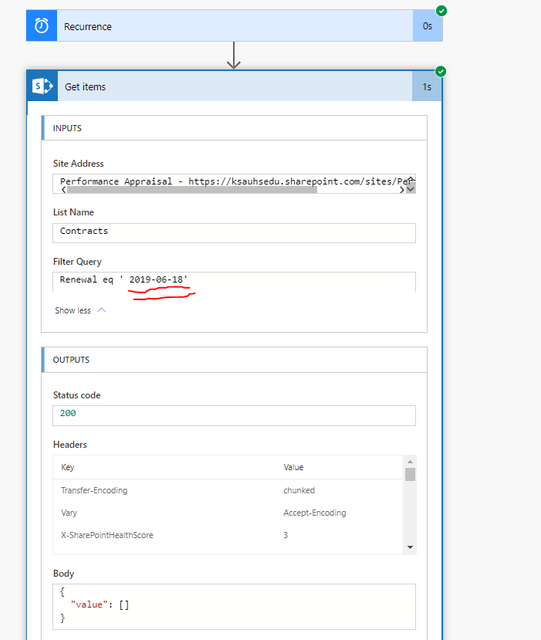
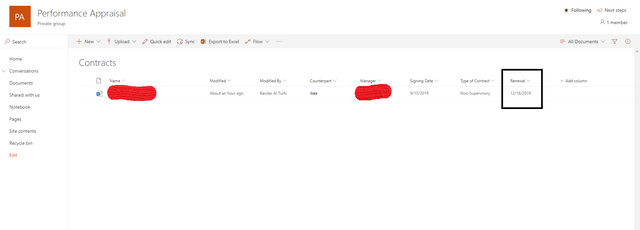
Hi, Am tring to bulid a reminder flow  that sends only one email 3 months befor the Renewal (Date coloumn in a sharepoint list). the issue i have is that i get 3 months befor today date, Not from the Renewal field in sharepoint list. How can i sort it out?

this is the formula i used:


Renewal eq 'formatDateTime(addDays(utcNow(),-90),'yyyy-MM-dd')'
 

Categories:
I have the same question (0)
  • ScottShearer Profile Picture
    25,290 Most Valuable Professional on at

    @theebalkaseem 

    I assume that the expression you are referring to is the filter query in Get items.

    I am also assuming that Renewal is a date/time column that is configure just for the date - not date and time.

    Is Renewal a calculated column?  If so, you can't use it in an OData filter.

    Try the following expression:

    Renewal eq 'addDays(utcNow(),-90,'yyyy-MM-dd')'


    If this does not work, please post a screen shot of the error message.


  • RobElliott Profile Picture
    10,481 Super User 2026 Season 1 on at

    When I do this on a daily recurrence trigger I don't use a filter query on the SharePoint list but add some Compose controls:
    one for today's date utcNow('yyyy-MM-dd')

    • one that holds the NextReview column from the dynamic content, and
    • one for the reminder date adddays(outputs('Compose_NextReview'),-90,'yyyy-MM-dd')

    I then add a condition that if the output of the today compose control equals the output of the reminder compose control then send the email.

    Rob
    Los Gallardos
    If I've answered your question or solved your problem, please mark this question as answered. This helps others who have the same question find a solution quickly via the forum search. If you liked my response, please consider giving it a thumbs up. Thanks.


  • Verified answer
    v-alzhan-msft Profile Picture
    Microsoft Employee on at

    Hi @theebalkaseem ,


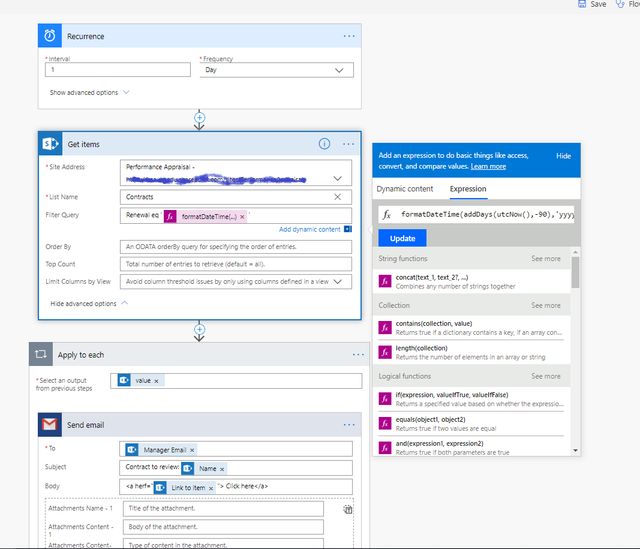
    Please take a try with @RobElliott 's solution, also please take a try with expression below in your flow:

    formatDateTime(addDays(utcNow(),90),'yyyy-MM-dd')

    1.png


    Best regards,

    Alice       


    Community Support Team _ Alice Zhang
    If this post helps, then please consider Accept it as the solution to help the other members find it more quickly.

Under review

Thank you for your reply! To ensure a great experience for everyone, your content is awaiting approval by our Community Managers. Please check back later.

Helpful resources

Quick Links

Introducing the 2026 Season 1 community Super Users

Congratulations to our 2026 Super Users!

Kudos to our 2025 Community Spotlight Honorees

Congratulations to our 2025 community superstars!

Congratulations to the March Top 10 Community Leaders!

These are the community rock stars!

Leaderboard > Power Automate

#1
Valantis Profile Picture

Valantis 711

#2
Vish WR Profile Picture

Vish WR 691

#3
Haque Profile Picture

Haque 525

Last 30 days Overall leaderboard