web
You’re offline. This is a read only version of the page.
close
Skip to main content

Announcements

News and Announcements icon
Community site session details

Community site session details

Session Id :
Power Platform Community / Forums / Power Automate / Parsing JSON Response ...
Power Automate
Answered

Parsing JSON Response error - "message": "Invalid type. Expected Integer but got Number."

(0) ShareShare
ReportReport
Posted on by Microsoft Employee

Hi Team,

Trying to get client secure scores by running a flow, but hitting an issue with parsing the response.
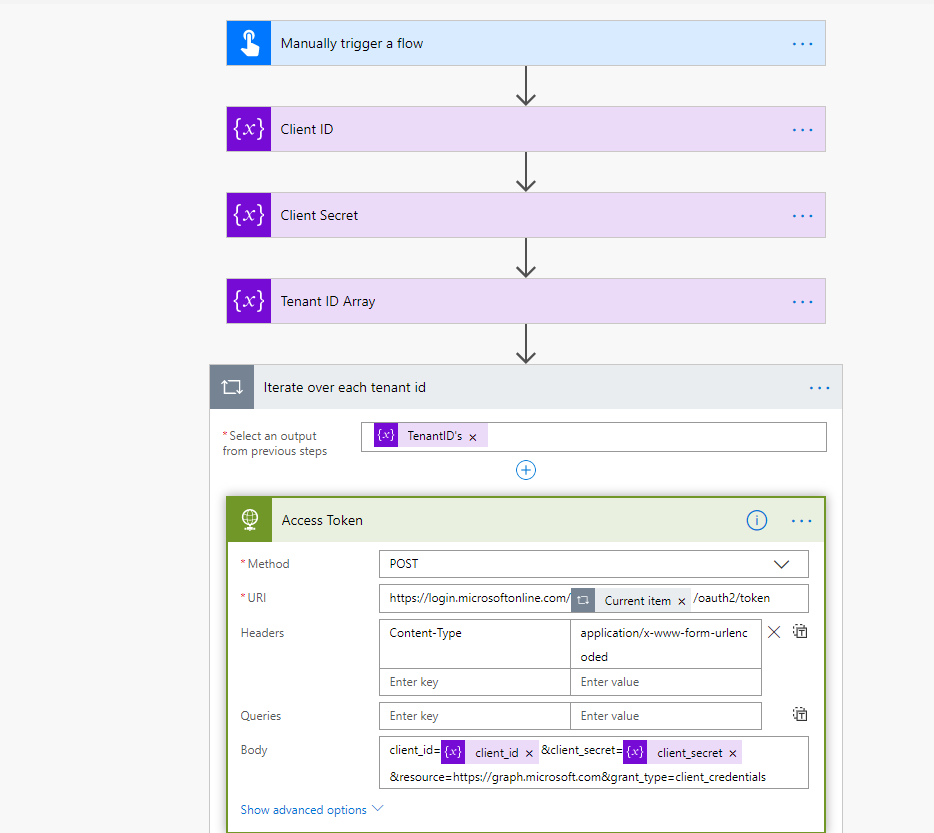
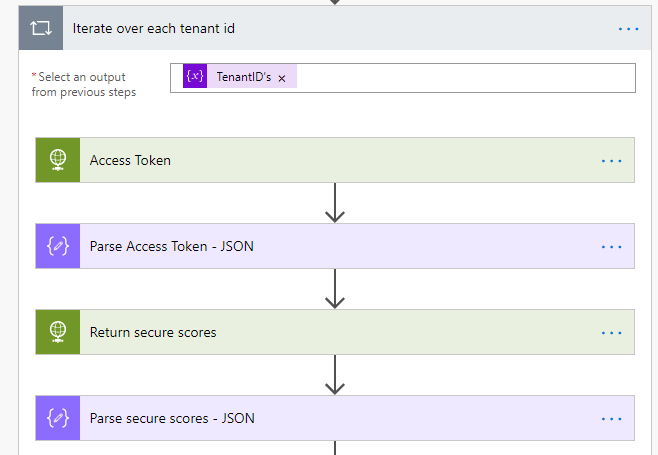
I'm getting this on my "Parse secure scores" action.


[
{
"message": "Invalid type. Expected Integer but got Number.",
"lineNumber": 0,
"linePosition": 0,
"path": "value[0].currentScore",
"value": 76,
"schemaId": "#/properties/value/items/properties/currentScore",
"errorType": "type",
"childErrors": []
},


I used the sample payload returned from the "Return secure scores" action to generate the schema(below). Any ideas would be helpful.


Parse secure scores schema

{

"type": "object",

"properties": {

"@@odata.context": {

"type": "string"

},

"@@odata.nextLink": {

"type": "string"

},

"value": {

"type": "array",

"items": {

"type": "object",

"properties": {

"id": {

"type": "string"

},

"azureTenantId": {

"type": "string"

},

"activeUserCount": {

"type": "integer"

},

"createdDateTime": {

"type": "string"

},

"currentScore": {

"type": "integer"

},

"enabledServices": {

"type": "array",

"items": {

"type": "string"

}

},

"licensedUserCount": {

"type": "integer"

},

"maxScore": {

"type": "integer"

},

"vendorInformation": {

"type": "object",

"properties": {

"provider": {

"type": "string"

},

"providerVersion": {},

"subProvider": {},

"vendor": {

"type": "string"

}

}

},

"averageComparativeScores": {

"type": "array",

"items": {

"type": "object",

"properties": {

"basis": {

"type": "string"

},

"averageScore": {

"type": "integer"

},

"deviceScore": {

"type": "string"

},

"dataScore": {

"type": "string"

},

"identityScore": {

"type": "string"

},

"appsScore": {

"type": "string"

},

"seatSizeRangeUpperValue": {

"type": "string"

},

"categoryValue": {

"type": "string"

},

"seatSizeRangeLowerValue": {

"type": "string"

},

"infrastructureScore": {

"type": "string"

}

},

"required": [

"basis",

"averageScore",

"deviceScore",

"dataScore",

"identityScore",

"appsScore"

]

}

},

"controlScores": {

"type": "array",

"items": {

"type": "object",

"properties": {

"controlCategory": {

"type": "string"

},

"controlName": {

"type": "string"

},

"description": {

"type": "string"

},

"score": {

"type": "integer"

},

"total": {

"type": "string"

},

"count": {

"type": "string"

},

"on": {

"type": "string"

},

"expiry": {

"type": "string"

},

"adopted": {

"type": "string"

},

"Reviewed": {

"type": "string"

},

"AgentCnt": {

"type": "string"

},

"UserCnt": {

"type": "string"

},

"UserCnt3DES": {

"type": "string"

},

"AgentCnt3DES": {

"type": "string"

},

"NotScored": {

"type": "string"

}

},

"required": [

"controlCategory",

"controlName",

"description",

"score"

]

}

}

},

"required": [

"id",

"azureTenantId",

"activeUserCount",

"createdDateTime",

"currentScore",

"enabledServices",

"licensedUserCount",

"maxScore",

"vendorInformation",

"averageComparativeScores",

"controlScores"

]

}

}

}

}

Categories:
I have the same question (0)
  • v-bacao-msft Profile Picture
    Microsoft Employee on at

    Hi @Anonymous ,


    Please try to modify schema and check if it helps:

    20.PNG


    Best Regards,

  • Community Power Platform Member Profile Picture
    Microsoft Employee on at

    Hi @v-bacao-msft ,

    I made the suggested change.

    Now I get the following.


    For reference, this is the "Return secure scores" action.

  • Verified answer
    v-bacao-msft Profile Picture
    Microsoft Employee on at

    Hi @Anonymous ,


    Please try to change Number to number.


    Best Regards,

  • Community Power Platform Member Profile Picture
    Microsoft Employee on at

    @v-bacao-msft ,


    That fixed it, thanks mate.


    Regards,

    Dan

  • DejanTrajkovic Profile Picture
    2 on at

    HI, I was using pars JSON action and got error msg

    : Parsing JSON Response error - "message": "Invalid type. Expected Integer but got Number."

    I have used the solution that was mentioned here 

    "temp_c": {                     "type": "integer"                 },

    solution has been

    "temp_c": {                

        "type": [  

                          "integer",

                            "number"  

                      ]        

            },


    However, now even that flow is running successfully fields that are having this fix are not showing in dynamic content.  When I change back to one data type it will show so the problem is definitely with this fix but I can't find a solution.

    Do you have any ideas on how this can be fixed?

Under review

Thank you for your reply! To ensure a great experience for everyone, your content is awaiting approval by our Community Managers. Please check back later.

Helpful resources

Quick Links

Introducing the 2026 Season 1 community Super Users

Congratulations to our 2026 Super Users!

Kudos to our 2025 Community Spotlight Honorees

Congratulations to our 2025 community superstars!

Leaderboard > Power Automate

#1
Haque Profile Picture

Haque 557

#2
Valantis Profile Picture

Valantis 328

#3
David_MA Profile Picture

David_MA 264 Super User 2026 Season 1

Last 30 days Overall leaderboard
