web
You’re offline. This is a read only version of the page.
close
Skip to main content
Community site session details

Community site session details

Session Id :
Power Platform Community / Forums / Power Automate / PowerApps Flows SendPu...
Power Automate
Unanswered

PowerApps Flows SendPushNotifications Recipients

(0) ShareShare
ReportReport
Posted on by 17

Hello,

I have been looking everywhere to see if someone knows an answer to this or if this question has been posted before but have had no luck.


I am trying to send push notifications to mulitple users using a manual trigger connected to the "PowerApps SendPushNoticiation" action. I can make the manual trigger work for single users but I cannot seem to figure out how to add either a distribution list or even just one extra email address to the recipients pop-up. It always errors out at pushnotifications when I have more then one recipient added to the recipients field. 


I had assumed because the Push notifications says "Recipients" it had the functionality to take more then one recipient per push notification. Below are screenshots of what my Flow looks like and what running the flow gives me, I have only gotten this to work with one recipient;
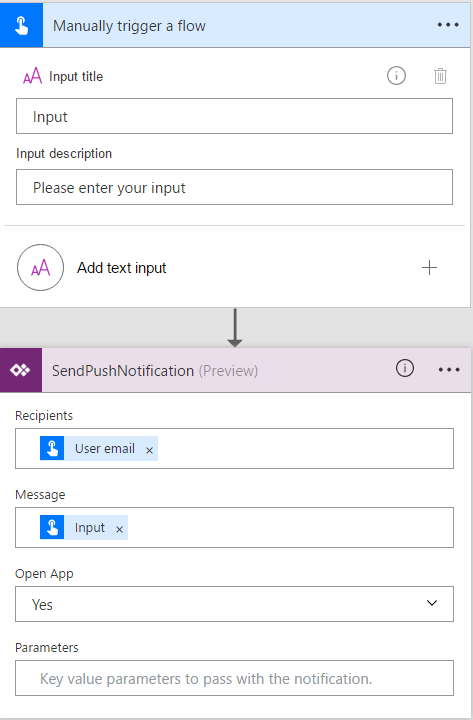
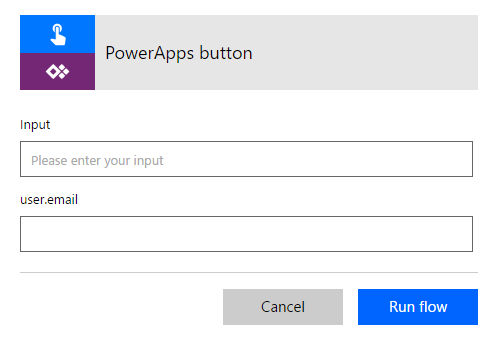
 

Manual Trigger FlowManual Trigger Inputs


Categories:
I have the same question (0)
  • Verified answer
    v-micsh-msft Profile Picture
    on at
    Re: PowerApps Flows SendPushNotifications Recipients

    Hi @rohittee1,


    Have you checked the Blog below?

    Add push notifications to your app and boost user engagement

    The formula used for the sendpushnotification in PowerApps is :

    PowerAppsNotification.SendPushNotification({recipients:[<list of email addresses>], message:"A new case was assigned to you."})

    But under Microsoft Flow, it would double quote the input string, which makes it only one parameter for the recipients.

    With only one Email address entered, the PowerApps push notification would work as expected.


    66.PNG

    67.PNG

    I will collect this as a feedback.

    Thanks for reporting this.

    Regards

  • Community Power Platform Member Profile Picture
    on at
    Re: PowerApps Flows SendPushNotifications Recipients

    @v-micsh-msft - so what is the answer here? What is the syntax required to successfully send a push notification to multiple user email addresses? 

  • Community Power Platform Member Profile Picture
    on at
    Re: PowerApps Flows SendPushNotifications Recipients

    Hi, how about the Office365Groups option  Office365Groups.ListGroupMembers("groupid") ?
    I have been trying this instead of configurating a flow, but I didn't manage to get the right syntaxis in order to retrieve emails only.


  • Community Power Platform Member Profile Picture
    on at
    Re: PowerApps Flows SendPushNotifications Recipients

    I realised after posting my message that there is a 'known limitation' to using the Powerapps SendPushNotification which only allows one recipient at the time (despite the MS examples showing multiple recipients and the box being listed as 'recipients' (plural)).


    The only way I can find to achieve this is to create individual actions for each recipient, which is time consuming, laborious and utterly impractical for a large user base. 

  • Community Power Platform Member Profile Picture
    on at
    Re: PowerApps Flows SendPushNotifications Recipients

    You might also use this flow connector.

    doc : https://docs.microsoft.com/en-us/powerapps/using-logic-flows

    Then in your flow you can define multiple emails.

  • Bitmann Profile Picture
    2 on at
    Re: PowerApps Flows SendPushNotifications Recipients

    Hi rohette1,


    Hope my steps could be a reference for you.


    1. Under the EditForm control, add a Dropdown control. Set its Items property as: [“email address1”, “email address2”,…]
    Note: The email address should be within your organization.
    2. Then set the EditForm’s OnSuccess property as: Back();PowerAppsNotification.SendPushNotification({recipients:[Dropdown1.Selected.Value],message:"tt"})
    3. Then create a new item, the push notification would be sent to the recipients.


    Cheers, Bitmann

Under review

Thank you for your reply! To ensure a great experience for everyone, your content is awaiting approval by our Community Managers. Please check back later.

Helpful resources

Quick Links

Forum hierarchy changes are complete!

In our never-ending quest to improve we are simplifying the forum hierarchy…

Ajay Kumar Gannamaneni – Community Spotlight

We are honored to recognize Ajay Kumar Gannamaneni as our Community Spotlight for December…

Leaderboard > Power Automate

#1
Tomac Profile Picture

Tomac 497 Moderator

#2
Michael E. Gernaey Profile Picture

Michael E. Gernaey 477 Super User 2025 Season 2

#3
chiaraalina Profile Picture

chiaraalina 242

Last 30 days Overall leaderboard
