Hello,
I am trying to use the unbound action msdyn_CopyProjectV4 in a PowerAutomate flow but am facing issues. I was trying to follow the steps here:
https://cps.co.uk/insights/copying-resource-assignments-through-the-power-automate-bound-action/.
But I am constantly getting this error with the unbound action. The project is also set to status completed and is active.
{
"error": {
"code": "0x80040265",
"message": "Unable to copy project. Project has scheduling in progress. Please try again later."
}
}
One thing I noticed is that this usually occurs if I am doing a CreateTeamMemberV1 unbound action beforehand to make sure the team members are in the target project. If I don't do this and use TeamMemberOption 2, I can sometimes get an error saying that I am missing the team member in the target project. In the article I linked this CreateTeamMemberV1 unbound action done, but I'm not sure if this is something that needs to be done or not.
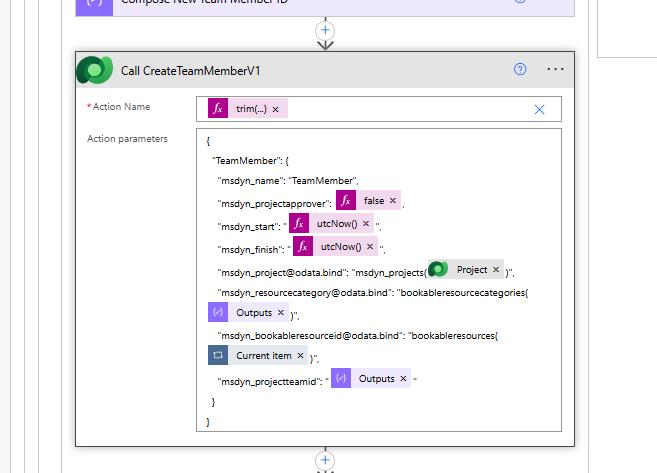
I don't set the TeamMembers field in the msdyn_CopyProjectV4 unbound action, only the TeamMembersMapping field is populated with the key value pairs of the Team Members from the source and target projects.
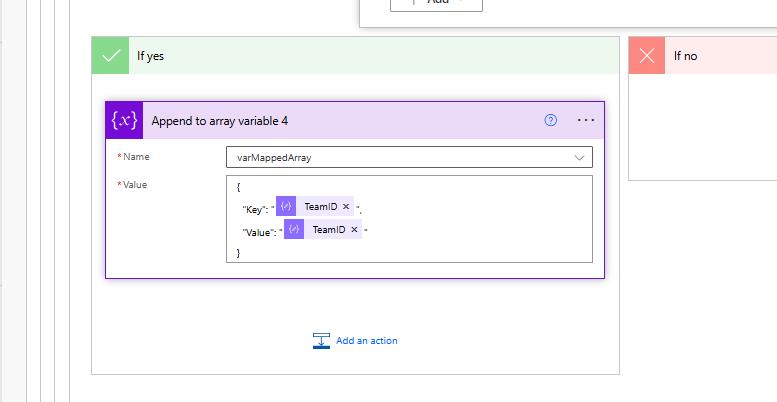

But I just keep getting the error about the project being stuck in scheduling and to try again later. When I don't do the
CreateTeamMemberV1 unbound action and just set
TeamMemberOption to 1, the msdyn_CopyProjectV4 works but it only copies generic resources.
Has anybody found a way to get the msdyn_CopyProjectV4 unbound action to work with
TeamMemberOption set to 2 so we can copy named and generic resources? The article I linked was the only resource I found that went into detail on the steps.
Thank you.


