web
You’re offline. This is a read only version of the page.
close
Skip to main content

Announcements

News and Announcements icon
Community site session details

Community site session details

Session Id :
Power Platform Community / Forums / Power Automate / Contract Expiring Auto...
Power Automate
Suggested Answer

Contract Expiring Automation

(0) ShareShare
ReportReport
Posted on by 6

I have a power automate flow attached to a microsoft list that houses all of our contracts. The flow sends an email notification when a contract is 60 days from expiring:
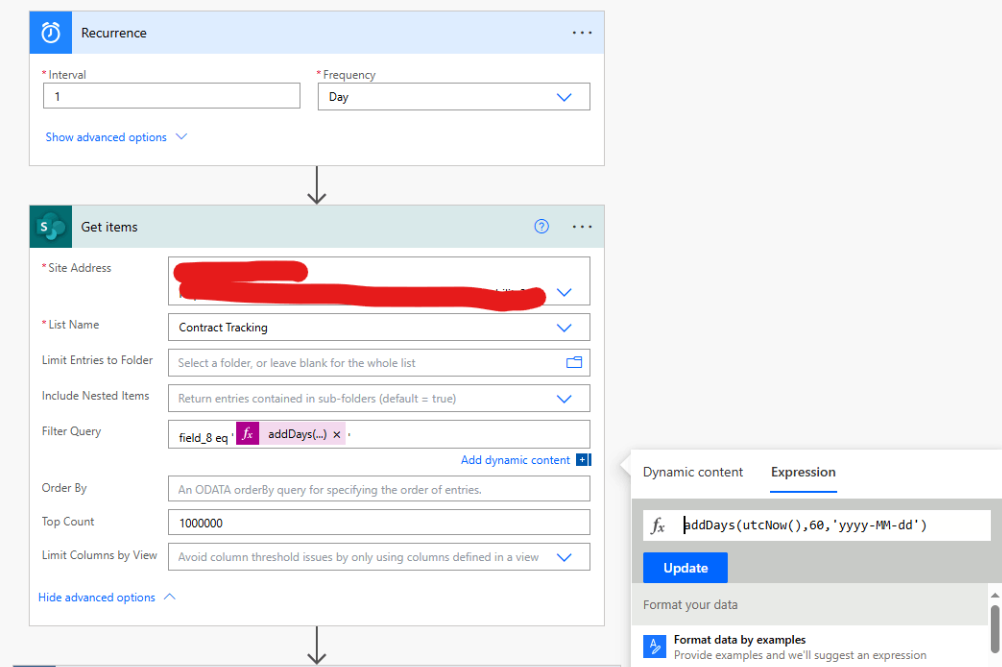
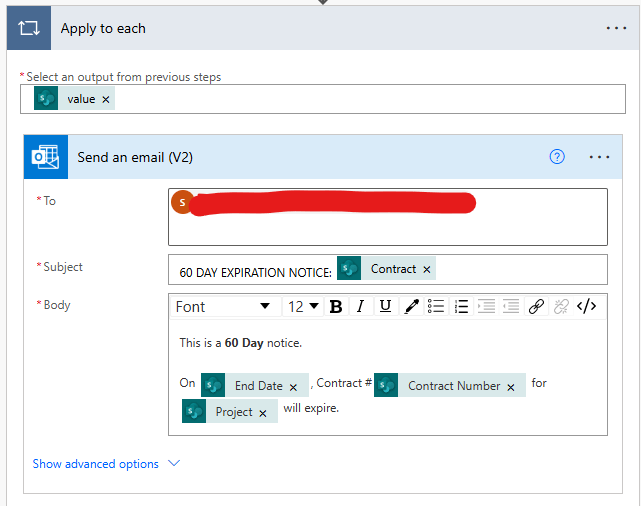
The flow is working properly except when I have multiple contracts expiring on the same day, I only get an email for one contract, not all. I want to have individual emails for each contract that's expiring. Here's an example of a successful flow that ran with multiple contracts ending on the same day, but I only got one email for one contract:
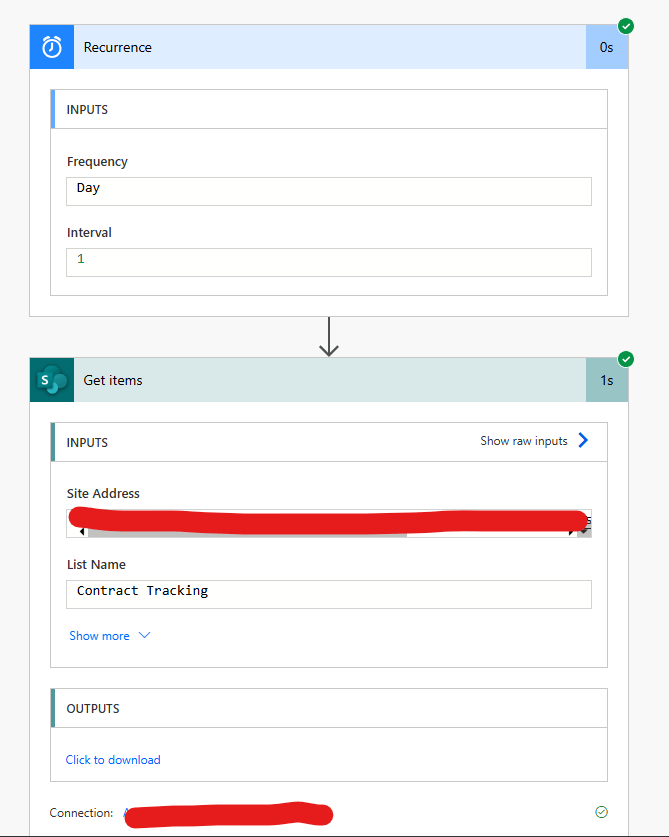
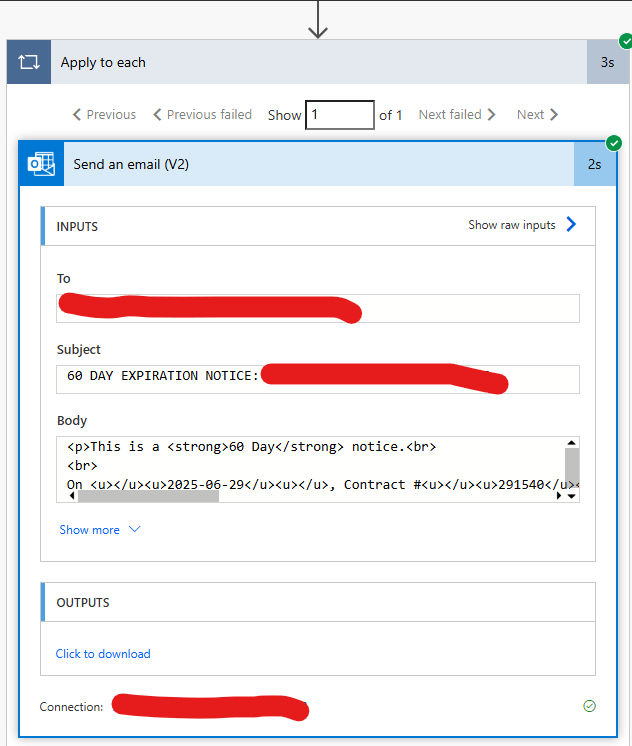
 

How do I ensure an email will send for each contract ending on the same day?


Categories:
I have the same question (0)
  • Suggested answer
    Lagortinez Profile Picture
    130 Moderator on at
    Hi there!
     
    This feels to me that you might have a Pagination turned on, can you check if you have something like this turned on?
    If you do, please turn it of or increase the Threshold to 100 for instance.
     
    Let me know what you find, other than that, your flow looks very nice!

    If this post helped you, please click "Does this answer your question?" and give it a like to help others in the community find the answer too!
     

    José Martínez Lago
    Solution Architect | Dynamics 365 & Power Platform

    Empowering low-code consultants to deliver high-impact solutions

    🔗 Blog: thatsagoodquestion.info
    🔗 LinkedIn: martinezlago

  • David_MA Profile Picture
    14,509 Super User 2026 Season 1 on at
    What you show looks like it is set up correctly. A couple of things you may want to do:
    1. Remove the top count value.
    2. What would be the most contracts that you expect to get in a single day?
      1. If you expect more than 100, then enable pagination on the Get items action and set it to the max value you expect. 100 is the default returned.
      2. If you expect more than 5,000 items in one day, look at this Get Over 5000 Items From A SharePoint List In Power Automate
    3. Since you have 1,000,000 in the top count value, I assume this is a very large list that exceeds 5,000 items.
      1. If so, is field_8 in your list indexed?
      2. If the field is not indexed, you will have a problem because your query filter is only going to return items that meet the filter for the first 5,000 items in the list (or the oldest items).
  • angelawilson Profile Picture
    6 on at
    I removed the top count and turned Pagination on with a threshold of 100. I ran the flow again and still only got 1 email for one contract. 
     
    The most contracts in a single day may be around 20. Today, for instance, I have 8 contracts that are expiring in 60 days, and I expected to get 8 emails. 
     
    I don't believe field_8 is indexed. I'm not too sure what that means. I had the top count increased because the default value when I was setting up the flow was 100. Because of that, I had an issue where not all contracts were being captured in the flow, so I had solved that by increasing the top count to 1,000,000. I see now when I deleted the value entirely, it shows the default as "all." 
  • David_MA Profile Picture
    14,509 Super User 2026 Season 1 on at
    How many items are in your current list? If it is under 20,000, you may still be able to index the field_8 field. To do so:
    1. Go to your list
    2. Go to the list settings
    3. Under the list of column names, click on indexed columns
    4. Click on create new index choose field_8 and press the create button
    5. If you have a lot of items in the list, it make take a few minutes
    6. If your list has reached the point beyond where you can create indexed columns, then what you want to do is not going to work unless you create a new list and create indexed columns to plan for when the list exceeds 5,000 items.
     
    You can read more about the 5,000 item limit at Living Large with Large Lists and Large Libraries | Microsoft Learn. And as the article notes, this is a limit of retrieving 5,000 items at one time and not the limit of how many items can be added to a list, which is 30 million items.
  • angelawilson Profile Picture
    6 on at
     
    I made field_8 indexed, which in this case is called "End Date." My list only has about 200 contracts currently, but once I have this flow working properly, I may have at most 2,000 active contracts on the list at a given time.
     
    I ran the flow again after indexing the column and I still only got one email! Any ideas?
  • Suggested answer
    Lagortinez Profile Picture
    130 Moderator on at
    @angelawilson I would create a new sharepoint connection in your power automate step at this point... I had a similar issue once with Dataverse and it got fixed like this, was quite a weird bug.
  • angelawilson Profile Picture
    6 on at
    @Lagortinez What do you mean by create a new sharepoint connection? 
  • Lagortinez Profile Picture
    130 Moderator on at
    @angelawilson Doing something like this:
     
  • Suggested answer
    David_MA Profile Picture
    14,509 Super User 2026 Season 1 on at
    I would suggest that you do the following:
    • Create a view in your SharePoint list and filter it to the date and make sure there is more than one item with that date.
      • Or since you don't currently have that many items in your list, create a view and group them on your date field and make sure there is more than 1 item for the date. For example:
    • Then change you filter query to use the ge and lt method, which I find is more accurate.
    • The first expression is: addDays(startOfDay(utcNow()), -2, 'yyyy-MM-dd')
    • The second expression is: addDays(startOfDay(utcNow()), -1, 'yyyy-MM-dd')
    • You will need to use positive numbers since you are going into the future. In the first expression you will replace -2 with 60 and in the second expression replace -1 with 61.


Under review

Thank you for your reply! To ensure a great experience for everyone, your content is awaiting approval by our Community Managers. Please check back later.

Helpful resources

Quick Links

Introducing the 2026 Season 1 community Super Users

Congratulations to our 2026 Super Users!

Kudos to our 2025 Community Spotlight Honorees

Congratulations to our 2025 community superstars!

Congratulations to the April Top 10 Community Leaders!

These are the community rock stars!

Leaderboard > Power Automate

#1
Vish WR Profile Picture

Vish WR 1,005

#2
Valantis Profile Picture

Valantis 825

#3
Haque Profile Picture

Haque 619

Last 30 days Overall leaderboard
