web
You’re offline. This is a read only version of the page.
close
Skip to main content

Announcements

News and Announcements icon
Community site session details

Community site session details

Session Id :
Power Platform Community / Forums / Power Automate / help!! excel file corr...
Power Automate
Answered

help!! excel file corrupted after syncing to sharepoint

(0) ShareShare
ReportReport
Posted on by 2

Hi Guys i made a simple flow. from to create or update an excel file my flow is just from our ftp server to sharepoint (see below picture). flow is always succesful. however, whenever i open the excel file from sharepoint it say its corrupted. i also tried to download the file from share so i can open it to excel desktop it still says the file is corrupted.

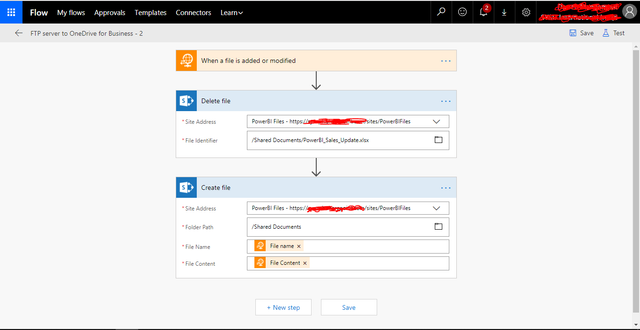
Capture


thanks in advance

Categories:
I have the same question (0)
  • Verified answer
    v-yuazh-msft Profile Picture
    Microsoft Employee on at

    Hi @kirby21,


    Could you please share screenshot of the run history details of your flow.


    Please make sure the filename of the new file should have a File extension.


    Best regards,

    Alice

  • kirby21 Profile Picture
    2 on at
    Sorry forgot to close. It was fixed by enabling binary. Thanka
  • robertogaspare1 Profile Picture
    22 on at

    Hi how did you solved it?
    Where did you enabled binary?

Under review

Thank you for your reply! To ensure a great experience for everyone, your content is awaiting approval by our Community Managers. Please check back later.

Helpful resources

Quick Links

Introducing the 2026 Season 1 community Super Users

Congratulations to our 2026 Super Users!

Kudos to our 2025 Community Spotlight Honorees

Congratulations to our 2025 community superstars!

Leaderboard > Power Automate

#1
David_MA Profile Picture

David_MA 262 Super User 2026 Season 1

#2
Haque Profile Picture

Haque 227

#3
Expiscornovus Profile Picture

Expiscornovus 225 Most Valuable Professional

Last 30 days Overall leaderboard
