web
You’re offline. This is a read only version of the page.
close
Skip to main content

Announcements

News and Announcements icon
Community site session details

Community site session details

Session Id :
Power Platform Community / Forums / Power Automate / DateTime comparison no...
Power Automate
Answered

DateTime comparison not working after update

(3) ShareShare
ReportReport
Posted on by 18
See the image below:
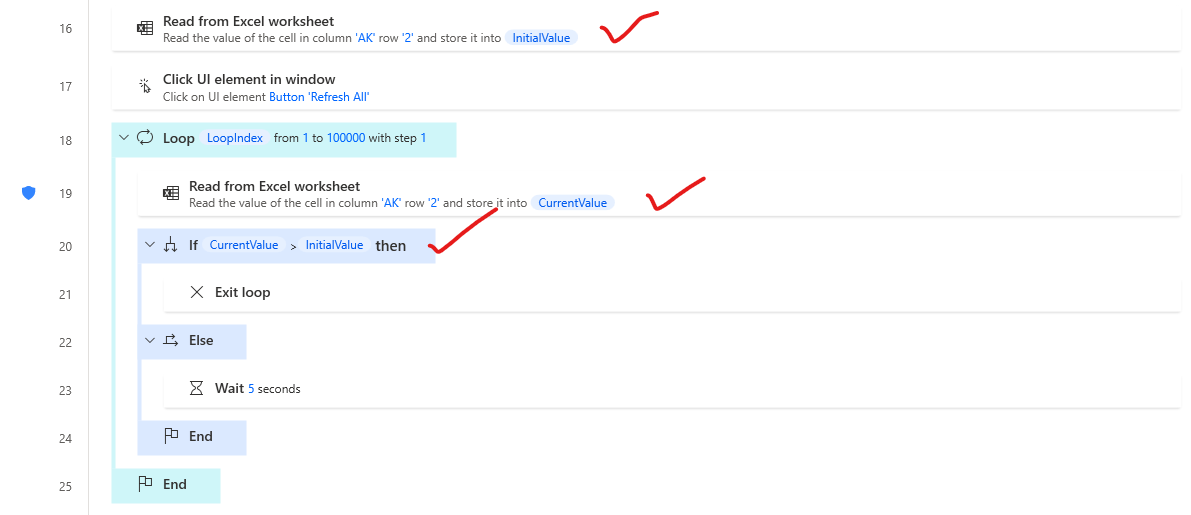
 
Firstly I am reading a cell from excel, which is a datetime. Then clicking refresh button.

In side loop, I am trying to read the same cell. Currently excel is in update process. Checking both the values, if datetime changed, then exit loop else wait 5 seconds until excel finish refresh.

This process previously working perfect. After PAD update, it is not working. Excel refreshed, datetime updated, but not exiting loop.

My flow has Power Fx enabled.

How to solve this?
I have the same question (0)
  • Suggested answer
    eetuRobo Profile Picture
    4,522 Super User 2026 Season 1 on at
    Can you show a scenario where the CurrentValue is larger than Initial value? Like show the variable values also.
     
    I would check the variables that they are actually same format and one is not text and another datetime or something. So open the variable and see if the types differ:


    See CurrentValue is Text type even though in Excel its type Date


    Also you said your Flow has Power Fx enabled but it doesn't look like it in your screenshot (unless you have copy pasted the actions from non power fx flow)
  • SH-28090713-0 Profile Picture
    18 on at
    Hi @etuRobo  Thanks for replay. Not copy pasted. All manually developed. From the beginning, Power Fx enabled. See image below:
     
     
    Check out the Initial value, current value and loop start position and variable type. See image below:
     
    Initial Value Image:
     
     
    Both have same data type. Because both coming from the same excel field. At the beginning both value are same. so condition not satisfy and loop will continue every 5 seconds. Once the excel refresh finished, then excel cell value will update as well as current value also update. and condition will satisfy and exit the loop. Last 3 month it was working perfectly. After update, suddenly that stops working and loops continuing indefinitely.
     
    See the image below for current value updates, which is greater than:
     
    Then I tried to check the If condition and found this. Why if condition showing this I don't know, previously it was not like that. Showing LHS > RHS but after clicking edit found only one side (LHS). see image below:
     
    Make no sense. So in summary:
    First reading cell value, which is date time. Then start refresh. After finishing refresh again reading cell value, which is greater than initial value. If, exit loop else continue. 
     
  • Suggested answer
    eetuRobo Profile Picture
    4,522 Super User 2026 Season 1 on at
    Thats weird. My if condition also had done that same thing and I think that might be the issue. Since Power Fx is still in preview it might have such bugs. So if you don't need to have power fx enabled change to regular flow where power fx is not enabled.

    If you need to use Power Fx then I would try this adding substract dates -action and use that in your if condition (if TimeDifference is gt 0)


    Like so:


  • Verified answer
    SH-28090713-0 Profile Picture
    18 on at
    Thank you @eetuRobo for you replay. Your Idea worked with a little modification. I haven't notice that before. When loops start first time, current value unable to read cell from excel (Why I don't know, may be because of refresh). Current Value is blank, so, subtracting dates throwing error with datetime. I have solved that by checking if the current value blank. If blank then subtract initial from initial else current from initial. See the image below:
     
     
    Thank you very much for you valuable time and meaning full suggestion.

    Best Regards,
    Shahariar Hafiz

Under review

Thank you for your reply! To ensure a great experience for everyone, your content is awaiting approval by our Community Managers. Please check back later.

Helpful resources

Quick Links

Introducing the 2026 Season 1 community Super Users

Congratulations to our 2026 Super Users!

Kudos to our 2025 Community Spotlight Honorees

Congratulations to our 2025 community superstars!

Congratulations to the April Top 10 Community Leaders!

These are the community rock stars!

Leaderboard > Power Automate

#1
Vish WR Profile Picture

Vish WR 957

#2
Valantis Profile Picture

Valantis 847

#3
Haque Profile Picture

Haque 609

Last 30 days Overall leaderboard



