web
You’re offline. This is a read only version of the page.
close
Skip to main content
Community site session details

Community site session details

Session Id :
Power Automate - Building Flows
Answered

How to Get Count of Items in SharePoint List

(0) ShareShare
ReportReport
Posted on by 11
Hi,
 
I'm a Power Automate newbie, and i'm trying to learn Power Automate by doing.
Im tying to count the number of rows in a Sharepoint List by using the HTTP Rest Sharepoint API. I'm following this tutorial : https://www.powertechtips.com/count-sharepoint-list-items-power-automate/.
 
Here's the result i get:


Does anyone know why i get this kind of outputs and not a proper Json format result ? Here's my Flow :
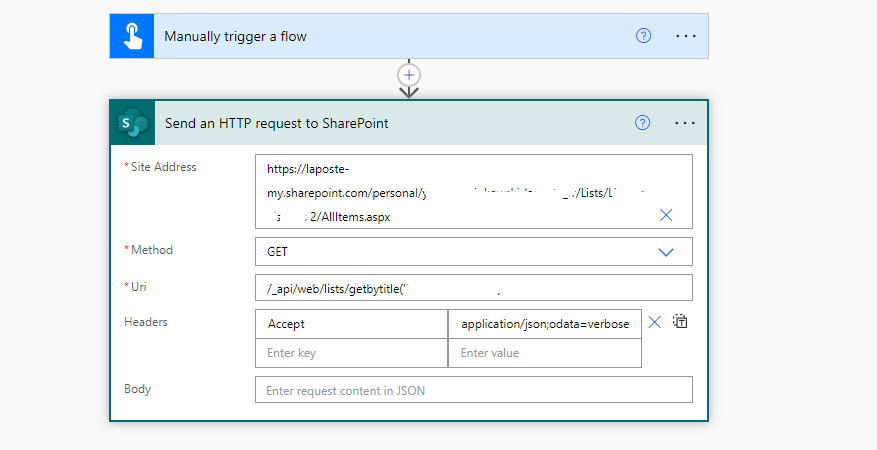


In the Uri i actually wrote : /_api/web/lists/getbytitle('Mylist')/itemCount
 
In the weird output i found the result but in a weird shape: 


Thanks in advance.
I have the same question (0)
  • YM-06112112-0 Profile Picture
    11 on at
    Weird result when creating a flow
    any help is welcome because I can't figure out what's going on.
  • Suggested answer
    Ellis Karim Profile Picture
    11,473 Super User 2025 Season 2 on at
    Weird result when creating a flow
    Try:
     
     
    The header:
    
    Accept: application/json;odata=nometadata
    
    Here is the runtime output of my flow. The List has 16,716 items:


    Ellis
     
  • Verified answer
    YM-06112112-0 Profile Picture
    11 on at
    Weird result when creating a flow
    @ekarim,
     
    Thanks for your answer. But sadly it didn't work. Must be a bigger issue within my organization.
     
    Thnaks.
  • Suggested answer
    Ellis Karim Profile Picture
    11,473 Super User 2025 Season 2 on at
    Weird result when creating a flow
    I think the problem is with the Site Address in the Send an HTTP request to SharePoint.
     
     
    You must specify the SharePoint Site Address only - you have included a URL pointing to a webpage:
     
     
    Your Site Address seems to be pointing to a List stored in your OneDrive. The HTTP may likely still work, but I haven't had a chance to test it.


    Ellis
  • Suggested answer
    David_MA Profile Picture
    12,515 Super User 2025 Season 2 on at
    Weird result when creating a flow
    I didn't bother reading what is in the link you provided since you're saying it doesn't work. If you just want to get the total count of items in a SharePoint list, your flow will look like this:
    • Configure the HTTP request as follows being sure to change 'Display Name of List' to the display name of your list. I see other things in the site address in prior replies. You only want what comes after sites/ up to and excluding the next / (essentially, the internal name of your site). Be sure to configure the Uri as shown below but with your list name. The Uri does not begin with a / as you show you your request.
    • Put the body of the HTTP request into the Compose action.
    • Run the flow and then copy what is returned in the body of the compose action for the Parse JSON action. Note: DO NOT add the other actions until your run your flow from this point!
    • For the Parse JSON action, click Generate from sample and then paste in what you copied from the Compose action in a successful run:
    • Initialize an integer variable and insert the ItemCount from the Parse JSON action:
    You can then use the variable wherever you need the value.

Under review

Thank you for your reply! To ensure a great experience for everyone, your content is awaiting approval by our Community Managers. Please check back later.

Helpful resources

Quick Links

Responsible AI policies

As AI tools become more common, we’re introducing a Responsible AI Use…

Chiara Carbone – Community Spotlight

We are honored to recognize Chiara Carbone as our Community Spotlight for November…

Leaderboard > Power Automate

#1
Michael E. Gernaey Profile Picture

Michael E. Gernaey 614 Super User 2025 Season 2

#2
Tomac Profile Picture

Tomac 401 Moderator

#3
chiaraalina Profile Picture

chiaraalina 282

Last 30 days Overall leaderboard



