web
You’re offline. This is a read only version of the page.
close
Skip to main content

Notifications

Announcements

Community site session details

Community site session details

Session Id :
Power Platform Community / Forums / Power Automate / Transform Input from M...
Power Automate
Suggested Answer

Transform Input from Ms Form to Integer

(0) ShareShare
ReportReport
Posted on by 4
Hi, I would like to insert input from Ms Form to Sharepoint List.
 
One of the question is in Text form (choice question), asking about Quarter (Quarter 1, Quarter 2, Quarter 3, Quarter 4). Another question is asking about duration (in quarter as well). I need to calculate the end of quarter based on these two information. Eg, if Quarter=Quarter 1, and duration is 2 quarters, then end of quarter = Quarter 2.
 
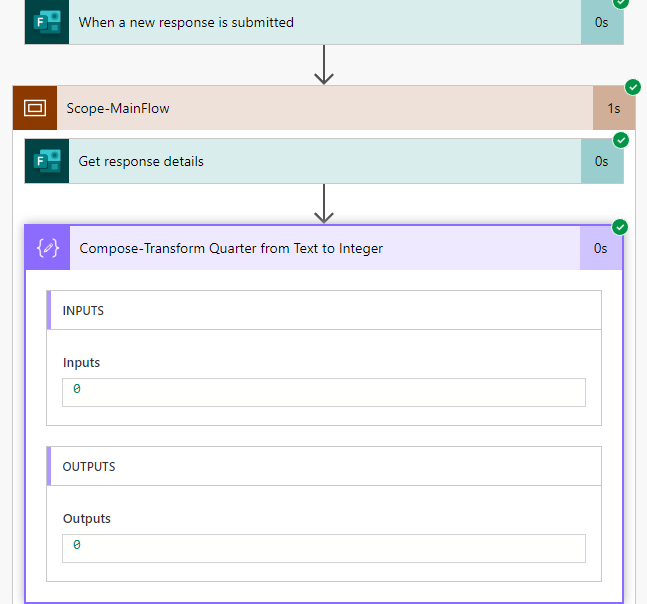
My thought is by convert the start of quarter into integer first. Then use expression 'Add' and 'Mod' to calculate the end quarter. Yet I get 0 as input at the Compose action. 

My expression in compose: 
if(equals(outputs('Get_response_details')?['body/ab1'], 'Quarter 1'), 1, if(equals(outputs('Get_response_details')?['body/ab2'], 'Quarter 2'), 2, if(equals(outputs('Get_response_details')?['body/ab3'], 'Quarter 3'), 3, if(equals(outputs('Get_response_details')?['body/ab4'], 'Quarter 4'), 4, 0))))
Anyone have any ideas on converting this to integer? Or maybe ways to get end of quarter?

Thank you in advance.

Categories:
I have the same question (0)
  • Suggested answer
    David_MA Profile Picture
    12,982 Super User 2025 Season 2 on at
    The expression you show should return 1, 2, 3 or 4. To make it an integer, you just need to wrap it with an int expression: 
     
    int(if(equals(outputs('Get_response_details')?['body/ab1'], 'Quarter 1'), 1, if(equals(outputs('Get_response_details')?['body/ab2'], 'Quarter 2'), 2, if(equals(outputs('Get_response_details')?['body/ab3'], 'Quarter 3'), 3, if(equals(outputs('Get_response_details')?['body/ab4'], 'Quarter 4'), 4, 0)))))
     

Under review

Thank you for your reply! To ensure a great experience for everyone, your content is awaiting approval by our Community Managers. Please check back later.

Helpful resources

Quick Links

Forum hierarchy changes are complete!

In our never-ending quest to improve we are simplifying the forum hierarchy…

Ajay Kumar Gannamaneni – Community Spotlight

We are honored to recognize Ajay Kumar Gannamaneni as our Community Spotlight for December…

Leaderboard > Power Automate

#1
Michael E. Gernaey Profile Picture

Michael E. Gernaey 525 Super User 2025 Season 2

#2
Tomac Profile Picture

Tomac 324 Moderator

#3
abm abm Profile Picture

abm abm 232 Most Valuable Professional

Last 30 days Overall leaderboard