web
You’re offline. This is a read only version of the page.
close
Skip to main content

Announcements

News and Announcements icon
Community site session details

Community site session details

Session Id :
Power Platform Community / Forums / Power Apps / Blank text when select...
Power Apps
Unanswered

Blank text when selecting text in a TextInputControl

(0) ShareShare
ReportReport
Posted on by 149

Hello,

I am doing an appliaction and when the user open the app with Dynamics365 and selects the text of a TextInputControl seemed to turn blank, this doesn't appear in the Designer Tool. You can see some screenshots of this problem.
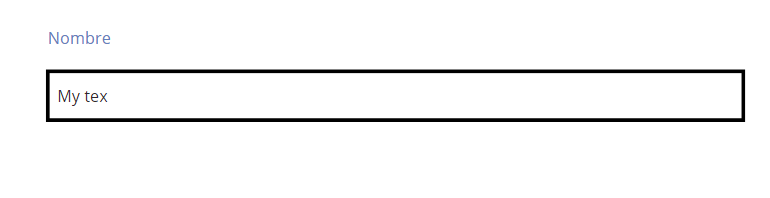
 

And now you can see what happened if I put the mouse on the textinput that changed the background of it.


In the designer tool it seemed to work just fine.

 

What could it be?

Categories:
I have the same question (0)
  • Meneghino Profile Picture
    6,949 on at

    Hi @Brank

    I think simply the selected text is turned white, which then becomes unfortunately invisible when the background is white.  I just experimented with that.

    Try to change the various colour related properties of the control, i.e. Fill (i.e. background), Color (text colour) etc.

    Alterrnatively please play with the Default and HintText properties to set the initial text to something useful.

  • v-yamao-msft Profile Picture
    Microsoft Employee on at

    Hi Brank,


    Thanks for reporting this issue. I can reproduce it on my side.


    When I opened the app with Dynamics 365, the selected text in a Text input control turned white, without selecting it, it turned normal.
    And in PowerApps studio, it works properly.


    I also tried the suggestion that @Meneghino has suggested, set the Fill property of the Text input control as: Color.Black. Then when I opened the app with Dynamics 365, the selected text would not be Blank.
    Hope this could be a temporary workaround.

    2.PNG


    I will collect and report this issue from my side.


    Best regards,
    Mabel Mao

  • Brank Profile Picture
    149 on at

    Hello,

    It seems this problem doesn't happen just in Dynamics 365, I opened the app with Powerapps app on Windows 10 and I the problem persists. I hope this problem fix soon because it can be confused for the final user.


    Regards,

  • v-yamao-msft Profile Picture
    Microsoft Employee on at

    Hi Brank,


    Thanks for understanding. I have reported this from my side, hope it can be fixed soon.


    Best regards,
    Mabel Mao

  • ManishM Profile Picture
    Microsoft Employee on at

    I am still facing this issue. When is the next release of PowerApps scheduled? I ask this because the theread is from 6/22/16 and looks like no release has happened since.

Under review

Thank you for your reply! To ensure a great experience for everyone, your content is awaiting approval by our Community Managers. Please check back later.

Helpful resources

Quick Links

Season of Sharing Community Challenge Winners!

Congratulations to our community stars!

Kudos to our 2025 Community Spotlight Honorees

Expanding mentorship, skilling, and AI innovation

Congratulations to the July Top 10 Community Leaders!

These are the community rock stars!

Leaderboard > Power Apps

#1
WarrenBelz Profile Picture

WarrenBelz 358 Most Valuable Professional

#2
11manish Profile Picture

11manish 207 Super User 2026 Season 2

#3
MS.Ragavendar Profile Picture

MS.Ragavendar 150 Super User 2026 Season 2

Last 30 days Overall leaderboard
