web
You’re offline. This is a read only version of the page.
close
Skip to main content

Notifications

Announcements

Community site session details

Community site session details

Session Id :
Power Platform Community / Forums / Power Automate / Trying to populate Wor...
Power Automate
Unanswered

Trying to populate Word Template with array

(0) ShareShare
ReportReport
Posted on by 2
Hello,
 
I created a flow, in which the first step is to analyze the JSON that was submitted by my Power Apps App. In this JSON I have a Value "Value44" which is an array of objects and in this array is another array.
Now if I want to populate the Word Template, the first array is working perfectly fine but the second array always shows this and does not make a new row:
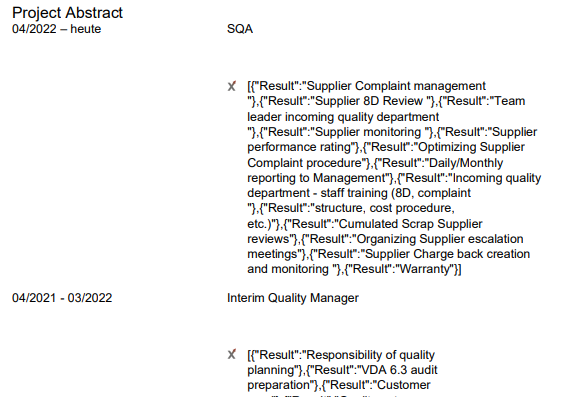
I just set Value44 to the tag 44 in the populate flow. But then I can't get rid of this [{result: .
Does anyone know any solutions to this. I don't have enough knowledge about this.
 
Best regards
Fabian 
Categories:
I have the same question (0)
  • David_MA Profile Picture
    12,966 Super User 2025 Season 2 on at
    What I think you may be asking to do, insert a table into a Microsoft Word Template, is outlined in this YouTube video: https://youtu.be/-MFpKx5QdrY?si=ZFHY5SN-G5rxpj1e
  • FG-18031326-0 Profile Picture
    2 on at
    @David_MA

    I already have a table as shown in the picture.
    The table is date       |       description
                                             and then another table with the tasks in this table
    and I don't know how to achieve this that it doesnt show this result and make a new row like the other table

Under review

Thank you for your reply! To ensure a great experience for everyone, your content is awaiting approval by our Community Managers. Please check back later.

Helpful resources

Quick Links

Forum hierarchy changes are complete!

In our never-ending quest to improve we are simplifying the forum hierarchy…

Ajay Kumar Gannamaneni – Community Spotlight

We are honored to recognize Ajay Kumar Gannamaneni as our Community Spotlight for December…

Leaderboard > Power Automate

#1
Michael E. Gernaey Profile Picture

Michael E. Gernaey 538 Super User 2025 Season 2

#2
Tomac Profile Picture

Tomac 405 Moderator

#3
abm abm Profile Picture

abm abm 252 Most Valuable Professional

Last 30 days Overall leaderboard



