web
You’re offline. This is a read only version of the page.
close
Skip to main content

Announcements

News and Announcements icon
Community site session details

Community site session details

Session Id :
Power Platform Community / Forums / Power Automate / Getting 403-ACL error ...
Power Automate
Answered

Getting 403-ACL error while adding site address & Excel business.

(1) ShareShare
ReportReport
Posted on by 11
Getting below error multiple times from last 5 days, its not allowing me to add the address, path & site details.
How to handle, its not let me to add or its not auto reflecting dont know why.. is this part of any new patch.
 
The dynamic invocation request failed with error: ["status":403,"source":"https://msmanaged-na.token.azure-apim.net:443/tokens/msmanaged-na/excelonlinebusiness/shared-excelonlinebu-38d1cb66-a39f-4706-a5bd-057cdf1f37a3/exchange", "message": "Error from token exchange: Permission denied due to missing connection ACL: Connection https://msmanaged-na.azure-apim.net/@msmanaged-na/default-66c65d8a-9158-4521-a2d8-664963db48e4/logicflows/81fcebf4-7e33-4841-a7d2-d7dac47bc66a version -9223372036854775808, connection=msmanaged-na/default-66c65d8a-9158-4521-a2d8-664963db48e4/excelonlinebusiness/shared-excelonlinebu-38d1cb66-a39f-4706-a5bd-057cdf1f37a3").
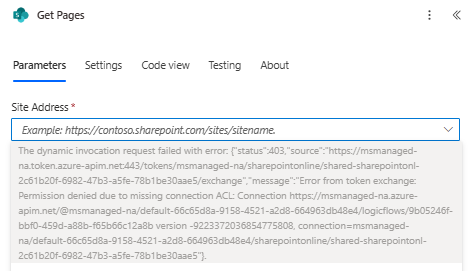
Screenshot 2025-12-17 210924.png
Categories:
I have the same question (3)
  • Verified answer
    rzaneti Profile Picture
    4,483 Super User 2026 Season 1 on at
     
    A few users are reporting similar issues recently. Please try to reauthenticate in your connections. If it doesn't work, remove the action and add it again (this is what worked for me when I got this issue a few days ago).
     
    Other solutions reported here in the Community include:
    - Recreate the flow
    - Open the flow in an incognito window
     
     
    Let me know if it works for you or if you need any additional help!
     
    If this solved your issue, please mark it as Accepted Answer.
    👍 If it helped, feel free to give it a like!

    🌐 Explore more Power Platform content on my Website or on my ▶️ YouTube
    💼 Find me on LinkedIn
  • Suggested answer
    AS-17121532-0 Profile Picture
    11 on at
    Yup, I tried but didn't work. I got a solution that if we will come back to old designer then this become fixed.
  • DD-13011329-0 Profile Picture
    3 on at
    When using the new designer, reauthenticating the connection did not fix this issue. Removing and adding the action did not fix the issue. The two things that worked for me. Disabling New Designer worked for me. If you want to keep New Designer on, creating a completely new workflow fixed this issue for me.

Under review

Thank you for your reply! To ensure a great experience for everyone, your content is awaiting approval by our Community Managers. Please check back later.

Helpful resources

Quick Links

Introducing the 2026 Season 1 community Super Users

Congratulations to our 2026 Super Users!

Kudos to our 2025 Community Spotlight Honorees

Congratulations to our 2025 community superstars!

Congratulations to the March Top 10 Community Leaders!

These are the community rock stars!

Leaderboard > Power Automate

#1
Haque Profile Picture

Haque 592

#2
Valantis Profile Picture

Valantis 340

#3
11manish Profile Picture

11manish 284

Last 30 days Overall leaderboard



