web
You’re offline. This is a read only version of the page.
close
Skip to main content

Notifications

Announcements

Community site session details

Community site session details

Session Id :
Power Platform Community / Forums / Power Automate / Alphanumeric ID Twilio...
Power Automate
Unanswered

Alphanumeric ID Twilio SMS doesnt work

(0) ShareShare
ReportReport
Posted on by

I am trying to make my alphanumeric ID i have configured for my number to work. When i test it with Python code it works perfectly. But in Flow it doesnt. I am using the Twilio send sms to a sharepoint list preset. In there it is possible to paste in the Messaging Service ID but it doenst seem to have any effect when i test the flow. Messages come perfectly but it doesnt apply the name.
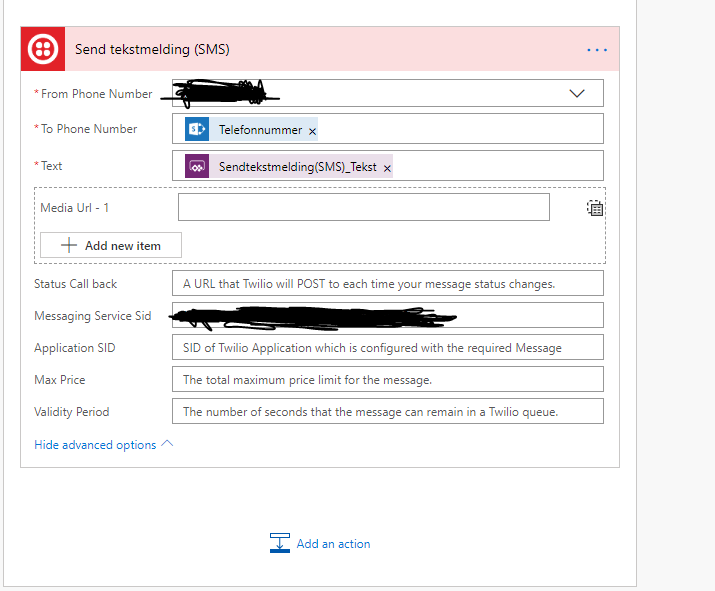
My twilio Flow setup

It works like this but it doesnt apply the alpha nummeric ID that i specified in the messaging service

Categories:
I have the same question (0)
  • v-yamao-msft Profile Picture
    on at

    Hi @Anonymous,


    Do you mean that the Alphanumeric Sender ID doesn’t work for you?

    Not all countries support the feature Alphanumeric Sender ID, please make sure you are sending SMS to a country where alphanumeric sender IDs are not supported. If it is not supported, Twilio will use a phone number from your messaging service.

    Please check the following doc for more details:

    https://www.twilio.com/docs/glossary/what-alphanumeric-sender-id

    Besides, I have made a test using phone number which is working well.

    1.PNG2.PNG


    Best regards,

    Mabel

  • Verified answer
    Community Power Platform Member Profile Picture
    on at

    Alphanumeric ID works when i test it in the twilio enviorement. But when i send messages using Flow the alpanumeric ID doesnt work. 


    I have checked that my country supports it, and it does.


    EDIT: I got it to work. I just had to write my Alphanumeric ID as the From Number in Flow. And then paste the Messaging Service ID below under Advanced Options


Under review

Thank you for your reply! To ensure a great experience for everyone, your content is awaiting approval by our Community Managers. Please check back later.

Helpful resources

Quick Links

Forum hierarchy changes are complete!

In our never-ending quest to improve we are simplifying the forum hierarchy…

Ajay Kumar Gannamaneni – Community Spotlight

We are honored to recognize Ajay Kumar Gannamaneni as our Community Spotlight for December…

Leaderboard > Power Automate

#1
Michael E. Gernaey Profile Picture

Michael E. Gernaey 522 Super User 2025 Season 2

#2
Tomac Profile Picture

Tomac 364 Moderator

#3
abm abm Profile Picture

abm abm 243 Most Valuable Professional

Last 30 days Overall leaderboard
