web
You’re offline. This is a read only version of the page.
close
Skip to main content

Notifications

Announcements

Community site session details

Community site session details

Session Id :
Power Platform Community / Forums / Power Automate / Manager and PA Develop...
Power Automate
Suggested Answer

Manager and PA Developer Both Receive Approval Notifications

(2) ShareShare
ReportReport
Posted on by 19

Co subject: Approval is routed to manager using 'Get manager', but Admin who develops the flow receive approval in Teams notification.

Hi there,

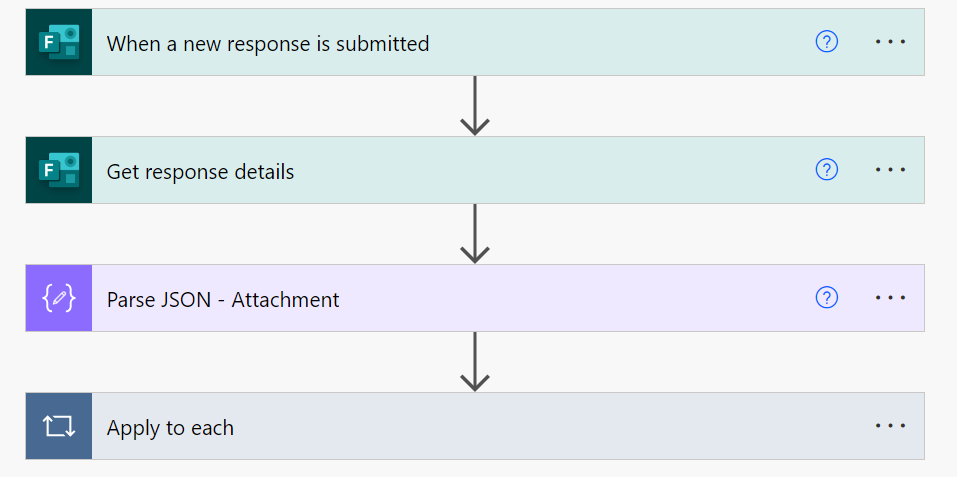
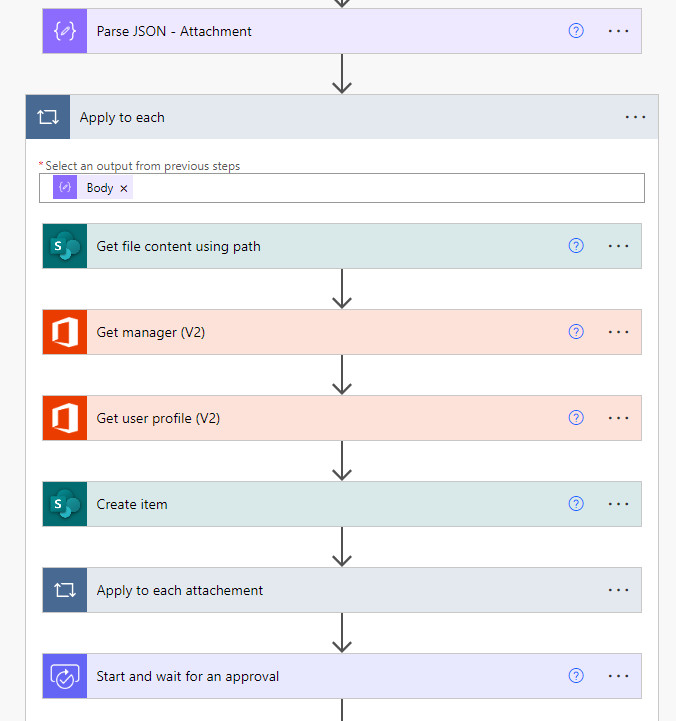
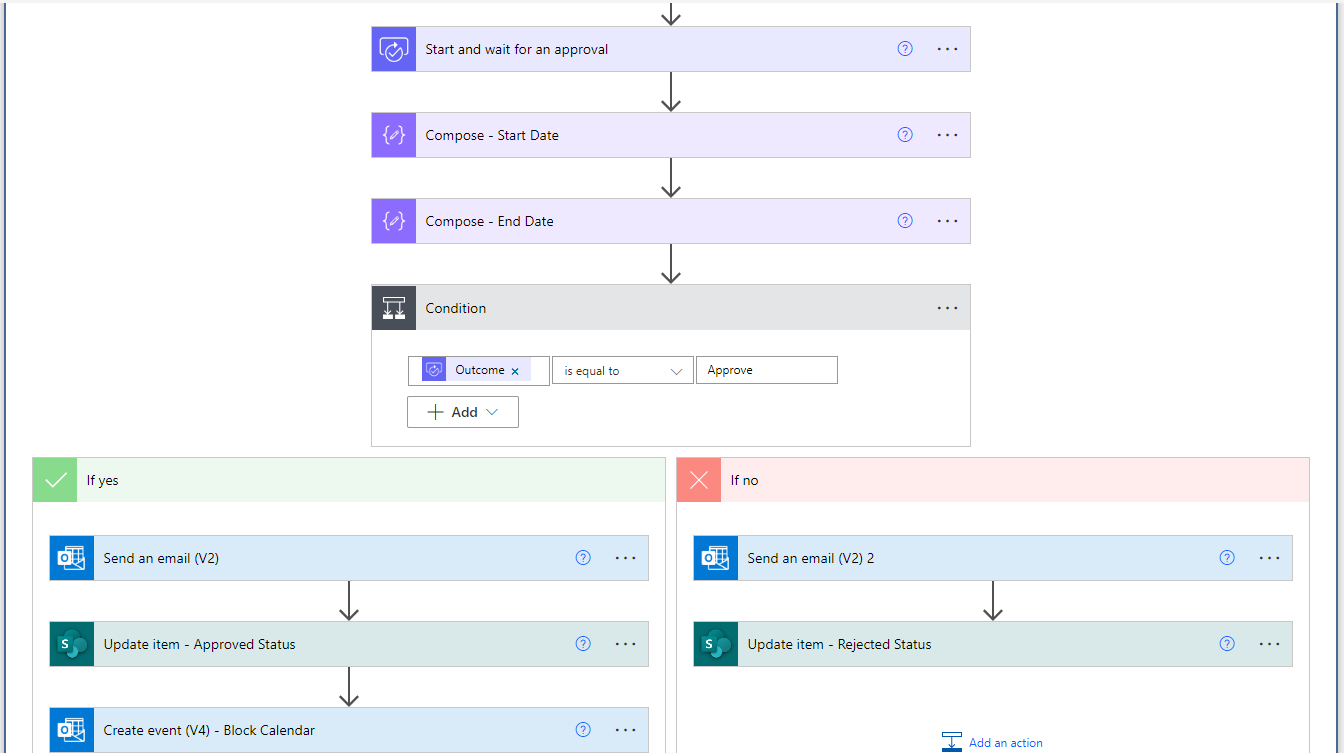
As the developer of the Power Automate flow, I designed a Microsoft Form for our team members to submit leave requests. When an employee submits the form, the flow creates an item in a SharePoint list and sends an approval request to the manager. The manager then receives an approval notification and email for their action.

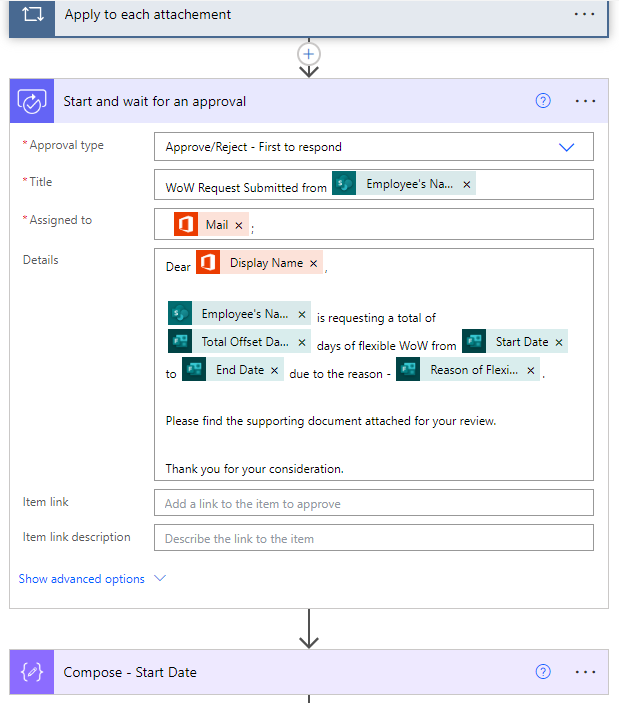
However, I’ve noticed that I, as the developer, also receive the Teams approval notification, which I believe is incorrect. I am not the requestor; the employee is. Despite this, I received the notification as if I were the requestor, which is not right. The manager and the employee (requestor) did receive the notification correctly and subsequently rejected the request.

I’m curious to understand what might be going wrong with the Teams Approval flow that causes the developer to receive the notification as well, even though they are not the one submitting the leave application.

Please refer to my screenshot for reference.

Thank you!


Categories:
I have the same question (0)
  • Suggested answer
    Michael E. Gernaey Profile Picture
    53,433 Super User 2025 Season 2 on at
    Hi,
     
    Please share the flow, and especially the Approval action (inputs and outputs) as well as a picture of it, with the values from a Flow Run.
     
    There are a few ways I can see this happening, but I'd like to review your flow to be sure.
  • Daphne Lau Profile Picture
    19 on at
    Hi @FLMike,

    I have updated the original post with few screen captures.

    Please let me know if you have anything else that could help you to better understand the issue!

    Hopefully you can see this message.
  • Suggested answer
    CU19082359-0 Profile Picture
    2 on at
    Hi
  • MS-15052048-0 Profile Picture
    3 on at
    Hi,
     
    Did you get an answer to this or figure it out on your own?
     
    I am having the same thing - mine is part of a Teams Power App.
     
    Thanks
     
    Mike

Under review

Thank you for your reply! To ensure a great experience for everyone, your content is awaiting approval by our Community Managers. Please check back later.

Helpful resources

Quick Links

Forum hierarchy changes are complete!

In our never-ending quest to improve we are simplifying the forum hierarchy…

Ajay Kumar Gannamaneni – Community Spotlight

We are honored to recognize Ajay Kumar Gannamaneni as our Community Spotlight for December…

Leaderboard > Power Automate

#1
Michael E. Gernaey Profile Picture

Michael E. Gernaey 525 Super User 2025 Season 2

#2
Tomac Profile Picture

Tomac 324 Moderator

#3
abm abm Profile Picture

abm abm 232 Most Valuable Professional

Last 30 days Overall leaderboard