web
You’re offline. This is a read only version of the page.
close
Skip to main content

Notifications

Announcements

Community site session details

Community site session details

Session Id :
Power Platform Community / Forums / Power Automate / Connect to an Excel-ta...
Power Automate
Suggested Answer

Connect to an Excel-tabel in an Ecxel file that is replaced/overwritten on na daily base

(0) ShareShare
ReportReport
Posted on by 2
I look for data in a specific row of the table, based on a kind of ID field.
This works great until the file is replaced by a new one.
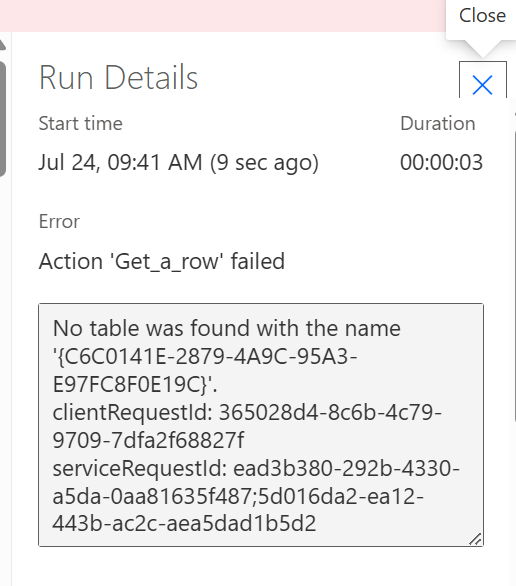
Same File name and file location, same table-name as well. But the flow then gives this error:
He sees the file but does not recognise the table. Manually pointing to the table in the action of the flow repairs it,
but next day=same story.
Categories:
I have the same question (0)
  • Suggested answer
    stampcoin Profile Picture
    5,058 Super User 2025 Season 2 on at
    Consider using Get table action, it makes sure you get the correct table id.
     
    for example.
     
  • SM-24070750-0 Profile Picture
    2 on at
    Thanks , but I wanted to avoid the automatic  "for each-loop".
    I now added a compose to get the name (or ID) of the FIRST tabel... which is partly a solution.
    Now I am stuck as the next step would be find a specific row (Get a row), but this step does not acccept the output of the compose-step as input table
  • yashag2255 Profile Picture
    24,769 Super User 2024 Season 1 on at
     
    You can also hard code the table name (if it is Table 1 then in the table selection, enter custom value and type in Table 1). I have implemented this and it has been working as expected for me with dynamic files but having same structure and same table names. 
     
    Hope this Helps!
     
    If this reply has answered your question or solved your issue, please mark this question as answered. Answered questions helps users in the future who may have the same issue or question quickly find a resolution via search. If you liked my response, please consider giving it a thumbs up. THANKS!
     
  • stampcoin Profile Picture
    5,058 Super User 2025 Season 2 on at
     
    If you want to avoid loop, let's say only 1 table in Sheet1.
     
    After Get tables, add Filter array
     
    From: 
    outputs('Get_tables')?['body/value']
     
    Filter Query:
    item()?['Name'] is equal to MyTable //replace with your table name, or use variable.
     
     
    Then add  Get a row.
    Table: 
    body('Filter_array')?[0]?['Id']
     
    Key Column and  Key value, you can use static value or variables.


Under review

Thank you for your reply! To ensure a great experience for everyone, your content is awaiting approval by our Community Managers. Please check back later.

Helpful resources

Quick Links

Forum hierarchy changes are complete!

In our never-ending quest to improve we are simplifying the forum hierarchy…

Ajay Kumar Gannamaneni – Community Spotlight

We are honored to recognize Ajay Kumar Gannamaneni as our Community Spotlight for December…

Leaderboard > Power Automate

#1
Michael E. Gernaey Profile Picture

Michael E. Gernaey 501 Super User 2025 Season 2

#2
Tomac Profile Picture

Tomac 323 Moderator

#3
abm abm Profile Picture

abm abm 237 Most Valuable Professional

Last 30 days Overall leaderboard



