web
You’re offline. This is a read only version of the page.
close
Skip to main content

Notifications

Announcements

Community site session details

Community site session details

Session Id :
Power Platform Community / Forums / Power Automate / History of Approval/Re...
Power Automate
Unanswered

History of Approval/Request Sign-Off & comments by requester/approver's accessible via dynamicC?

(1) ShareShare
ReportReport
Posted on by 2
Ladies and Gentlemen,

There are 2 built-in options for requesting an approval without the need for a power automate workflow. Request approval (button) & Request signature (automate flow)
My questions about this:

Is the history of approvals/signatures for both or one of these options stored where I can access it via power automate workflow?
My goal is to use them a while and store the history so when a more sophisticated power automate workflow is being set up i can switch, if a switch to a specific approval flow is needed at all which i doubt at the moment.
 
By history I mean specifically how often one or both of these options have been executed with the saved information about the sender, approving person's, date and version of the list item that was sent.
 
Are the comments by requester and approver's accessible via dynamic content?
 
Thank you very much for your help.

Best regards
Translated with DeepL.com (free version)
Categories:
I have the same question (0)
  • Ravi-Prajapati Profile Picture
    416 Super User 2025 Season 2 on at

    Yes, both the "Request Approval" (button) and "Request Signature" (automate flow) store approval history, but how and where they are stored differs. Here's a breakdown:


    1. Where Is Approval/Signature History Stored?

    Request Approval (Button)

    • The history is stored in Microsoft Dataverse under the Approval and Approval Request tables.
    • You can access these tables via Power Automate by using:
      • Dataverse connector → List rows (Approvals table)
      • Dataverse connector → List rows (Approval Requests table)

    Request Signature (Automate Flow)

    • If this is part of the built-in eSignature provider integration (e.g., Adobe Sign, DocuSign), the history is stored within that provider.
    • Microsoft does not store signature approvals in Dataverse by default.
    • However, if you used Power Automate for this, you could store approval history in SharePoint, Dataverse, or a custom table.

    2. Can I Access This History in Power Automate?

    Yes! You can retrieve approval history using the Dataverse connector in Power Automate.

    To fetch past approvals:

    1. Use the "List Rows" action on the Approval or Approval Request tables.
    2. Filter based on Title, Approver, or Request Date.

    For SharePoint List-based approvals, the data may also be found in:

    • Version History (if enabled).
    • The List Item itself (if approval status is stored in a column).

    3. Can I Access Comments from the Requester and Approver?

    Yes, the comments are stored in the Approval Request table.

    • Requester comments are stored in the Approval Request table.
    • Approver comments are stored under the Comments field of the Approval table.

    You can access them via Power Automate dynamic content when:

    • Fetching an approval in an automated flow.
    • Using the "Get Approval Details" action.

    4. Can I Use This History Later for a More Advanced Workflow?

    Absolutely! Since approvals are stored in Dataverse (or potentially SharePoint), you can:

    1. Pull past approval history when needed.
    2. Create a Power Automate workflow to analyze trends (e.g., how often approvals are rejected).
    3. Switch to an advanced approval process while keeping old records.

    Summary

    ✅ Approval history is stored in Dataverse (Approval and Approval Request tables).
    ✅ Comments from requesters and approvers are accessible via Power Automate.
    ✅ You can track how often approvals/signatures were executed by querying Dataverse tables.
    ✅ Future-proofing is possible: Store approval history and transition to a custom Power Automate workflow later.

  • CU21022220-0 Profile Picture
    2 on at
     
    thank you for your reply.
     
    I looked into those things and played around. 
    The Microsoft Dataverse connector led me to connect the data to powerBi, to check the situation.
    Unfortunately, the Approval and Approval Request tables (or any other table about approvals "msdyn_flow_" via dataverse) only show me either the approvals I triggered or sent to someone due testing. I dont see any data about someone else with access to the list started an approval flow for a certain item or how often and with what result, etc...
    Additionally I cant wrap my head around this data for each item, e.g.:  
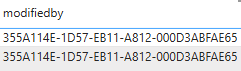
     
    There are no names except the "owner" which in my case is myself.
    Maybe this needs further processing?
    And as i mentioned, i can assure that the tables from the dataverse dont contain any approval flow (the "button" one &or the automate-request signature type) started by someone else with access to the list.
    Is that correct?
     
    This means i cant use the microsoft dataverse approach atm.
     
     
    The workaround i try now is to run a flow where i check the current item version and store the link to that item first.
    Then get the version-histories array, get rid of everything except each versionnumber and check if they match the current one. (No side-versions by-the-way, they are deactivated because i cant activate them somehhow, it doesnt let me)
     
    This way i can create a combined approval's & item-version history and store/track this information and most important send whats going on via email.
    All done by "if item modified" trigger with condition checkers who check the value of ApprovalStatusValue.
     
    So i get a flow where i can process requesting and answering and attach for each the information about the current item version and the approval history, to know which versions so far got an approval or got rejected.
     
    So far i would call this ok. But the next point makes me worry.
    To not just have this information stored elsewhere l need to show it on the list item.
    This means i would need to update the item and that makes me worry because i was able to avoid that a flow is updating items.
    What makes me worry is that the update-item action creates a new version history. This means it will cause that the just set up flow checked version-number doesnt match with the item shown in the list by at least +1.
     
    The only solution to that selfmade problem is to soft-overwrite the version number in the previous flow.
    What i yet don't know is how to include the case of a stopped request.
    Well...
     
    It would be handy if one of those approval flows would actually store an item-version in the version-history of the item where the ApprovalStatusValue 0,1,2,3 is being shown in each case.
     
     
    My entire workaround here or the dataverse part is based on my initial problem.
    Maybe i got them wrong, here are my questions:
     
    Only 365 users can right click on an item to execute a power automate flow?
    Do i have to share the power automate flow to each person with access to the list, so they can use them?
     
    If not, i need to use the out of the box approval worklfows until the majority got the 365 installed. Which is my current conclusion.
     
    Thank you very much.
    Best regards!


Under review

Thank you for your reply! To ensure a great experience for everyone, your content is awaiting approval by our Community Managers. Please check back later.

Helpful resources

Quick Links

Forum hierarchy changes are complete!

In our never-ending quest to improve we are simplifying the forum hierarchy…

Ajay Kumar Gannamaneni – Community Spotlight

We are honored to recognize Ajay Kumar Gannamaneni as our Community Spotlight for December…

Leaderboard > Power Automate

#1
Michael E. Gernaey Profile Picture

Michael E. Gernaey 503 Super User 2025 Season 2

#2
Tomac Profile Picture

Tomac 321 Moderator

#3
abm abm Profile Picture

abm abm 237 Most Valuable Professional

Last 30 days Overall leaderboard



