web
You’re offline. This is a read only version of the page.
close
Skip to main content

Announcements

News and Announcements icon
Community site session details

Community site session details

Session Id :
Power Platform Community / Forums / Power Automate / expenses process autom...
Power Automate
Answered

expenses process automation

(0) ShareShare
ReportReport
Posted on by 441
Hello,
 
I'm trying to create an expenses claim process using MS Forms and power automate.
 
My form gives the user, depending on how they answer the question, the chance to add a maximum of 10 expense lines in one form submission.
 
My issue: each expense line gives the user a question to share how many miles and at what rate they are claiming. For example, 10 miles, at rate £1.25.
 
In my flow, i want to calculate the Miles multiplied by the Rate to give a total amount but because the user 'COULD' answer this 10 times by adding more expense lines, i need power automate to calculate this for each expense line and then at the end add all of the totals together.
 
Also as sometimes the answer in the form could be blank as they may only do 5 expense lines, i need ensure if the question is empty then to treat the value as 0 - hope that makes sense.
 
The only way i can see to do this the below (Initialize variable, then set the variable, then compose to multiply) however this feels like a really really long winded way of achieving this as id have to initialize x10, set var x10, multiply x10 and then add all the mutiplied numbers together, so looking at 31 actions before the flow even gets going properly.
 
Expression used for set var:
int(if(empty(outputs('Get_response_details')?['body/ra41978102e8d4119b59fdcd535a84e02']), 0, outputs('Get_response_details')?['body/ra41978102e8d4119b59fdcd535a84e02']))
 
Before i proceed, can anyone recommend a more simple way?
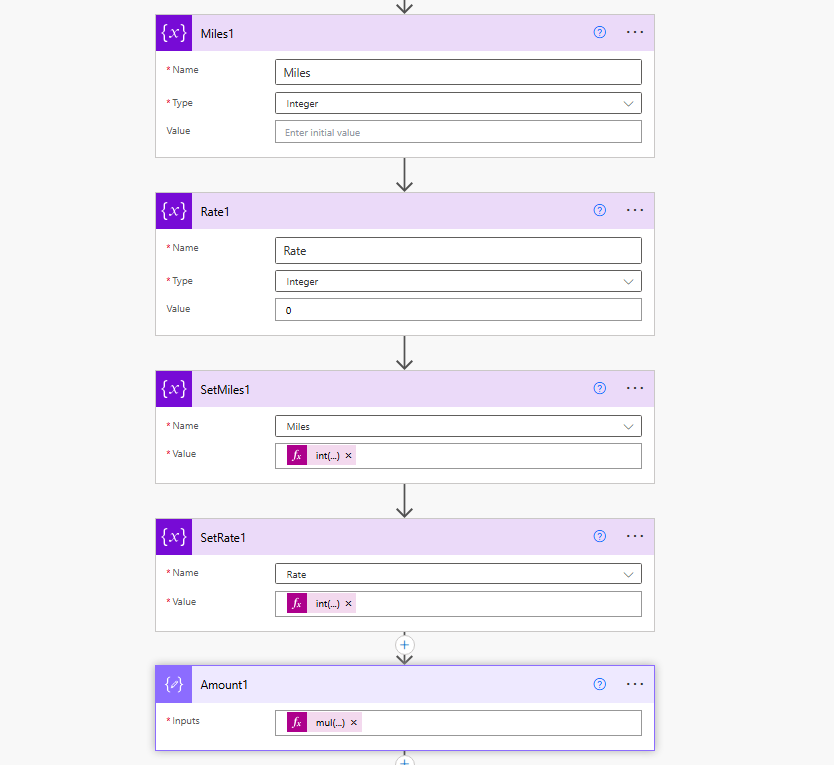
 
Any help appreciated!
Categories:
I have the same question (0)
  • DJ_Jamba Profile Picture
    2,837 Moderator on at
    If I understand correctly, there are 10 expense rows (questions) in the form but n number of fields could be submitted (less than 10) e.g.
    1 Miles field and Rate field
    6 Miles fields and rate fields
    Or
    10 Miles and rate fields
     
    Can the Rate field be different in each row?

     
  • Jap11 Profile Picture
    441 on at
    Hello @DJ_Jamba - good question, I've just had it confirmed that the rate is the same for each line, so it would only be the miles that is always different.
  • Verified answer
    DJ_Jamba Profile Picture
    2,837 Moderator on at
    OK. I can do this in 4 actions (or 7 if you want a total sum of all expenses submitted).
    I've kept rate in there in case it changes in the future and you don't have to change your flow

    1. Define an array (You can use a variable if you want but I've used a Compose)
     
     
    [
      {
        "Expense No": 1,
        "Miles": @{item()?['Question1_Miles_Field']},
        "Rate": @{item()?['Question1_Rate_Field']}
      },
      {
        "Expense No": 2,
        "Miles": @{item()?['Question2_Miles_Field']},
        "Rate": @{item()?['Question2_Rate_Field']}
      },
      {
        "Expense No": 3,
        "Miles": @{item()?['Question3_Miles_Field']},
        "Rate": @{item()?['Question3_Rate_Field']}
      },
      {
        "Expense No": 4,
        "Miles": @{item()?['Question4_Miles_Field']},
        "Rate": @{item()?['Question4_Rate_Field']}
      },
      {
        "Expense No": 5,
        "Miles": @{item()?['Question5_Miles_Field']},
        "Rate": @{item()?['Question5_Rate_Field']}
      },
      {
        "Expense No": 6,
        "Miles": @{item()?['Question6_Miles_Field']},
        "Rate": @{item()?['Question6_Rate_Field']}
      },
      {
        "Expense No": 7,
        "Miles": @{item()?['Question7_Miles_Field']},
        "Rate": @{item()?['Question7_Rate_Field']}
      },
      {
        "Expense No": 8,
        "Miles": null,
        "Rate": null
      },
      {
        "Expense No": 9,
        "Miles": null,
        "Rate": null
      },
      {
        "Expense No": 10,
        "Miles": null,
        "Rate": null
      }
    ]
    Substitute each row for the corresponding Miles and Rate fields
    8, 9 & 10 must also be the corresponding 8th - 10th questions (I set them as null for testing)


    2. Add a Select action
     
     
    From: Compose in Step 1
    Map (switch to text mode then copy & paste the code below)
     
    {
      "Expense Row": @{item()?['Expense No']},
      "Miles": @{item()?['Miles']},
      "Rate": @{item()?['Rate']}
    }
     
    3. Filter out rows where rate is empty or miles is empty using the Filter array action


    From: Select action above
    Filter (switch to Advanced mode then copy paste)
     
    @and(
    	not(equals(item()?['Miles'], null)),
    	not(equals(item()?['Rate'], null))
    )
     
    4. Add another Select to convert values to float and calculate totals


    From: Filter query action above
    Map (Copy and paste)
     
    {
      "Expense Row": @{item()?['Expense Row']},
      "Miles": @{float(item()?['Miles'])},
      "Rate": @{float(item()?['Rate'])},
      "Total": @{mul(float(item()?['Miles']),float(item()?['Rate']))}
    }

    Now you have an array of valid expenses with totals.

    If you want to sum all of the expenses to put a total in e.g. an email, you need 3 more actions and we need to use xpath & xml technique
     
    5. Select total column only


    From: Select action in Step 4
    Map: (Copy and paste)
     
    @item()?['Total']
     
    6. Construct an XML root node containing the totals in the previous step using a Compose
     
     
    Copy and paste
     
    {
      "root": {
        "Totals": @{body('Select_totals_only')}
      }
    }
     
    7. Finally, we can use xpath to sum the totals in a Compose


    Copy and paste into expression:
    xpath(xml(outputs('Construct_XML_root')), 'sum(/root/Totals)')
     
     
    d(-_-)b
  • Jap11 Profile Picture
    441 on at
    Hello @DJ_Jamba - that's perfect, exactly what i was looking for, thank you so much!
  • Jap11 Profile Picture
    441 on at
    Hello @DJ_Jamba thank you again for your support on this.
     
    I wondered if you'd possibly be able to help with something further...
     
    I need a way to get the Total for each expense line so i can enter the value into the corresponding total field. I was hoping and have tried a few ways of simply writing an expression here that retrieves the total from expense row when expense row is equal to 1, but not having much luck.
     
     
    I have found a way to do this, but again, it feels like a very long way around it by needing x20 new actions (2 for each expense line)
     
     
    Thanks,
    Josh

Under review

Thank you for your reply! To ensure a great experience for everyone, your content is awaiting approval by our Community Managers. Please check back later.

Helpful resources

Quick Links

Introducing the 2026 Season 1 community Super Users

Congratulations to our 2026 Super Users!

Kudos to our 2025 Community Spotlight Honorees

Congratulations to our 2025 community superstars!

Congratulations to the April Top 10 Community Leaders!

These are the community rock stars!

Leaderboard > Power Automate

#1
Vish WR Profile Picture

Vish WR 959

#2
Valantis Profile Picture

Valantis 872

#3
Haque Profile Picture

Haque 589

Last 30 days Overall leaderboard
