web
You’re offline. This is a read only version of the page.
close
Skip to main content

Notifications

Announcements

Community site session details

Community site session details

Session Id :
Power Platform Community / Forums / Power Automate / How to access JSON Obj...
Power Automate
Unanswered

How to access JSON Object - Select or Apply to each wants an Array

(0) ShareShare
ReportReport
Posted on by 71
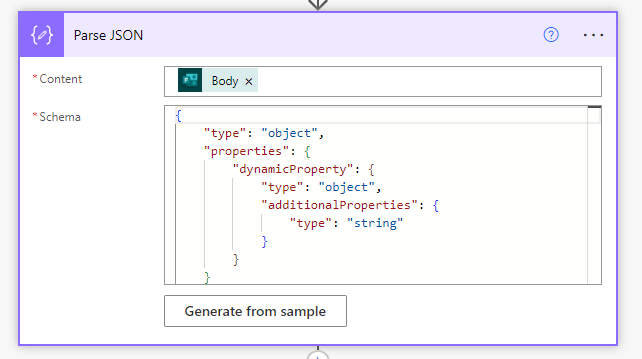
I'm processing a MS Form Response.  I want to get the actual questions and answers so I'm Parsing the JSON from the Get Response details action.
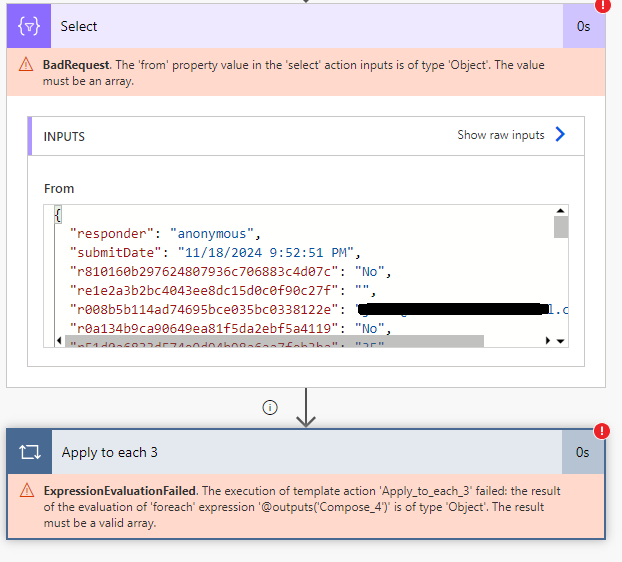
I'm able to get a result but the out is a JSON Object and not an array so I can loop through it in Apply to Each and I can transform it with Select.  Both say they need an array.
So how do I take a JSON Object, that varies in the number of items, and load it into an array:
My JSON Object looks like this:
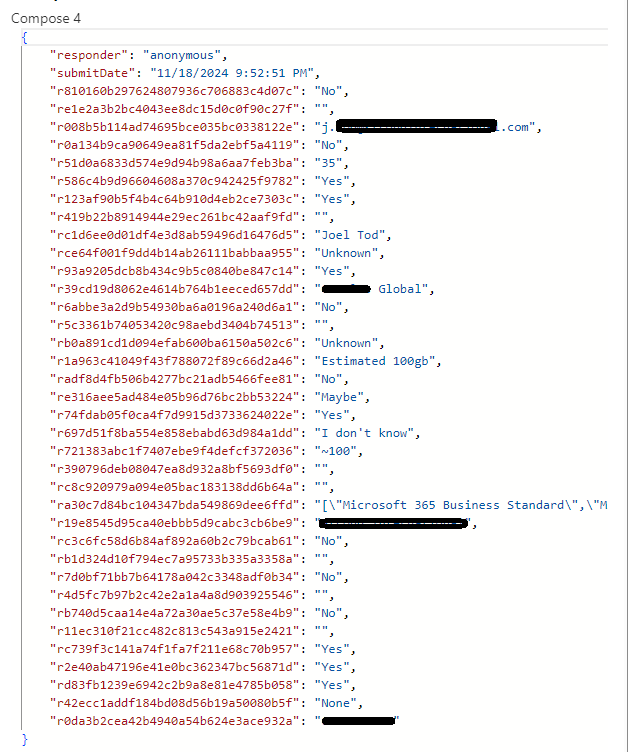
The Select and Apply to each steps look like this:
 
The Parse JSON Step looks like this:
 
I then Compose the Parse JSON with this step:
Categories:
I have the same question (0)
  • CU09011154-0 Profile Picture
    2 on at
    I have almost the exact same issue, except for that I am trying to get responses from an adaptive card instead (that also varies in the number of items). 
    If you find a solution for your problem I would deeply appreciate if you could let me know how you solved the issue! 
     
    This is the output from Parse JSON when I retrieve the data from the adaptive card. 
     
    "data": {
        "comment-entity1": "this is my comment",
        "comment-entity2": "this is my comment",
        "comment-entity3": "this is my comment",
        "date-entity1": "2025-01-15",
        "date-entity2": "2025-01-22",
        "date-entity3": "2025-01-21",
        "status-entity1": "In progress",
        "status-entity2": "In progress",
        "status-entity3": "In progress",
        "action": "submit-comments"
      }
     
  • Gyllentid Profile Picture
    894 on at
    Hi, I have faced the same issue as you have. When I solved this a few years ago I used this expression, however there might be an even better way :)
     
    split(replace(replace(string(body('Get response details')),'{',''),'}',''),'","')
  • Suggested answer
    David_MA Profile Picture
    12,953 Super User 2025 Season 2 on at
    Can you explain why you are doing what you are doing? There really isn't any need to do what you're doing if you just need to get the answers (responses) to the questions. As you show in the compose action, they're returned from the Get response details action (well, I assume that is how you are getting that data since you don't show the trigger). Such as:
     
    If you need to populate a Microsoft Word template with the answers for example, you just insert the question from the dynamic content and insert it into the Word template:

     
    If you need to write an expression to do something with one of the answers to a question, you use the question from the dynamic content to build the expression. For example: if(equals(trim(outputs('Get_response_details')?['body/r9fb253bcfc554a149a4d75fb055e216d']),'Medical Device Complaint'),variables('Checked Box'),variables('Unchecked Box'))
     
    The Get response details actions returns an object, since it can only return the values from one response. An array would be the values from multiple responses, which the Get response details action cannot return; thus your error message.
  • Gyllentid Profile Picture
    894 on at
    @David_MA It might be that the questions in the Form change often and that would imply you have to change the Flow every time the questions change.
  • MS-03101913-0 Profile Picture
    71 on at
    Hi David MA,
     
    You are correct, the form changes constantly and updating the FLOW to send the email needs to be changed every time the form changes.  The reason, is we have many forms that gather information and I'm trying to create a single dynamic flow that will save the question and answer pair in a SharePoint list and send an email with the question and answer pair.  Outside of the context of the form, the question is a guid that is meaningless.
     
    If I can transform the responses to JSON in the format of "ID/Answer" -  {"id": "r008b5b114ad74695bce035bc0338122e", "answer": "j.xxx@acme.com"}, then I can loop back through the form object and get the actual wording of the question:
    ID: r008b5b114ad74695bce035bc0338122e
    Question: What is your Email Address?
    Answer: j.xxx@acme.com
     
  • Verified answer
    Chriddle Profile Picture
    8,424 Super User 2025 Season 2 on at
    The name() function of xPath returns a value ​​that escape characters that are not allowed in XML node names, but that shouldn't be a problem here (In similar situations where escaping occurs, you may need to undo the escaping):
     
    From
    xpath(
    	xml(json(concat('{"Root":{"Item":', outputs('Compose_Data'), '}}'))),
    	'//Item/*'
    )
    Map key
    xpath(
    	item(),
    	'name(//*)'
    )
    Map value
    xpath(
    	item(),
    	'string(//*)'
    )


Under review

Thank you for your reply! To ensure a great experience for everyone, your content is awaiting approval by our Community Managers. Please check back later.

Helpful resources

Quick Links

Forum hierarchy changes are complete!

In our never-ending quest to improve we are simplifying the forum hierarchy…

Ajay Kumar Gannamaneni – Community Spotlight

We are honored to recognize Ajay Kumar Gannamaneni as our Community Spotlight for December…

Leaderboard > Power Automate

#1
Michael E. Gernaey Profile Picture

Michael E. Gernaey 525 Super User 2025 Season 2

#2
Tomac Profile Picture

Tomac 425 Moderator

#3
abm abm Profile Picture

abm abm 245 Most Valuable Professional

Last 30 days Overall leaderboard
