web
You’re offline. This is a read only version of the page.
close
Skip to main content

Notifications

Announcements

Community site session details

Community site session details

Session Id :
Power Platform Community / Forums / Power Automate / Transfer of multi sele...
Power Automate
Suggested Answer

Transfer of multi select option set values from Sharepoint List to Dataverse

(0) ShareShare
ReportReport
Posted on by
Hi all,
 
We have built a canvas app that feeds submitted info into a Sharepoint List. We now need to take the values of the list and create a corresponding record in a model driven app. This is all good except for a handful of multi select option sets which I can't figure out how to get across. We've got the "normal" option sets (using string map lookups and "First" expressions) text and y/n fields over fine but I can't work out how to transfer the values of the multi select fields.
 
Example- we have a multiselect option set called Weather Conditions (hrp_WeatherConditions) which has the following values in D365:
Options:
168640018: Bright/Clear 🔆
168640001: Cloudy ☁️
168640020: Cold 🥶
168640019: Cool 😎
168640000: Dry 🌵 
168640008: Fog 🌫️
168640024: Hail 🌨️
168640006: Hot ♨️
168640007: Humid 💧
168640023: Ice/Frost 🧊
168640022: Mild 👌
168640003: Rain (Heavy) ☔
168640002: Rain (Light) ☂️
168640017: Rain (Showers) 🌂
168640005: Snow 🌨️
168640010: Sunshine 🌞
168640004: Thunderstorm ⛈️
168640014: Unknown
168640021: Warm 🌡️
168640016: Wet 💦
168640015: Wind (Light) 🌬️
168640009: Wind (Strong) 🌬️
Default: N/A
 
The Sharepoint list has the same text values as above (but not the numbers so I understand I will need to extract these, match them and then submit the actual numbers to D365. How do I ensure I can transfer and display the multiple values selected in the SP list? 
 
Any help would be much appreciated. 
 
Many Thanks,
 
Isabell
Categories:
I have the same question (0)
  • Suggested answer
    Mark Nanneman Profile Picture
    991 Super User 2025 Season 2 on at
    The simplest one time solution would be to export the sharepoint list to excel and then import it into your model driven app. There are several ways you can do this.
    https://learn.microsoft.com/en-us/power-apps/user/import-data
     

    E.g. Export SharePoint list to excel

    Export the sharepoint list with multi select column:
    It looks something like this:
     

    Download a template from the matching Model Driven App Table


    Paste data from SP export into Model Driven App Template


    Replace any # characters from the sharepoint export with spaces


    Save and Import to Model Driven App


    You could also consider making a virtual table in dataverse that's mapped to your sharepoint list.
    https://learn.microsoft.com/en-us/power-apps/maker/data-platform/create-virtual-tables-using-connectors?tabs=sharepoint
     
    I'll post another method using a power automate flow that uses a dynamics api to get your choice column choices for mapping.

    If this helped you, please click "Does this answer your question" and give it a like to help others in the community and close the ticket
    Power Platform Developer | LinkedIn: Mark Nanneman | Blog: Power Stuff  | YouTube: Mark's Power Stuff 

     
  • Suggested answer
    Mark Nanneman Profile Picture
    991 Super User 2025 Season 2 on at
    If you want a flow to do this as records are created or modified in SharePoint, you can use a Dynamics API to list the values and label names of your choice set in Dynamics 365 and then filter that by the label from SharePoint to find the Dataverse numeric value for each sharepoint choice set value.

    Here's a blog post on how to do that--you'd have to modify for multi select of course.
    https://marknanneman.wordpress.com/2025/01/13/get-dataverse-choice-set-values-in-power-automate-to-map-text-values-from-excel/

     
    It'd work something like this in Power Automate for a multi-select choice column:
     

    Use a HTTP Request to the Dynamics endpoint for the Choice Set definition

    This is to get the array mapping labels to values for your choice column.
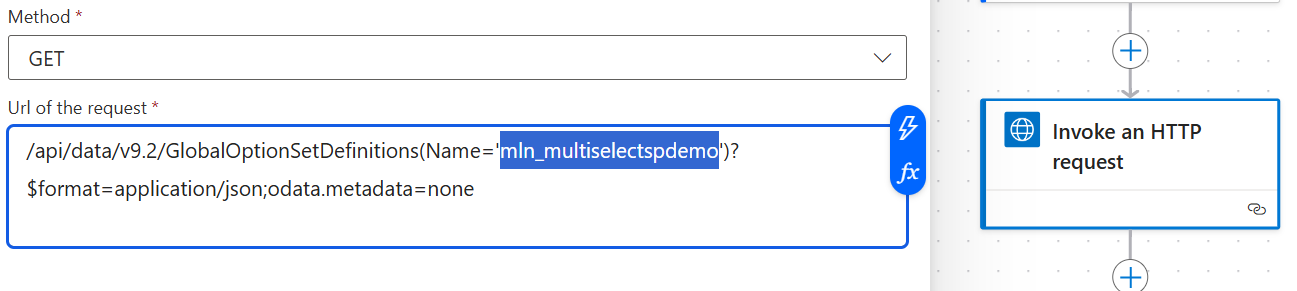


    The endpoint would be:

    /api/data/v9.2/GlobalOptionSetDefinitions(Name='<your_choice_set_logical_name>')?$format=application/json;odata.metadata=none
    You'd set up your connection for "Invoke an HTTP Request with Microsoft Entra ID" to be your dynamics base url.
     
    i.e.
    https://<your-domain>.crm.dynamics.com
     

    Use "Select" to create a simple array of all the choices selected in your Sharepoint Multi Select Column

    The "from" will be your SharePoint multi select column.  For mapping switch to "text" mode and just drop in an expression for "Item()?['Value']"
     
    Should look something like this:
    When you run it, it simplifies your sharepoint item's selected options like this:


    Filter your Dataverse Choice Set Definition Options array for those that are in the current SharePoint item's Selection

    From is the "Options" array property of the response you get from the Dynamics API call with the Invoke and HTTP request action.

    For your filter query check if the simple array we made in the previous step contains a matching label from dataverse.
    item()?['Label/UserLocalizedLabel/Label']


    Select the Matching Dataverse Choice Option Values from the filter

    After the filter we have all the matching dataverse choices that share the same label with the current sharepoint multiselect choice column.
     
    But we need to drop all the excess data and select only the numeric values in a simple array.  This is done with another Select action.

    Select from the output of the filter above, use the "text' mode and use the expression "item()?['Value]"

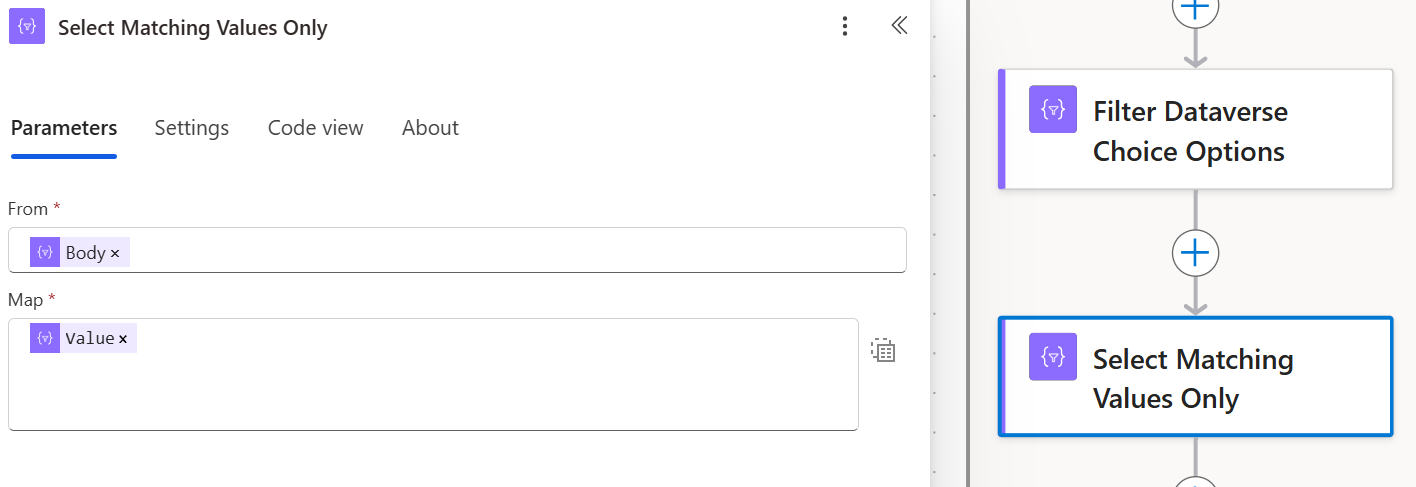


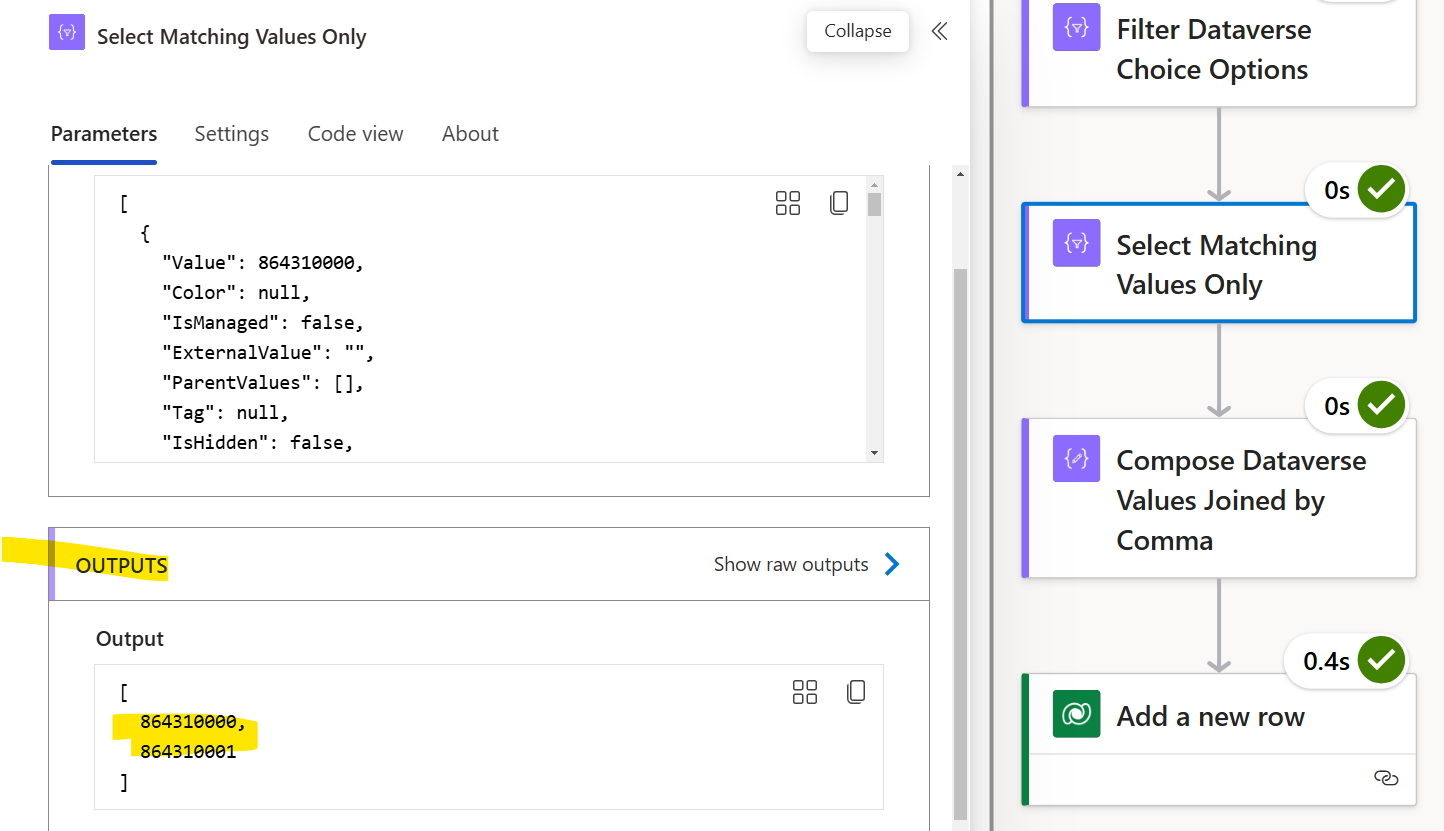
    on a run, this simplifies the filtered dataverse options array like this:


    Join the simple array of matching dataverse choice set values into a string by commas

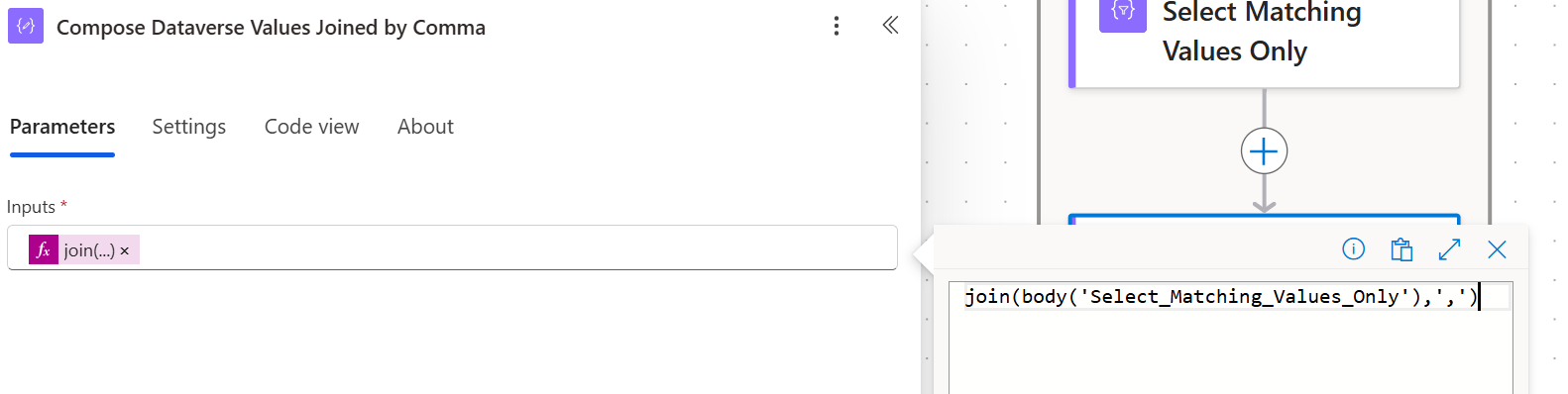
    To set the multi-select column in Dataverse we need the values separated by commas in a string.  Use the Join() function to do this.
     
    join(body('Select_Matching_Values_Only'),',')
     

    The output on a run looks something like:


    Add a new row in Dataverse

     
    Just use the join(body('Select_Matching_Values_Only'),',') to set the multi select column, or if you are using a compose to store the value like I am you can just reference the output of the compose.


    Example:


    If this helped you, please click "Does this answer your question" and give it a like to help others in the community and close the ticket
    Power Platform Developer | LinkedIn: Mark Nanneman | Blog: Power Stuff  | YouTube: Mark's Power Stuff 


Under review

Thank you for your reply! To ensure a great experience for everyone, your content is awaiting approval by our Community Managers. Please check back later.

Helpful resources

Quick Links

Forum hierarchy changes are complete!

In our never-ending quest to improve we are simplifying the forum hierarchy…

Ajay Kumar Gannamaneni – Community Spotlight

We are honored to recognize Ajay Kumar Gannamaneni as our Community Spotlight for December…

Leaderboard > Power Automate

#1
Michael E. Gernaey Profile Picture

Michael E. Gernaey 501 Super User 2025 Season 2

#2
Tomac Profile Picture

Tomac 323 Moderator

#3
abm abm Profile Picture

abm abm 237 Most Valuable Professional

Last 30 days Overall leaderboard
