web
You’re offline. This is a read only version of the page.
close
Skip to main content

Announcements

News and Announcements icon
Community site session details

Community site session details

Session Id :
Power Platform Community / Forums / Power Automate / Azure DevOps connector...
Power Automate
Suggested Answer

Azure DevOps connector: When a build completes - Output: Parameters is always empty

(1) ShareShare
ReportReport
Posted on by 2
Hello,
I am trying to create a notification in my teams channel based on successful pipeline run.
I want to output informations from the devops trigger. Every output from trigger works fine (sourceBranch, buildId, ....) Except "Parameters"
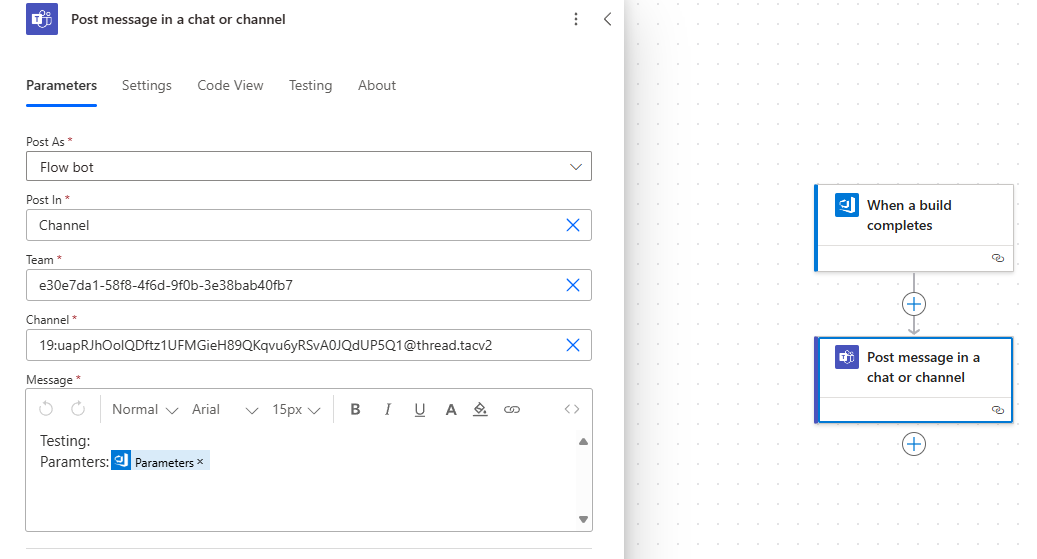
Message from teams

Pipeline ran with this parameters:
Line: "Hello, world!"

Right now I use basic pipeline that just echoes whatever is inside the line parameter


Why is the parameters output always empty when the pipeline is being called with parameter?
Categories:
  • Suggested answer
    Michael E. Gernaey Profile Picture
    53,970 Super User 2026 Season 2 on at
    Hi,
     
    What I would do, if you haven't is try to view the raw data, just add a compose and spit out that value.
     
    I would also suggest, adding a compose that has the entire JSON of the response, then you can view it yourself and see if its really blank or if its a bug
    in the connector action

Under review

Thank you for your reply! To ensure a great experience for everyone, your content is awaiting approval by our Community Managers. Please check back later.

Helpful resources

Quick Links

Season of Sharing Community Challenge Winners!

Congratulations to our community stars!

Kudos to our 2025 Community Spotlight Honorees

Expanding mentorship, skilling, and AI innovation

Leaderboard > Power Automate

#1
Mohsin Ali Profile Picture

Mohsin Ali 389

#2
11manish Profile Picture

11manish 345 Super User 2026 Season 2

#3
M Bilal Khan Profile Picture

M Bilal Khan 308

Last 30 days Overall leaderboard







