web
You’re offline. This is a read only version of the page.
close
Skip to main content

Notifications

Announcements

Community site session details

Community site session details

Session Id :
Power Platform Community / Forums / Power Automate / Dynamic Date Text Not ...
Power Automate
Suggested Answer

Dynamic Date Text Not Recognized By Adaptive Card

(0) ShareShare
ReportReport
Posted on by 10
H
Problem
I'm unable to get a dynamic card in one of my flows to recognize any dynamic syntax that I've created as a date/time to be recognized as a string. I'm working in Power Automate. My flow is triggered manually by the user from teams (based on the template automated reminder). I'm using the adaptive card to capture information. (full payload below). I would like one of the elements (Input.Date) appear with a dynamic default value (tomorrow's date). However, I haven't found a way to make this work.
Trouble Shooting
  • I've tried all of the following which result in a successful PREVIEW when developing, but fail to work at load:  
    • "${formatDateTime(utcNow(), 'yyyy-MM-dd')}"
    • "${substring(utcNow(),0,10)}"
  • I've tried with and without the quotes shown above
  • This issue persists regardless of the element used -- if I type any of these in a text field, same result
  • All of the above is true when troubleshooting in the Input.Time parameters.
 
 
Illustration
Within Power Automate, While Editing Card:
  • I've inserted the dynamic text shown below both in date input parameter.
  • I also inserted in text area just for texting
  • I included hard-coded value in time just to make sure that I am not crazy in my understanding how default values should appear.

 
Preview Still within Power Automate
  • This is what I would expect to see in preview mode (and the flow!)
  • Both the text and date inputs have been recognized and populated, as does the time

 
View Once Flow Is Triggered
  • This is NOT what I'd expect
  • The text value displays the literal text instead of the date
  • This doesn't change if I remove the quotes from the payload code
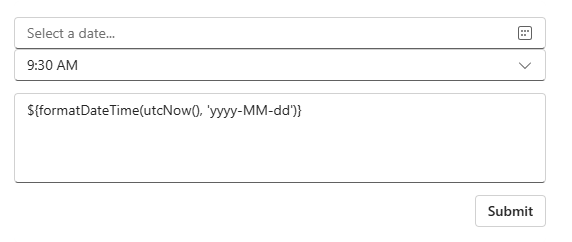

Why?
Full payload 


{
    "$schema": "http://adaptivecards.io/schemas/adaptive-card.json",
    "type": "AdaptiveCard",
    "version": "1.3",
    "body": [
        {
            "type": "Input.Date",
            "spacing": "None",
            "id": "remindDate",
            "value": "

${formatDateTime(utcNow(), 'yyyy-MM-dd')}

"
        },
        {
            "type": "Input.Time",
            "spacing": "None",
            "id": "remindTime",
            "value": "09:30"
        },
        {
            "placeholder": "Notes for reminder",
            "type": "Input.Text",
            "id": "NotesForReminder",
            "isMultiline": true,
            "value": "

${formatDateTime(utcNow(), 'yyyy-MM-dd')}

"
        }
    ]
}

Categories:
I have the same question (0)
  • Suggested answer
    Nived_Nambiar Profile Picture
    18,129 Super User 2025 Season 2 on at
     
    try like below
     
    {
        "$schema": "http://adaptivecards.io/schemas/adaptive-card.json",
        "type": "AdaptiveCard",
        "version": "1.3",
        "body": [
            {
                "type": "Input.Date",
                "spacing": "None",
                "id": "remindDate",
                "value": "@{formatDateTime(utcNow(), 'yyyy-MM-dd')}"
            },
            {
                "type": "Input.Time",
                "spacing": "None",
                "id": "remindTime",
                "value": "09:30"
            },
            {
                "placeholder": "Notes for reminder",
                "type": "Input.Text",
                "id": "NotesForReminder",
                "isMultiline": true,
                "value": "@{formatDateTime(utcNow(), 'yyyy-MM-dd')}"
            }
        ]
    }


    Thanks & Regards,
    Nived N

    Stay connected:
    LinkedIn | YouTube | Blogs

    Was this answer helpful?
    If yes, please mark it as the solution by selecting the checkbox in the discussion thread.
    Your feedback motivates me to keep contributing. Thank you!

  • pgSystemTester Profile Picture
    10 on at
    Thanks Nived, I tried just the line of the edit as well as the whole payload which had and not successful. The full version of yours did not even preview, so maybe something was omitted? Does it work for you as a basic adaptive card?

    I gave your response a like for the effort. Let me know if you have any other suggestions.
  • Suggested answer
    David_MA Profile Picture
    12,982 Super User 2025 Season 2 on at
    I am a bit confused by your images in your post since it is in the Building Flow forum. You are doing this with Power Automate, correct? If so, I write the code for the adaptive card in a Compose action. The date you want to show on the card should be in the Compose action as an expression, which would not begin with a dollar sign. Here is an example from one of my flows below. As you can see, the two dates show up in the Compose action in pink as expressions. If you are putting the actual code in that you show, that is why it is populating that way when the adaptive card is created.
     
     
    This is how it is then renders in Teams as a card. Note the code above does not align with the card below. It is for illustrative purposes only. I don't get the card sent above, but I do get the one sent below and the date shown is entered with an expression like above.
  • pgSystemTester Profile Picture
    10 on at
    Thanks for response David. In answer to your question, yes I am using Power Automate. Most of your answer makes sense to me as I am (somewhat) familiar with writing dynamic expressions. What prevents me from executing what you are proposing is that because my adaptive card is attached to my trigger, I can't (possibly don't know how...?) insert a dynamic expression. There's probably some easy solution to this I'm unaware of, but it sounds like that's the real root problem.

    I'll research this a bit. If I get an answer on this route, I'll mark yours as the answer for putting me on the right track. I gave it a like for the effort which again I appreciate.

    IN case you want to see something exactly like me, if you look at Microsoft's "Followup to a message" template shown below, it's the type of triggers/setup I'm dealing with.


Under review

Thank you for your reply! To ensure a great experience for everyone, your content is awaiting approval by our Community Managers. Please check back later.

Helpful resources

Quick Links

Forum hierarchy changes are complete!

In our never-ending quest to improve we are simplifying the forum hierarchy…

Ajay Kumar Gannamaneni – Community Spotlight

We are honored to recognize Ajay Kumar Gannamaneni as our Community Spotlight for December…

Leaderboard > Power Automate

#1
Michael E. Gernaey Profile Picture

Michael E. Gernaey 507 Super User 2025 Season 2

#2
Tomac Profile Picture

Tomac 267 Moderator

#3
abm abm Profile Picture

abm abm 232 Most Valuable Professional

Last 30 days Overall leaderboard



