web
You’re offline. This is a read only version of the page.
close
Skip to main content

Announcements

News and Announcements icon
Community site session details

Community site session details

Session Id :
Power Platform Community / Forums / Power Automate / Power Automate- Apply ...
Power Automate
Suggested Answer

Power Automate- Apply to each action not taking out of Parse Json

(0) ShareShare
ReportReport
Posted on by 4
Hey, pls help me to understand what I'm doing wrong. 

I'm building a flow to run a Power BI query and add the extracted data into a Dataverse table. The flow runs, but no data is added to the Dataverse table. Here are the steps:
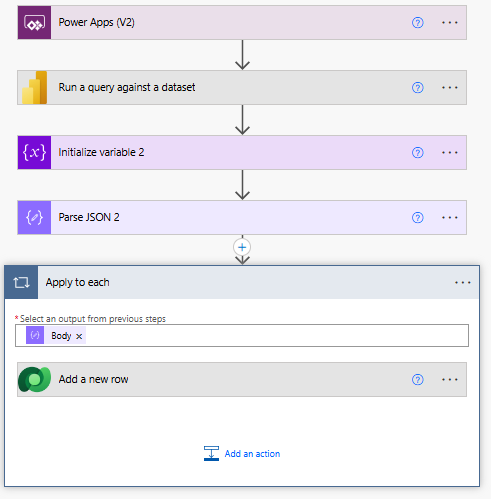
 
Parse Json step seems to be giving an array as output, but the Apply to each action does not take the output of Parse Json. 
 
Input to Parse Json action:


Output of parse json action: 
 
Checking the input to Apply to each, I see this:
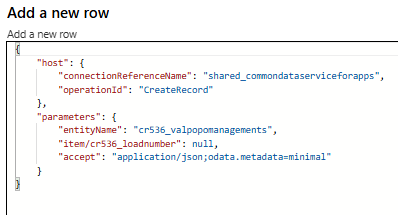
 
Pls help to fix the issue with this flow. 
Categories:
I have the same question (0)
  • developerAJ Profile Picture
    4,763 on at
    could you please provide the input of loadnumber property in add a new row action
  • CU01120131-0 Profile Picture
    4 on at
    The data goes into a column called Load Number in the Dataverse table, and that column is defined as String. 
  • chiaraalina Profile Picture
    1,929 Super User 2026 Season 1 on at
    Hi 
     
    Can you show the input of your Add a new row action? Are you using an expression or direct dynamic content?
  • CU01120131-0 Profile Picture
    4 on at
    Here's the Schema for Parse Json action:
    {
        "type""array",
        "items": {
            "type""object",
            "properties": {
                "INBOUND_LOAD_ID": {
                    "type""string"
                },
                "SHIPPING_ORDER_NBR": {
                    "type""string"
                }
            },
            "required": [
                "INPUT_DATA[INBOUND_LOAD_ID]"
            ]
        }
    }
     
    Input to Apply to each is dynamic: body('Parse_JSON_2')
  • Suggested answer
    developerAJ Profile Picture
    4,763 on at
    {
        "type""object",
        "properties": {
            "body": {
                "type""array",
                "items": {
                    "type""object",
                    "properties": {
                        "INPUT_DATA[INBOUND_LOAD_ID]": {
                            "type""string"
                        },
                        "INPUT_DATA[SHIPPING_ORDER_NBR]": {
                            "type""string"
                        }
                    },
                    "required": [
                        "INPUT_DATA[INBOUND_LOAD_ID]",
                        "INPUT_DATA[SHIPPING_ORDER_NBR]"
                    ]
                }
            }
        }
    }
     
    try this schema not sure why parse Json was giving something different
     
    your content and schema are not matching
  • developerAJ Profile Picture
    4,763 on at
    Once you update your parse Json schema update the input property of Load Number
     
     
  • developerAJ Profile Picture
    4,763 on at
    Following up to check whether the issue has been resolved. If it is resolved, please mark the thread as closed. If not, please tag me and provide info for further assistance.

Under review

Thank you for your reply! To ensure a great experience for everyone, your content is awaiting approval by our Community Managers. Please check back later.

Helpful resources

Quick Links

Introducing the 2026 Season 1 community Super Users

Congratulations to our 2026 Super Users!

Kudos to our 2025 Community Spotlight Honorees

Congratulations to our 2025 community superstars!

Congratulations to the April Top 10 Community Leaders!

These are the community rock stars!

Leaderboard > Power Automate

#1
Vish WR Profile Picture

Vish WR 957

#2
Valantis Profile Picture

Valantis 847

#3
Haque Profile Picture

Haque 609

Last 30 days Overall leaderboard
