web
You’re offline. This is a read only version of the page.
close
Skip to main content
Community site session details

Community site session details

Session Id :
Power Platform Community / Forums / Power Automate / Input Dialogue Box to ...
Power Automate
Unanswered

Input Dialogue Box to show Next Line in Message

(0) ShareShare
ReportReport
Posted on by 73
Hi Experts
 
I'm using following code to display an input dialogue box. It apparently works fine.
 
But I want it to show some part of message in next line, so that I have clarity while reading the input message.
 
Tried using </br> but that doesn't help.
 
Please help
Thanks in Advance 🙏
 
The code I'm using is - 
 
Display.InputDialog Title: $'''Which bill is this...''' Message: $'''1 - BSES ; 2 - DJB ; 3 - IGL ; 4 - MF ; 5 - Purchases ; 6 - Stocks</br>0 - Statements or Correct Name''' InputType: Display.InputType.SingleLine IsTopMost: False UserInput=> BType
I have the same question (0)
  • Suggested answer
    eetuRobo Profile Picture
    4,163 Super User 2025 Season 2 on at
    Input Dialogue Box to show Next Line in Message
    I think you need to use "Display custom form". 
    Display input dialog -action I think has the text block to be just one line of text.
    Custom form you can modify bit more:


    Code:
    @@statistics_TextBlock: '2'
    @@statistics_Input_Text: '1'
    @@statistics_Action_Submit: '2'
    Display.ShowCustomDialog CardTemplateJson: '''{
      \"type\": \"AdaptiveCard\",
      \"version\": \"1.4\",
      \"id\": \"AdaptiveCard\",
      \"body\": [
        {
          \"type\": \"TextBlock\",
          \"id\": \"Text block\",
          \"text\": \"${Text_block_Text}\"
        },
        {
          \"type\": \"TextBlock\",
          \"id\": \"Text block2\",
          \"text\": \"${Text_block2_Text}\"
        },
        {
          \"type\": \"Input.Text\",
          \"id\": \"Text input\"
        }
      ],
      \"actions\": [
        {
          \"type\": \"Action.Submit\",
          \"id\": \"Ok\",
          \"title\": \"${Ok_Title}\"
        },
        {
          \"type\": \"Action.Submit\",
          \"id\": \"Cancel\",
          \"title\": \"${Cancel_Title}\"
        }
      ]
    }''' CustomFormData=> CustomFormData ButtonPressed=> ButtonPressed @Text_block_Text: $'''1 - BSES; 2 - DJB; 3 - IGL; 4 - MF; 5 - Purchases; 6 - Stocks''' @Text_block2_Text: $'''0 - Statements or Correct Name''' @Ok_Title: $'''Ok''' @Cancel_Title: $'''Cancel'''
  • SanjayGMusafir Profile Picture
    73 on at
    Input Dialogue Box to show Next Line in Message
    @eetuRobo Thanks a lot 🙏
     
    This seems to work as intended. In fact it open many window for me to explore new things.
     
    Thanks Again 🙏
  • SanjayGMusafir Profile Picture
    73 on at
    Input Dialogue Box to show Next Line in Message
     
    There is challenge with the solution - How to use the input (Text or Number) for the next process. it's giving error.
     
    @@statistics_TextBlock: '2'
    @@statistics_Input_Number: '1'
    @@statistics_Action_Submit: '1'
    Display.ShowCustomDialog CardTemplateJson: '''{
      \"type\": \"AdaptiveCard\",
      \"version\": \"1.4\",
      \"id\": \"AdaptiveCard\",
      \"body\": [
        {
          \"type\": \"TextBlock\",
          \"id\": \"Text block\",
          \"text\": \"${Text_block_Text}\"
        },
        {
          \"type\": \"TextBlock\",
          \"id\": \"Text block2\",
          \"text\": \"${Text_block2_Text}\"
        },
        {
          \"type\": \"Input.Number\",
          \"id\": \"Number input\"
        }
      ],
      \"actions\": [
        {
          \"type\": \"Action.Submit\",
          \"id\": \"Submit\",
          \"title\": \"${Submit_Title}\"
        }
      ],
      \"FormTitle\": \"${AdaptiveCard_FormTitle}\"
    }''' CustomFormData=> BType @AdaptiveCard_FormTitle: $'''BType''' @Text_block_Text: $'''0 - Statements or Correct Name''' @Text_block2_Text: $'''1 - BSES ; 2 - DJB ; 3 - IGL ; 4 - MF ; 5 - Purchases ; 6 - Stocks''' @Submit_Title: $'''Ok'''
    IF Contains($'''[1,2,3]''', BType, False) THEN


  • Suggested answer
    eetuRobo Profile Picture
    4,163 Super User 2025 Season 2 on at
    Input Dialogue Box to show Next Line in Message
    I think the problem is with the if condition. If I understand correctly you want to have if condition to check which input the person gave. So something like this:


    Try this:
    @@statistics_TextBlock: '2'
    @@statistics_Input_Number: '1'
    @@statistics_Action_Submit: '1'
    Display.ShowCustomDialog CardTemplateJson: '''{
      \"type\": \"AdaptiveCard\",
      \"version\": \"1.4\",
      \"id\": \"AdaptiveCard\",
      \"body\": [
        {
          \"type\": \"TextBlock\",
          \"id\": \"Text block\",
          \"text\": \"${Text_block_Text}\"
        },
        {
          \"type\": \"TextBlock\",
          \"id\": \"Text block2\",
          \"text\": \"${Text_block2_Text}\"
        },
        {
          \"type\": \"Input.Number\",
          \"id\": \"Number input\"
        }
      ],
      \"actions\": [
        {
          \"type\": \"Action.Submit\",
          \"id\": \"Submit\",
          \"title\": \"${Submit_Title}\"
        }
      ],
      \"FormTitle\": \"${AdaptiveCard_FormTitle}\"
    }''' CustomFormData=> BType @AdaptiveCard_FormTitle: $'''BType''' @Text_block_Text: $'''0 - Statements or Correct Name''' @Text_block2_Text: $'''1 - BSES ; 2 - DJB ; 3 - IGL ; 4 - MF ; 5 - Purchases ; 6 - Stocks''' @Submit_Title: $'''Ok'''
    IF Contains(BType['Number input'], 1, False) THEN
        SET NewVar3 TO $'''selected 1'''
    ELSE IF Contains(BType['Number input'], 2, False) THEN
        SET NewVar3 TO $'''selected 2'''
    ELSE IF Contains(BType['Number input'], 3, False) THEN
        SET NewVar3 TO $'''selected 3'''
    END


    Or you can modify it to be choices to avoid user input error. So user wont accidentally put "BSES" or 9 when the logic expects numbers numbers and doesn't have numbers up to 9.
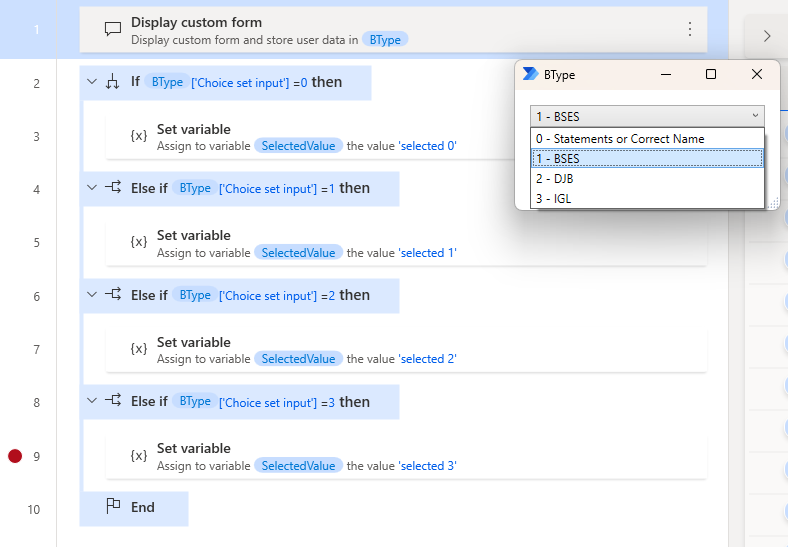

    Or if you want one condition to check if user selected options 1-3 then like so:
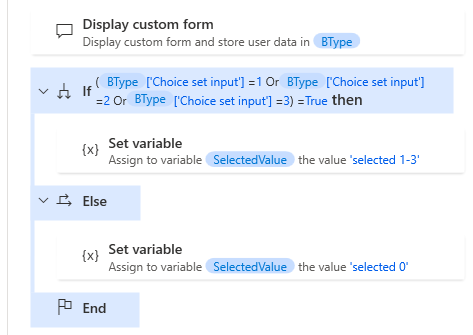

    Code:
    @@statistics_Input_ChoiceSet: '1'
    @@statistics_Action_Submit: '1'
    Display.ShowCustomDialog CardTemplateJson: '''{
      \"type\": \"AdaptiveCard\",
      \"version\": \"1.4\",
      \"id\": \"AdaptiveCard\",
      \"body\": [
        {
          \"type\": \"Input.ChoiceSet\",
          \"id\": \"Choice set input\",
          \"style\": \"compact\",
          \"isMultiSelect\": false,
          \"choices\": [
            {
              \"title\": \"0 - Statements or Correct Name\",
              \"value\": \"0\"
            },
            {
              \"title\": \"1 - BSES\",
              \"value\": \"1\"
            },
            {
              \"title\": \"2 - DJB\",
              \"value\": \"2\"
            },
            {
              \"title\": \"3 - IGL\",
              \"value\": \"3\"
            }
          ]
        }
      ],
      \"actions\": [
        {
          \"type\": \"Action.Submit\",
          \"id\": \"Submit\",
          \"title\": \"${Submit_Title}\"
        }
      ],
      \"FormTitle\": \"${AdaptiveCard_FormTitle}\"
    }''' CustomFormData=> BType @AdaptiveCard_FormTitle: $'''BType''' @Submit_Title: $'''Ok'''
    IF (BType['Choice set input'] = 1 OR BType['Choice set input'] = 2 OR BType['Choice set input'] = 3) = True THEN
        SET SelectedValue TO $'''selected 1-3'''
    ELSE
        SET SelectedValue TO $'''selected 0'''
    END
    

  • SanjayGMusafir Profile Picture
    73 on at
    Input Dialogue Box to show Next Line in Message
    @eetuRobo That Helps.
     
    Thanks a lot 🙏

Under review

Thank you for your reply! To ensure a great experience for everyone, your content is awaiting approval by our Community Managers. Please check back later.

Helpful resources

Quick Links

Forum hierarchy changes are complete!

In our never-ending quest to improve we are simplifying the forum hierarchy…

Ajay Kumar Gannamaneni – Community Spotlight

We are honored to recognize Ajay Kumar Gannamaneni as our Community Spotlight for December…

Leaderboard > Power Automate

#1
Michael E. Gernaey Profile Picture

Michael E. Gernaey 462 Super User 2025 Season 2

#2
Tomac Profile Picture

Tomac 456 Moderator

#3
abm abm Profile Picture

abm abm 243 Most Valuable Professional

Last 30 days Overall leaderboard



