web
You’re offline. This is a read only version of the page.
close
Skip to main content

Announcements

News and Announcements icon
Community site session details

Community site session details

Session Id :
Power Platform Community / Forums / Power Automate / Power Automate: Flow s...
Power Automate
Unanswered

Power Automate: Flow spamming approval emails issue

(0) ShareShare
ReportReport
Posted on by 59

Hello everyone,


First off I apologize for a lack of screenshots, I wanted to insert pictures to help me describe each part but it keeps giving me errors when I try to upload images unfortunately.

Anyway, I have created a flow for my workplace to handle our automated approval processes during busy seasons. I managed to get it working through multiple stages of approval and it is able to handle rejections through every approval stage (there is about 7) through some layered functions.

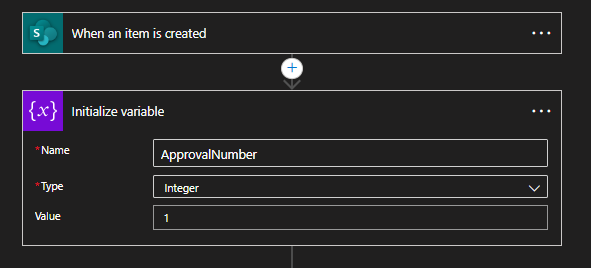
First, when a new list item is created it initializes an integer variable, starting at 1.
Next, everything else is contained within a 'Do Until' function which tells the flow to keep going until its status column is marked 'Approved' which happens after the last approval stage (set to timeout after 1 month).
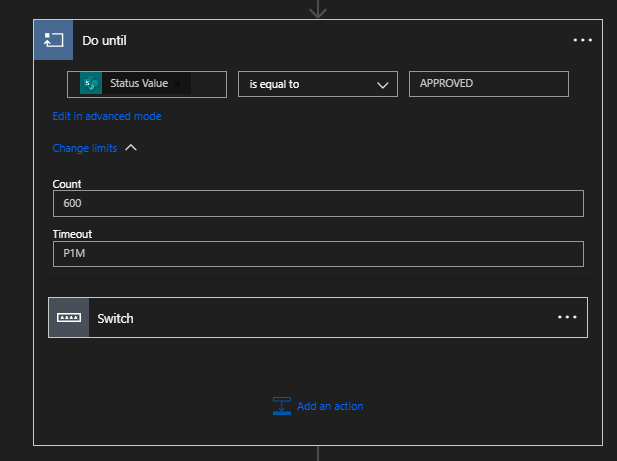
Within that Do Until function, there is another 'Switch' function that switches the integer variable to different stages of the flow when an item is rejected or accepted.

  • Eg. the flow starts at variable 1, then when an item is approved, it switches the variable to 2 and that sends the item to the second approver.

  • The second approver can then approve the item, which will set the variable to 3 and moves the item forward to the next approver, or reject the item, which sets the variable back to 1 and moves the item backward to the previous approver.

  • These options repeat at each approval stage until it reaches the final approval stage and the status is set to 'Approved'


Now, I am quite proud of getting this to work and it does work excellently through the actual process, but there is one problem.

I believe the problem is rooted in approvals that are left behind:

Eg. if someone creates an item on the list and they accidently put the wrong link or a wrong approver, they have to delete that item and re-create it with the correct information. But that first version of the item they created still lives on as an approval, essentially in limbo. Now, I was under the impression that these limbo approvals would simply stop working when the 1 month timeout period ends.

What seems to be happening instead however is that at the end of the timeout period, whoever was the approver that the item got left with will get spammed with identical approval emails for that item (and I am talking about hundreds) sending over the course of 1 hour straight and usually in the middle of the night, like between 2am and 5am.
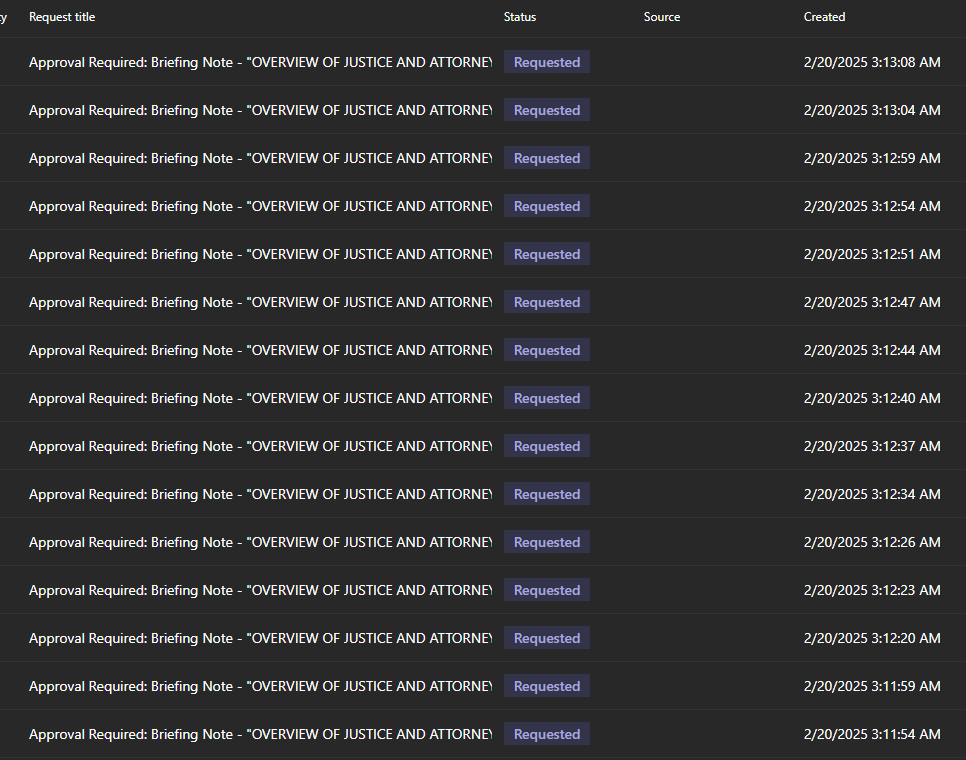
So my question is, has anyone experienced this issue and how can I avoid this happening?

Any help would be appreciated.

Categories:
I have the same question (0)
  • David_MA Profile Picture
    14,499 Super User 2026 Season 1 on at
    You will need to show the configuration of the flow. Your current images indicate you are handling the approval in completely the wrong way, but I cannot be sure without seeing your flow. Most likely you have not configured the do until action correctly. When you configure the approval, you either need to use start and wait for an approval, or a combination of create an approval and wait for an approval:
     
    It would appear you configured the approval without a wait, which is why the do until is sending so many approvals out.
     
    To add screen shots to your post. enable the screen capture button in Microsoft Edge by doing the following:
    • Click the three dots at the top right of the browser and choose settings from the menu.
    • Then choose Appearance under settings.
    • Srcoll down to the Customize toolbar section.
    • And toggle on the screenshot button:
    • You can then take a screen shot and paste it directly into your post as I have done. The icon above will be shown in your toolbar to take a screen shot.
  • NC-24021854-0 Profile Picture
    59 on at
     
    So the symbols seem the same and I renamed the headings so I'm not sure if I can tell which of those 3 approval options I used... but I'm fairly certain I chose the "Start and Wait" option if my memory serves correctly.
     
    The flow is constructed exactly like this picture shows however, repeating at each stage but simply changing the 'Status' column of the item to reflect who last approved and then changing the variable by 1 number each way to cycle it to the next or previous case in the Switch function (the next approval). There are 7cases total that are built like this, and when an item is approved on the last case brings the item to the 'Approved' status, which satisfies the Do Until condition and completes the flow.
     
     
    But just to clarify, the flow doesn't always send hundreds of approval emails. We run dozens of approvals at a time and it sends them all 1 by 1 at each stage as it should. We just seem to encounter the spam problem for the couple of approval items that reach the Do Until timeout limit and do not complete the full flow cycle.

Under review

Thank you for your reply! To ensure a great experience for everyone, your content is awaiting approval by our Community Managers. Please check back later.

Helpful resources

Quick Links

Introducing the 2026 Season 1 community Super Users

Congratulations to our 2026 Super Users!

Kudos to our 2025 Community Spotlight Honorees

Congratulations to our 2025 community superstars!

Congratulations to the April Top 10 Community Leaders!

These are the community rock stars!

Leaderboard > Power Automate

#1
Vish WR Profile Picture

Vish WR 959

#2
Valantis Profile Picture

Valantis 872

#3
Haque Profile Picture

Haque 589

Last 30 days Overall leaderboard
