




 Share
Share Report
 25
25I have an Excel file that is always seven columns, but the number of rows can change from month to month.
I need to open the Excel file and, using the existing data, create a pivot table on a new worksheet. I'll then resave (save as new name?) the file.
The newly updated file will be emailed as an attachment. The original file will need to be deleted so it can be recreated the following month.
I've created the following script in Excel for the pivot table creation:
function main(workbook: ExcelScript.Workbook) {
let selectedSheet = workbook.getActiveWorksheet();
// Set font bold to true for range 1:1 on selectedSheet
selectedSheet.getRange("1:1").getFormat().getFont().setBold(true);
// Add a new worksheet
let sheet1 = workbook.addWorksheet();
// Add a new pivot table on sheet1
let newPivotTable = workbook.addPivotTable("PivotTable1", selectedSheet.getRange("A1:G1000000"), sheet1.getRange("A3"));
// Rename worksheet to "PIVOT"
sheet1.setName("PIVOT");
// Add pivot field to a hierarchy in newPivotTable
newPivotTable.addRowHierarchy(newPivotTable.getHierarchy("COMMODITY DESC"));
// Add pivot field to a hierarchy in newPivotTable
newPivotTable.addRowHierarchy(newPivotTable.getHierarchy("DATE DT"));
// Add pivot field to a hierarchy in newPivotTable
newPivotTable.addRowHierarchy(newPivotTable.getHierarchy("ORIGIN LOC CD"));
// Add pivot field to a hierarchy in newPivotTable
newPivotTable.addRowHierarchy(newPivotTable.getHierarchy("COUNTRY CD"));
// Add pivot field to a hierarchy in newPivotTable
newPivotTable.addRowHierarchy(newPivotTable.getHierarchy("MONTH NM"));
// Add pivot field to a hierarchy in newPivotTable
newPivotTable.addColumnHierarchy(newPivotTable.getHierarchy("ROUTE NBR"));
// Change pivot position in a hierarchy in newPivotTable
newPivotTable.getColumnHierarchy("ROUTE NBR").setPosition(0);
// Add pivot field to a hierarchy in newPivotTable
newPivotTable.addDataHierarchy(newPivotTable.getHierarchy("AWB NBR"));
}
The script works fine inside Excel, but I haven't figured out how to make use of the connectors in Power Automate to put the script to use there.
If there's an easier way to accomplish the pivot table creation, PLEASE let me know.
If you can tell me how to make use of the script that has been generated, I'm good with that, too!
I am extremely new to Power Automate, so a very detailed map of how to proceed is appreciated. Pictures are welcomed 😉
When I tried to run the script from the workflow, this is the error I see:
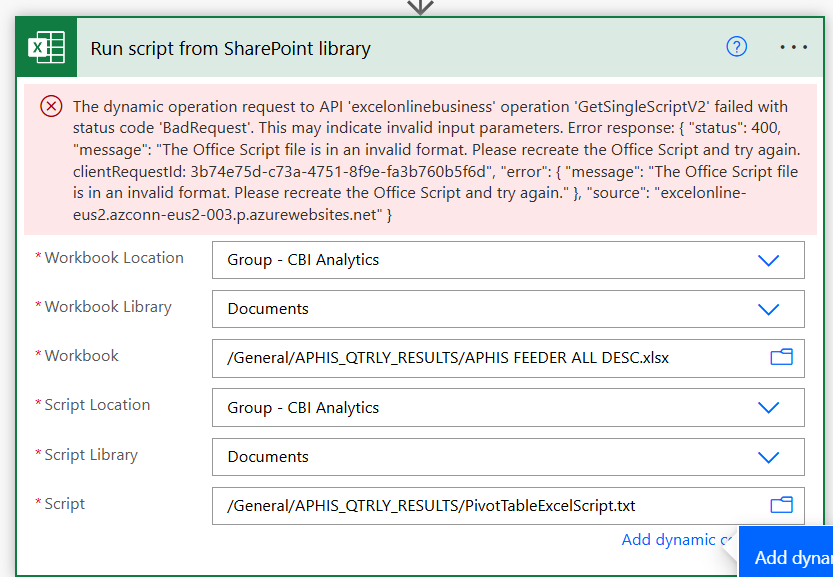
When I tried to run the script from the workflow, this is the error I see:
Categories:
I have the same question (0)
 All responses (
 Answers (







