web
You’re offline. This is a read only version of the page.
close
Skip to main content

Announcements

News and Announcements icon
Community site session details

Community site session details

Session Id :
Power Platform Community / Forums / Power Automate / Help with Power Automa...
Power Automate
Suggested Answer

Help with Power Automate Condition for Mini Bus Booking System

(0) ShareShare
ReportReport
Posted on by 394

Hi everyone,


I’ve set up a Power Automate flow that starts with a form for a mini bus booking system. The form allows users to select a bus, input the number of students and staff, and indicate if a driver is required. We have two buses:


  • Bus 1: Seats 16 passengers + 1 driver

  • Bus 2: Seats 14 passengers + 1 driver


  •  

When a user selects a bus, the system books it on both the user's calendar and the respective bus calendar. If Bus 1 is unavailable, it attempts to book Bus 2. However, since Bus 2 is smaller, I need to set a condition that considers the combined number of students and staff, as well as whether a driver is required (Yes/No choice column).

The condition should ensure that if the total number of students and staff is 14 or less, it can book Bus 2. However, if a driver is required, the system should account for this by reducing the available seats accordingly.

How can I set this condition in Power Automate? The "number of students" and "number of staff" fields are in text format, and the "driver required" field is a choice column.

Thanks in advance!

Categories:
I have the same question (0)
  • David_MA Profile Picture
    13,489 Super User 2026 Season 1 on at
    I would offer these suggestions:
    1. Show what you've already done as that will help in providing guidance. Show the questions and options possible that relate to the condition you are asking us to provide guidance on.
    2. Update your form so that the number of students and staff are integers rather than strings for data integrity. You can then use a simple add expression to add the two values and check if the total is equal to or less than the max the bus can hold.
    3. And how can the driver be optional? Is one of the buses self-driving? If so, very cool!
  • AB1 Profile Picture
    394 on at
    Apologies!
     
    Further info: 
     
    Form: 


    Power automate: 


    Some staff are able to drive the mini bus without the need for a external minibuss driver, which they were self drive! ahah 


    This powerautomate was created years ago and still works however I do not understand much of it as I am new to using this, regarding this question: 
    1. Update your form so that the number of students and staff are integers rather than strings for data integrity. You can then use a simple add expression to add the two values and check if the total is equal to or less than the max the bus can hold.
     
    Can you explain further please? 
     
    Thanks in advance 
  • David_MA Profile Picture
    13,489 Super User 2026 Season 1 on at
    Thanks for the additional details. This opens up new questions now:
    1. Is it correct that people can choose both buses? It looks that way.
    2. Is the question, "Member(s) of staff" the question that holds the number of staff members who will be on the bus, or does it hold the names of staff members, so you know who to contact? If it is the number of staff, I would reword it to "Number of staff?" instead.
    3. Since the number of driver's is required, I think that clarifies my earlier question. But why can three bus drivers be selected when you have only two buses? If three is an accurate choice, then I guess what you're asking is how to figure out the logic for when three is selected to include the extra bus driver in the total number of passengers?
    4. Have you/can you update the two questions that determine the number of passengers (students and staff) to numbers? You can make it a number by as I don't see any reason to have it an open-ended text string:
    I need to run to a meeting, so I will finish the above later - if I don't forget ;-)
  • AB1 Profile Picture
    394 on at
    Thank you, 
     
    1. They are able to pick both busses if needed. 
    2. This is number of staff and students
    3. It used to be 3 busses I removed one today as the bus is out of service
    4. I will change these
     
     
    Thank you
  • Suggested answer
    David_MA Profile Picture
    13,489 Super User 2026 Season 1 on at
    With the new information, I think I would change your form a bit in order to make the process more flexible in the future in case you add a bus to the fleet. I don't think you need to count the driver in the passenger total, since the question on your form shows that the passenger is not counted in the number of seats. At least that is how I interpret it with "+ Driver". If the driver is included in the number, I would change it to 15, 13 and 29 seats respectively and adjust the logic below accordingly.

    First, I would change your first question to:
     
    This way, it puts the work on the person submitting the form to choose the option that will meet their needs.
     
    Then in your workflow, you can use a switch based on which option is selected. If you add a bus, you will just need to add a new case to the switch. Since I don't think you can handle the passenger limit check in MS Forms, we'll still do that in the workflow.
     
    I would create a variable called passengers and make the default value the total of the students and staff. For what I tested with, this expression should work as long as you update it to your question values: add(int(body('Get_response_details')?['r9251ceba05194c7f88522399a853c494']), int(body('Get_response_details')?['r97434f401f49487caa16e6693c569d18']))
     
    Then your workflow will look like this. The first condition will check to see if the total passengers is more than 30. If it is true, you can do what you want to notify the requester that the buses cannot hold more than 30.
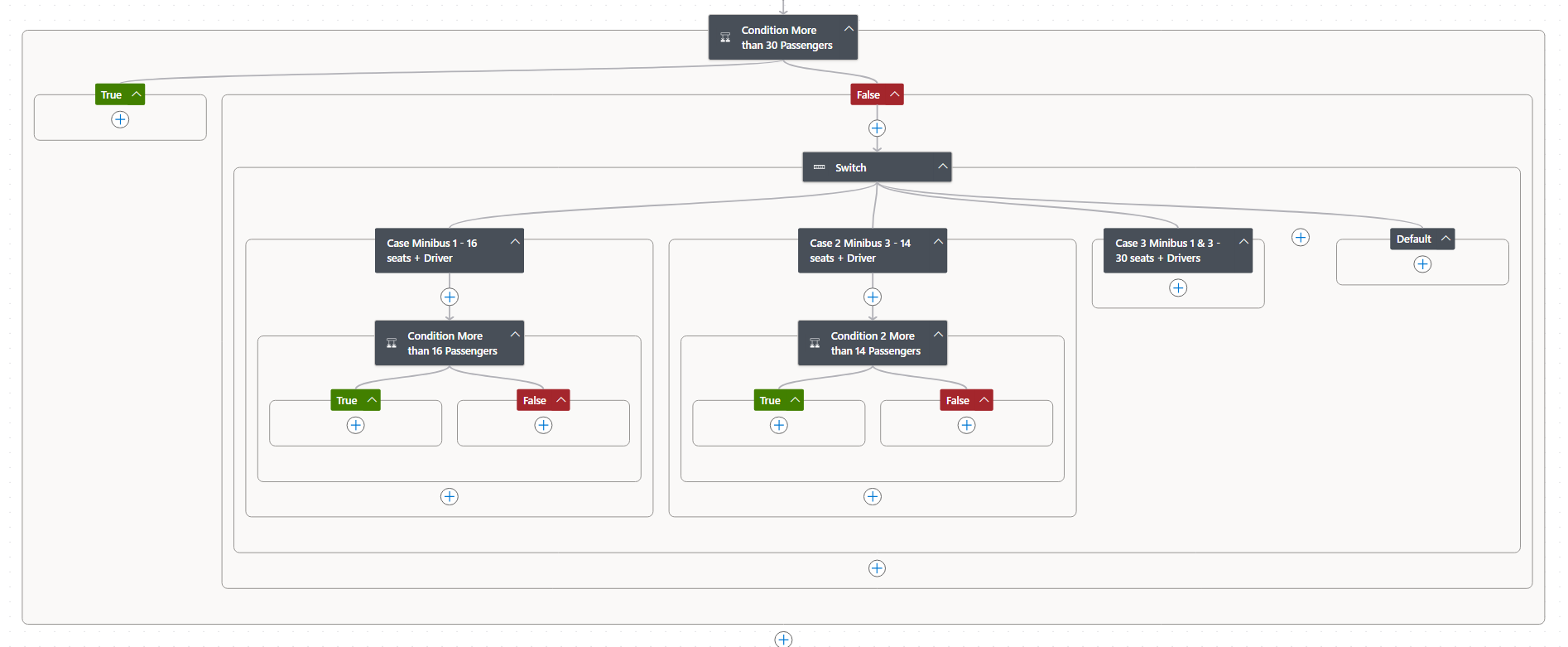
    Then the switch will go down the path based on the option selected Except for when they choose both buses, you will check option 1 and option 2 to see if the total passengers exceed 16 or 14 passengers. Again, you can determine what to do if it does. You do not need to check the number of passengers for option three when both buses are selected unless you want to check to see if the number of passengers is 16 or less, in which case you could do something to see why they need both buses when everyone will fit on one.
     
    Granted, you'll need to do a check to see if the bus has already been selected for the date chosen, but this should get you started.

    This is how the first condition is configured, and you would set up the other condition the same way:

  • AB1 Profile Picture
    394 on at
    Hi,
     
    Thanks, so much for this. 
     
    I will test to see if it works for me. Would I need anything changing for this: 


    Thanks again.
     
  • AB1 Profile Picture
    394 on at
    Hi,

    Can you help abit further with this please? 
     
     
  • David_MA Profile Picture
    13,489 Super User 2026 Season 1 on at
    What do you need help with specifically?

Under review

Thank you for your reply! To ensure a great experience for everyone, your content is awaiting approval by our Community Managers. Please check back later.

Helpful resources

Quick Links

Introducing the 2026 Season 1 community Super Users

Congratulations to our 2026 Super Users!

Kudos to our 2025 Community Spotlight Honorees

Congratulations to our 2025 community superstars!

Leaderboard > Power Automate

#1
David_MA Profile Picture

David_MA 112 Super User 2026 Season 1

#2
Haque Profile Picture

Haque 52

#3
Ellis Karim Profile Picture

Ellis Karim 51 Super User 2026 Season 1

Last 30 days Overall leaderboard
