web
You’re offline. This is a read only version of the page.
close
Skip to main content

Announcements

News and Announcements icon
Community site session details

Community site session details

Session Id :
Power Platform Community / Forums / Power Automate / getting email attachme...
Power Automate
Answered

getting email attachment error

(0) ShareShare
ReportReport
Posted on by 10
Hi!
I have this flow:
 
There was a compose for debugging but i removed. I cant get any attachment. Run result:
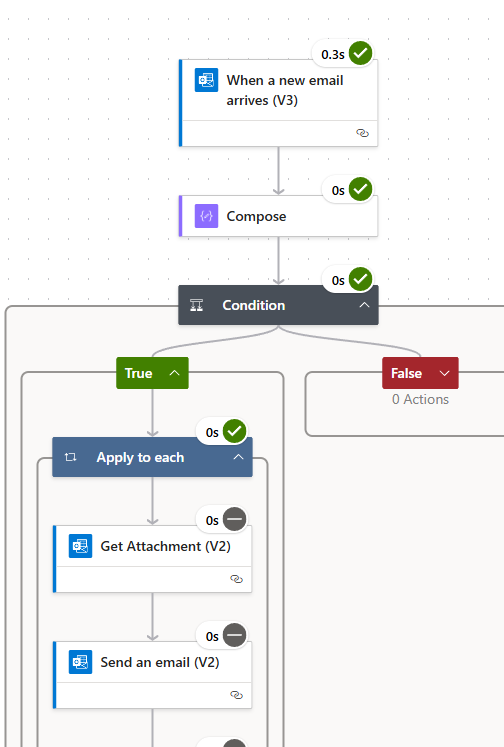
 
The condition passed, the email has attachment. The get attachment has this parameters:
I tried all begining with the attachment. None of them works. Please help what am I missing?
My goal is if an email arrives with attachments, conditions are met, write a new email with new email body, using the original email attachment. The sending email part:
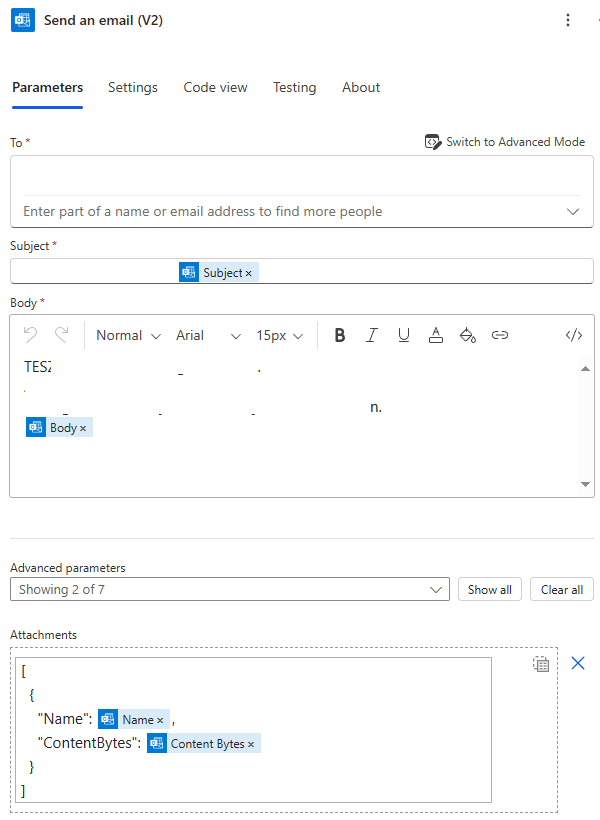
 
If you need any more information please let me know. I also tried at least 5 templates if i could modify them, and check the forums, saw same topic, but not the solutions.
Categories:
I have the same question (0)
  • VitoMinheere Profile Picture
    4 on at
    I am not sure if you need the "Get Attachement" step in there. I found another answer that explained how you could use it as it will need a variable to store the attachement. https://techcommunity.microsoft.com/discussions/powerappflow/how-to-get-get-attachment-into-power-automate/1854137

    I run a flow where I send an attachment to oneDrive and that runs without the "Get Attachement" and also uses the contentBytes to send the attachement as you did in "Send an email". 

    Perhaps you can try it without that step inbetween
  • petersonal Profile Picture
    10 on at
    Hello!
    Thank you for trying to help me. Maybee I am unexperienced or unlucky, but this is not helping. I read the post. I edited the flow, now this look like this:
     
    The running result saying the attachment name has no value:
     
    The attachment name is a String type. The value is set inside the apply to each. It is a dynamic content from the when email arrives, value is Attachments name.
    The attachment data fist was object, second is now an array type, but I am failing with the name already...
  • Micky Profile Picture
    365 Moderator on at
    Hello,
     
    You just need an array for your attachments. Like the image below.
     
     
    Then use that attachment array variable in the send an email action
     
     
    Make sure the send an email action is outside the Apply to each action.

    Happy Power Automating :) 
     
    Regards,
    Micky
  • petersonal Profile Picture
    10 on at
    Hey Micky,
     
    Thank you for triying to help. After a lot of tires and experimenting I realized, the flow build as you suggested seems to be working, jut alittle bit not every time. Bigger picture: I am triying to use this flow to process the user submission mails. You know where user reporting phishing mails, and the admin mailbox receives an attachment of a reported mail to examine. 
    So if i sending a mail with for example a picture, or a pdf, the flow works fine. But when I attached a .msg, or the orignal report mail has .eml extension attachment, it fails to grab it.
     
    This is my current flow (as Mickey suggested):
     
    and when giving a flow a .eml or .msg attachment the for each part is empty:
     
    Any idea why is this happening? Is the special type of attachment?
  • Verified answer
    Micky Profile Picture
    365 Moderator on at
    Hello @petersonal,
     
     
    Power Automate don't treat .msg and .eml file as an attachment that's why it returned empty.
     
    Here a workaround for that, but it will send the whole email as an attachment including the .eml and .msg
     
     
    The Attachments Name is the Subject from When anew email arrives(v3) followed by .eml
    The Attachment Content field value is from Export email (v2)
     
    Happy Power Automating
     
    Regards,
    Micky
  • petersonal Profile Picture
    10 on at
    Hi @Mickey!
     
    Thank you for your help now i can send the email with attachments. However, a new problem arised. Our system doest like the attachment names, because it has many special characters. Is there a way to rename the attachment? I did not see any actions in outlook to do this.
     
    Thank you
  • Micky Profile Picture
    365 Moderator on at
    Hello Peter,
     
    You can put any text in the attachment name, just don't forget the .eml extension.

    For example

     
    Happy Power Automating :)
     
    Regards,
    Micky

Under review

Thank you for your reply! To ensure a great experience for everyone, your content is awaiting approval by our Community Managers. Please check back later.

Helpful resources

Quick Links

Introducing the 2026 Season 1 community Super Users

Congratulations to our 2026 Super Users!

Kudos to our 2025 Community Spotlight Honorees

Congratulations to our 2025 community superstars!

Congratulations to the March Top 10 Community Leaders!

These are the community rock stars!

Leaderboard > Power Automate

#1
Haque Profile Picture

Haque 592

#2
Valantis Profile Picture

Valantis 340

#3
11manish Profile Picture

11manish 284

Last 30 days Overall leaderboard



