web
You’re offline. This is a read only version of the page.
close
Skip to main content

Announcements

News and Announcements icon
Community site session details

Community site session details

Session Id :
Power Platform Community / Forums / Power Automate / Approval rejections - ...
Power Automate
Answered

Approval rejections - pulling data from an array

(0) ShareShare
ReportReport
Posted on by 34
Hi folks
 
Here's the scenario:
I'm in the process of automating onboarding of new staff (and learning much as I go).


  1. A csv comes via email from HR team with name/job title/start date etc of new staff members.
  2. My flow extracts the data from the csv and puts it into an array
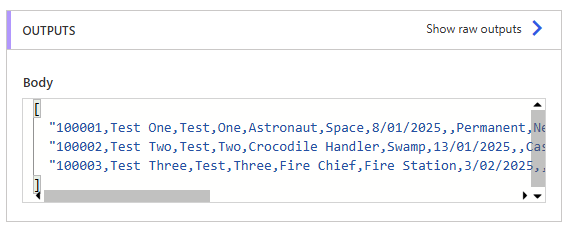

     
  3. Within an 'Apply to Each', an approval is started for each of the new starters. One of my team casts their eye over it to make sure no typo's or errors anywhere.
  4. If approved, a new item is added to a SharePoint List, showing name (Test One)/start date etc.
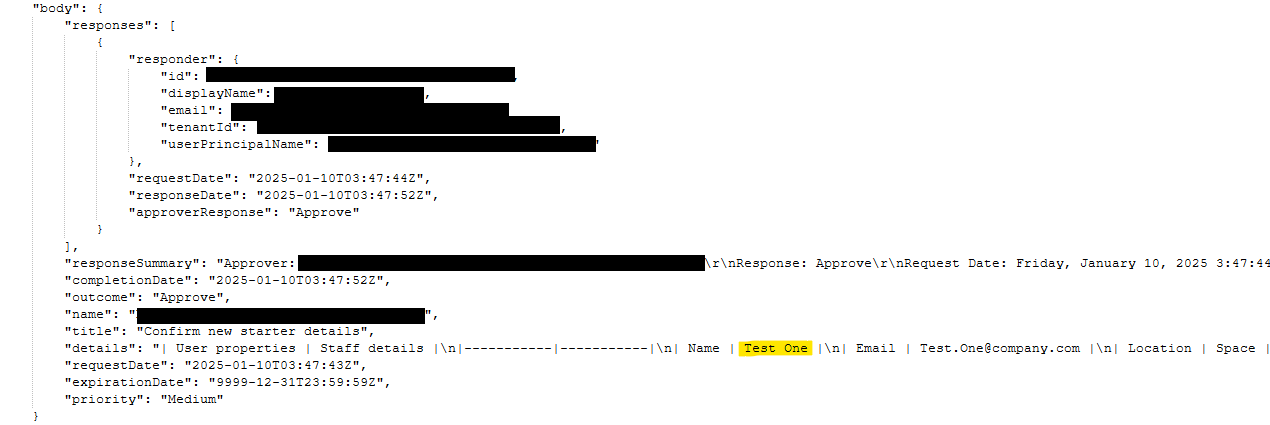

     
  5. If Rejected, I'm creating a HTML table to hold the name (Test One from screenshot above highlighted yellow) of the staff member.
  6. This table is then sent via email to my team and HR to advise there's something wrong with this particular staff members details.
The part I'm stuck on - I can't get the name out of the array to put into the HTML table.


I tried doing the same as I did for adding the values to the SharePoint List (which works fine), but when I try this in the HTML table (or even directly into an email) I get an error that it's expecting a string, not an object.
 
split(item(),',')?[1]


Anyone know how I get just the name (Test One from the screenshot above highlighted yellow) into my table?
 
Thanks in advance
Categories:
I have the same question (0)
  • Mira Ghaly Profile Picture
    11,415 Moderator on at
    Can you please share the inputs to this step ?
    if you can as well upload a sample of your CSV file to try from my end ?
  • LydonNZ Profile Picture
    34 on at
    Hi Mira, thanks for taking a look at this.
     
    Here's the approval from the flow, and what gets sent through to Teams for approval.


    Here's a link to download my .csv file.
    Sorry, can't see anywhere to upload it on this post.
     
  • Verified answer
    NickWarner Profile Picture
    113 on at
    If you just reused the code split(item(),',')?[1] in your HTML table, then that might be where you are going wrong as the item() part of that code will be referring to the Responses output.
     
    Try split(items('Apply_to_each'),',')?[1] to refer to the current array item.
     
  • LydonNZ Profile Picture
    34 on at
    Thank you!!!
     
    Oh my, I spent an entire day trying all kinds of different ways to get that to work. 
    Still so much to learn about Power Automate but loving it.
     
    Thanks again, much appreciated :-)

Under review

Thank you for your reply! To ensure a great experience for everyone, your content is awaiting approval by our Community Managers. Please check back later.

Helpful resources

Quick Links

Introducing the 2026 Season 1 community Super Users

Congratulations to our 2026 Super Users!

Kudos to our 2025 Community Spotlight Honorees

Congratulations to our 2025 community superstars!

Leaderboard > Power Automate

#1
David_MA Profile Picture

David_MA 251 Super User 2026 Season 1

#2
Haque Profile Picture

Haque 239

#3
Expiscornovus Profile Picture

Expiscornovus 220 Most Valuable Professional

Last 30 days Overall leaderboard



