web
You’re offline. This is a read only version of the page.
close
Skip to main content

Notifications

Announcements

Community site session details

Community site session details

Session Id :
Power Platform Community / Forums / Power Automate / Power Automate saves c...
Power Automate
Answered

Power Automate saves corrupted excel files on Sharepoint

(0) ShareShare
ReportReport
Posted on by 4
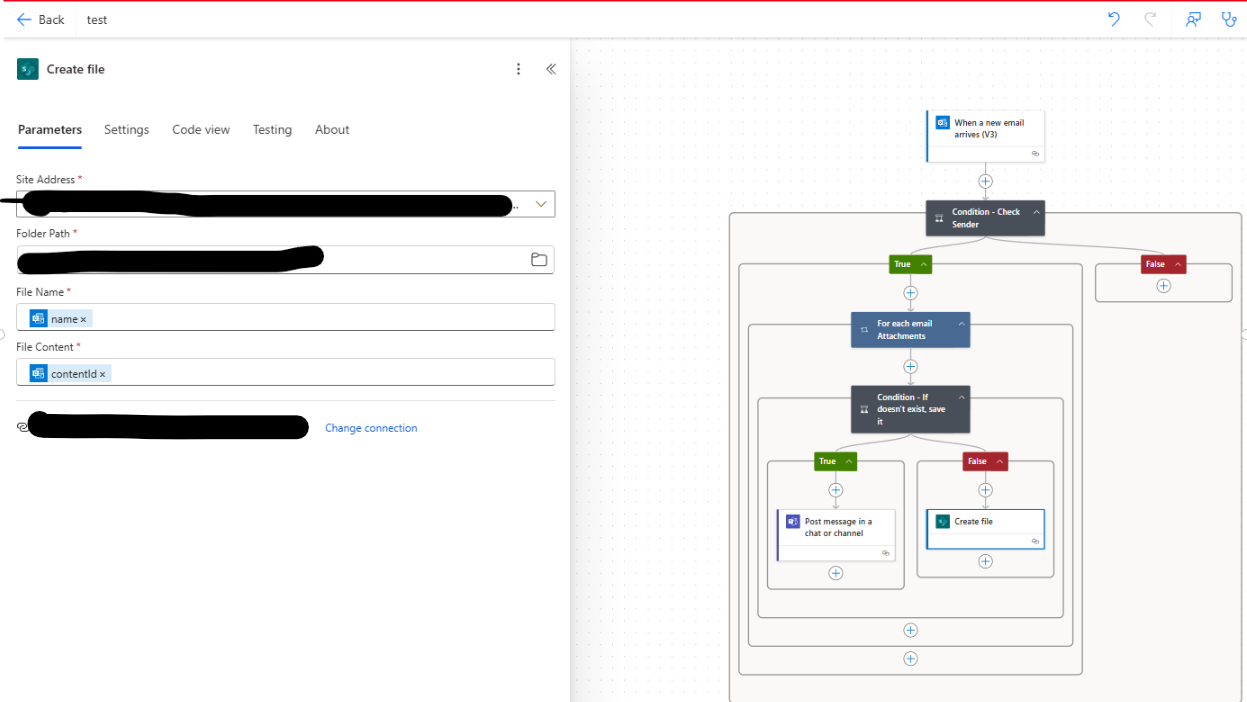
I have a very simple flows that picks up an attachement from an email, and saves it in a sharepoint folder. The flow itself works, but the saved file is only 1KB and provides the following statement when trying to open it: 
This workbook couldn't be opened because the file format may not be matching with the file extension.

To resolve this issue, try restoring your file to a previous version. Click the link below for step-by-step instructions
Categories:
I have the same question (0)
  • Verified answer
    rzaneti Profile Picture
    4,249 Super User 2025 Season 2 on at
    Hi,
     
    Try to use the Attachments Content property, instead of Attachment Id:
     
     
    Let me know if it works for you or if you need any additional help!


    -------------------------------------------------------------------------
    If this is the answer for your question, please mark the post as Accepted Answer.
    If this answer helps you in any way, please give it a like.

    http://digitalmill.net/
    https://www.linkedin.com/in/raphael-haus-zaneti/
  • Suggested answer
    RD-29011130-0 Profile Picture
    4 on at
    @rzaneti i managed to fix the issue by inserting, before the file creation action, another step: Get Attachment (VS).
    I now have another problem, the second condition doesn't really work.

    I'm trying to see if the file already exists in the target folder, but always get a False statement as a result. Any suggestion?
  • rzaneti Profile Picture
    4,249 Super User 2025 Season 2 on at
    Hi,
     
    Sorry for the late response.
     
    It seems that you are using the "Body" property from Get files (properties only) action in the Condition. One of the properties retrieved by this action is the file name, so you can use it to compare with the attachment name:
     
    Let me know if it works for you or if you need any additional help!


    -------------------------------------------------------------------------
    If this is the answer for your question, please mark the post as Accepted Answer.
    If this answer helps you in any way, please give it a like.

    http://digitalmill.net/
    https://www.linkedin.com/in/raphael-haus-zaneti/

Under review

Thank you for your reply! To ensure a great experience for everyone, your content is awaiting approval by our Community Managers. Please check back later.

Helpful resources

Quick Links

Forum hierarchy changes are complete!

In our never-ending quest to improve we are simplifying the forum hierarchy…

Ajay Kumar Gannamaneni – Community Spotlight

We are honored to recognize Ajay Kumar Gannamaneni as our Community Spotlight for December…

Leaderboard > Power Automate

#1
Michael E. Gernaey Profile Picture

Michael E. Gernaey 525 Super User 2025 Season 2

#2
Tomac Profile Picture

Tomac 324 Moderator

#3
abm abm Profile Picture

abm abm 232 Most Valuable Professional

Last 30 days Overall leaderboard



