web
You’re offline. This is a read only version of the page.
close
Skip to main content

Notifications

Announcements

Community site session details

Community site session details

Session Id :
Power Platform Community / Forums / Power Automate / Error in power automat...
Power Automate
Suggested Answer

Error in power automate flow

(1) ShareShare
ReportReport
Posted on by 2
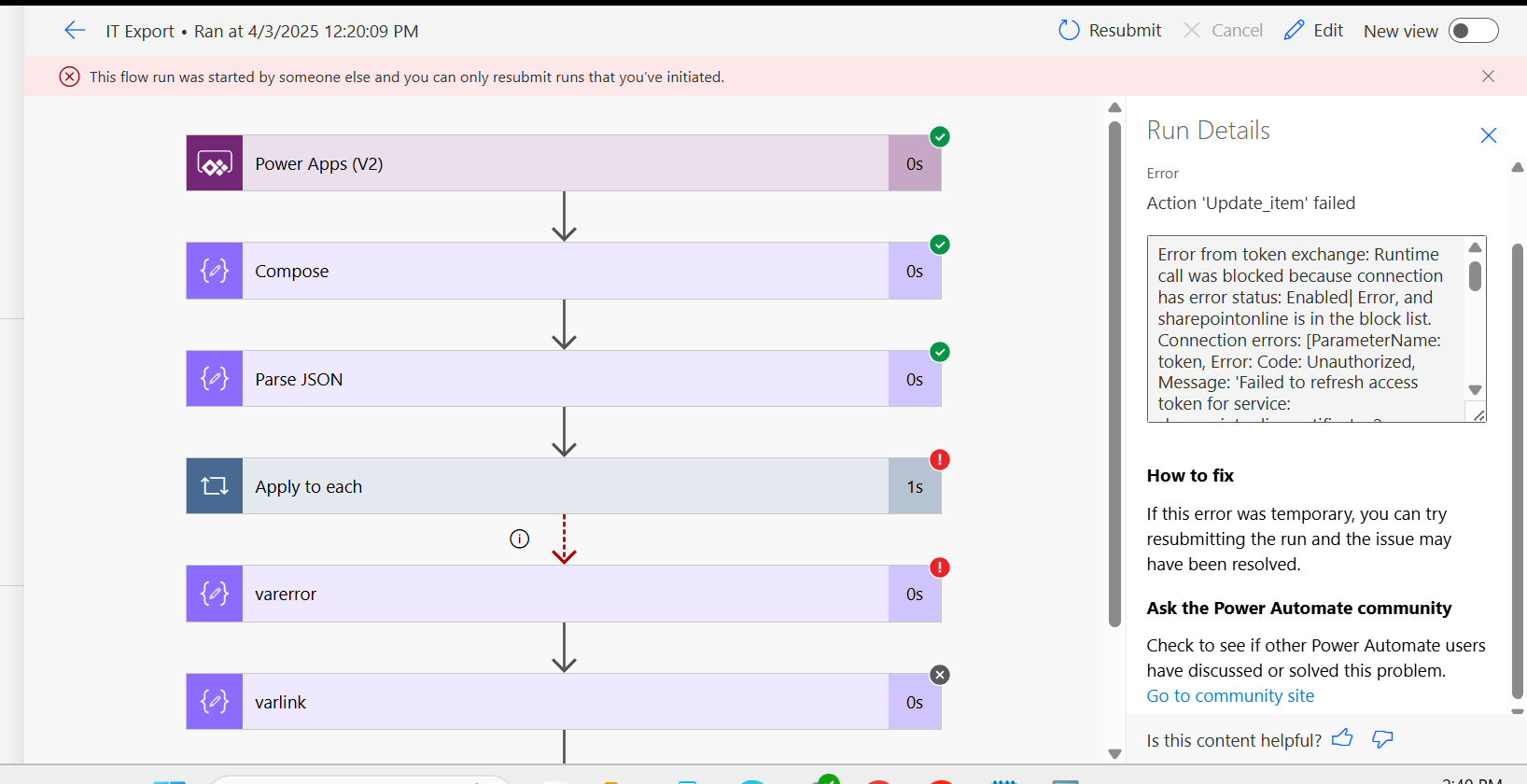
While run the flow Some employee get the error in flow.
 
Error from token exchange: Runtime call was blocked because connection has error status: Enabled| Error, and sharepointonline is in the block list. Connection errors: [ParameterName: token, Error: Code: Unauthorized, Message: 'Failed to refresh access token for service: sharepointonlinecertificatev2. Correlation Id=36b28388-b414-4f00-9646-3c6a96ba42a8, UTC TimeStamp=4/3/2025 6:50:09 AM, Error: Failed to acquire token from AAD: {"error":"invalid_grant","error_description":"AADSTS700082: The refresh token has expired due to inactivity. The token was issued on 2024-12-30T06:35:59.8961910Z and was inactive for 90.00:00:00. Trace ID: fd189588-5fff-48e9-a099-3742e9c20500 Correlation ID: 5bc46a30-5172-4391-be52-a20d2819c074 Timestamp: 2025-04-03 06:50:09Z","error_codes":[700082],"timestamp":"2025-04-03 06:50:09Z","trace_id":"fd189588-5fff-48e9-a099-3742e9c20500","correlation_id":"5bc46a30-5172-4391-be52-a20d2819c074","error_uri":"https://login.windows.net/error?code=700082"}']
 
what is the issue .
 
NOTE :
 
The issue can be resolved by going to Connections and re-authenticating. However, it’s not practical for each individual user to perform the re-authentication manually.

For example, if a flow runs 100 times and 90 executions are successful while 10 fail, those 10 users would need to re-authenticate. Since most employees are not familiar with the technical steps required, this approach isn't feasible.



Categories:
I have the same question (0)
  • DJ_Jamba Profile Picture
    2,837 Super User 2025 Season 2 on at
    It could be that the stored user connection has timed out. Unfortunately, user connections have a shelf life (if they are not used within a certain period) and it looks like the last time this specific user used this connection was end of 2024.

    To test if this is the case, have the affected user go to Power Automate, click on the 3 dots next to more, then click on Connections. If any of the listed connections have a red error, they need to click on Fix link/error, sign in again and it will refresh the token. 


  • Suggested answer
    MS.Ragavendar Profile Picture
    5,011 Super User 2025 Season 2 on at
     
    The SharePoint Online connection used in your Power Automate flow has become invalid due to inactivity for 90 days this is the reason for the error.
     
    Update the connection
    • Go to Power Automate (https://make.powerautomate.com).

    • Click on Data → Connections.

    • Find the SharePoint Online connection (it may show "Error" or "Needs attention")

    • Click Edit (pencil icon) or Re-authenticate.

    • Sign in with the correct SharePoint Admin or User credentials.

    • Save and test the connection.

    Please click Accept as solution if my post helped you solve your issue. This will help others find it more readily. It also closes the item

Under review

Thank you for your reply! To ensure a great experience for everyone, your content is awaiting approval by our Community Managers. Please check back later.

Helpful resources

Quick Links

Forum hierarchy changes are complete!

In our never-ending quest to improve we are simplifying the forum hierarchy…

Ajay Kumar Gannamaneni – Community Spotlight

We are honored to recognize Ajay Kumar Gannamaneni as our Community Spotlight for December…

Leaderboard > Power Automate

#1
Michael E. Gernaey Profile Picture

Michael E. Gernaey 525 Super User 2025 Season 2

#2
Tomac Profile Picture

Tomac 324 Moderator

#3
abm abm Profile Picture

abm abm 232 Most Valuable Professional

Last 30 days Overall leaderboard