Hi Power Automate Community,
I’m working on a flow in Power Automate for attendance tracking in a pediatric therapy CRM built on Dataverse. The flow is designed to process matching rows and non-matching rows sequentially so that every row from an uploaded Excel file is either updated in Dataverse (if matching) or added as a new record (if non-matching). Each Excel file has the potential to include both matching and non-matching rows, so the flow must process both conditions dynamically and efficiently.
The current challenge is dynamically filtering rows in the List Rows action using an OData query to identify matching rows in the Dataverse table based on the combination of Child’s Name and File Number.
Steps Taken So Far:
1. Dynamic OData Query Construction
The goal is to dynamically construct an OData query to filter rows in Dataverse using values from the Excel file.
I’ve tried various dynamic expressions for constructing the query with the following two being the most recent, but both result in the following output in the List Rows action:
{
"value": []
}
Expression 1 (with 0):
concat('ppts_ChildsName eq ''', outputs('Compose_ChildsName')?[0], ''' and ppts_File eq ''', outputs('Compose_FileNumber')?[0], '''')
Expression 2 (without 0):
concat('ppts_ChildsName eq ''', outputs('Compose_ChildsName'), ''' and ppts_File eq ''', outputs('Compose_FileNumber'), '''')
Both expressions aim to dynamically reference the Child's Name and File Number values, but neither has worked so far.
2. Compose Steps for Dynamic Values
To prepare dynamic inputs for the OData query, I created Compose Child's Name and Compose File Number steps. These steps reference the output of a previous action (Select Clean Rows) to extract the required data.
Output from Select Clean Rows
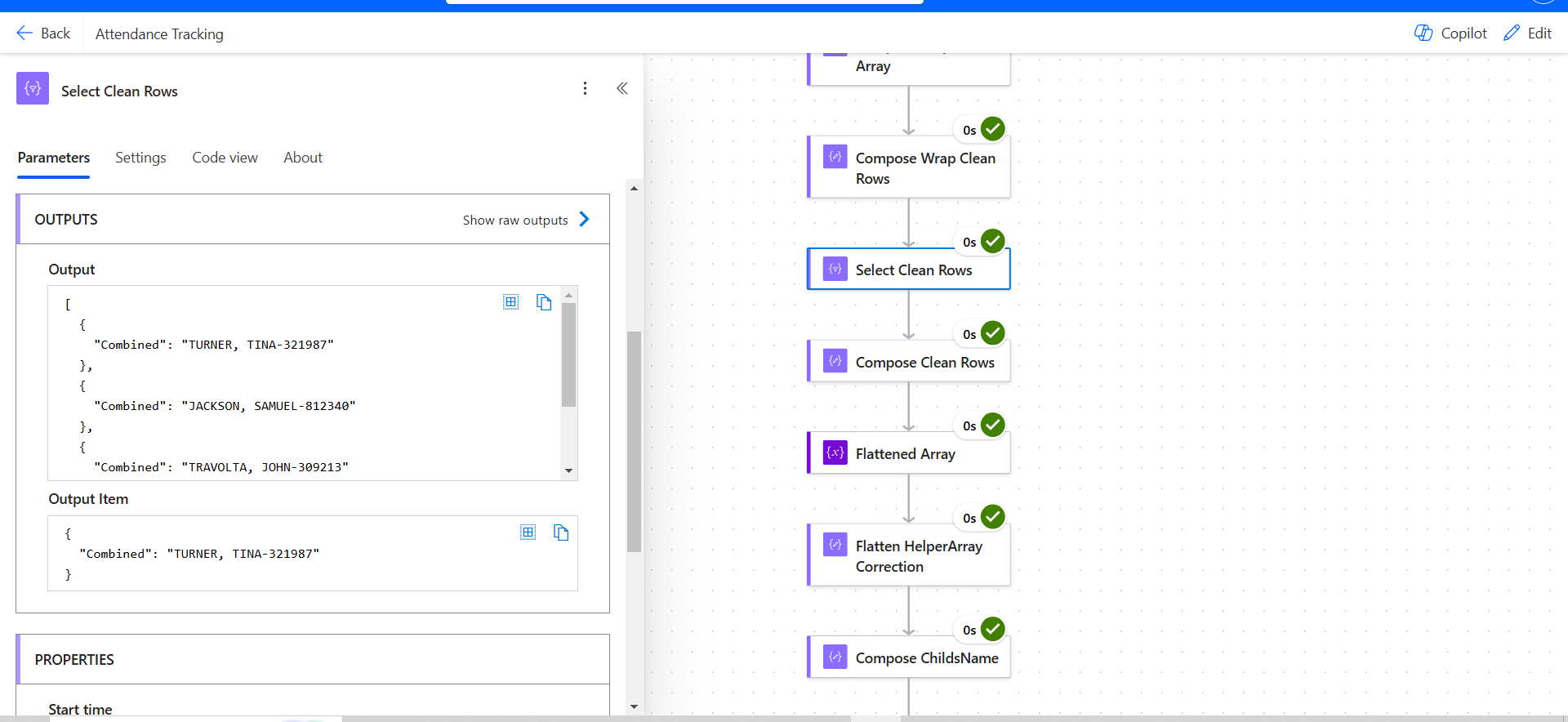
The current expressions used are:
For Compose Child's Name:
outputs('Select_Clean_Rows')?[0]?['ChildsName']
For Compose File Number:
outputs('Select_Clean_Rows')?[0]?['FileNumber']
The outputs of these compose steps render the following error message: Action 'Compose_ChildsName' failed: Unable to process template language expressions in action 'Compose_ChildsName' inputs at line '0' and column '0': 'The template language expression 'outputs('Select_Clean_Rows')?[0]?['Combined'] ' cannot be evaluated because property '0' cannot be selected. Object properties can only be selected by names. Please see https://aka.ms/logicexpressions for usage details.'.
When the [0] is removed from the expression to process all rows, the compose output is blank causing the List Rows action to not produce the expected output, which are the existing records in Dataverse. Instead the output is:
{
"value": []
}
3. Purpose and Flow Requirements
The purpose of this flow is to process each row in the uploaded Excel file and perform the following:
- Identify matching rows in Dataverse using the List Rows action with a dynamic OData query.
- Update matching rows in Dataverse.
- Add non-matching rows as new records in Dataverse.
Since each uploaded Excel file has the potential to contain both matching and non-matching rows, the flow must dynamically handle both conditions sequentially, ensuring all rows are processed.
Current Issues:
- Compose steps are not generating the expected outputs causing the List Rows action to also not produce the necessary outputs.
- Handling Matching and Non-Matching Rows: The flow must process both conditions (matching and non-matching) within the same file sequentially, but the current configuration struggles to achieve this.
Questions:
- How can I properly structure the compose step expressions to output a properly formatted ChildName and FileNumber that is compatible with what Dataverse expects?
- How can I properly structure the dynamic expressions to format the OData query correctly for the List Rows action to render the expected outputs?
- How can I configure the flow to dynamically process all rows in the uploaded Excel file so that both matching and non-matching rows are processed correctly?
- Matching rows - Update the existing record in Dataverse
- Non-Matching rows - Add a new row/record
- Are there alternative approaches to handling matching and non-matching rows that would simplify this process while maintaining efficiency?
Any guidance, suggestions, or examples would be greatly appreciated. If needed, I can provide additional details or screenshots for further clarification.
Thank you.







