web
You’re offline. This is a read only version of the page.
close
Skip to main content

Announcements

News and Announcements icon
Community site session details

Community site session details

Session Id :
Power Platform Community / Forums / Power Automate / Optimize Flow and Forc...
Power Automate
Answered

Optimize Flow and Force Excel Calculation in SharePoint

(0) ShareShare
ReportReport
Posted on by 8
Hello everyone,
 
I have two flows that are triggered together using a toggle:  
  1. The first flow updates a row in an Excel file stored in SharePoint.  
  2. The second flow creates a temporary copy of this Excel file in OneDrive, converts it to a PDF, and then saves the PDF in another SharePoint location.
The flows work, but sometimes they take a lot of time because I need to ensure that the Excel file is actually updated before copying it to OneDrive (second flow).
The issue seems to be that Excel in SharePoint does not calculate formulas immediately after the row is updated (first flow). To work around this, I use an Excel script to check if cell B51 is up to date or not within a "Do Until" loop. Without this check, my PDF would contain outdated data.
 
I have several questions:  
  • How can I optimize this flow? It takes too much time and is not reliable.  
  • How can I force the recalculation of the workbook in Excel (SharePoint)?  
Below is my first flow (update a row in Excel SharePoint). Note: The condition is just another "Update Row" action with different data.  
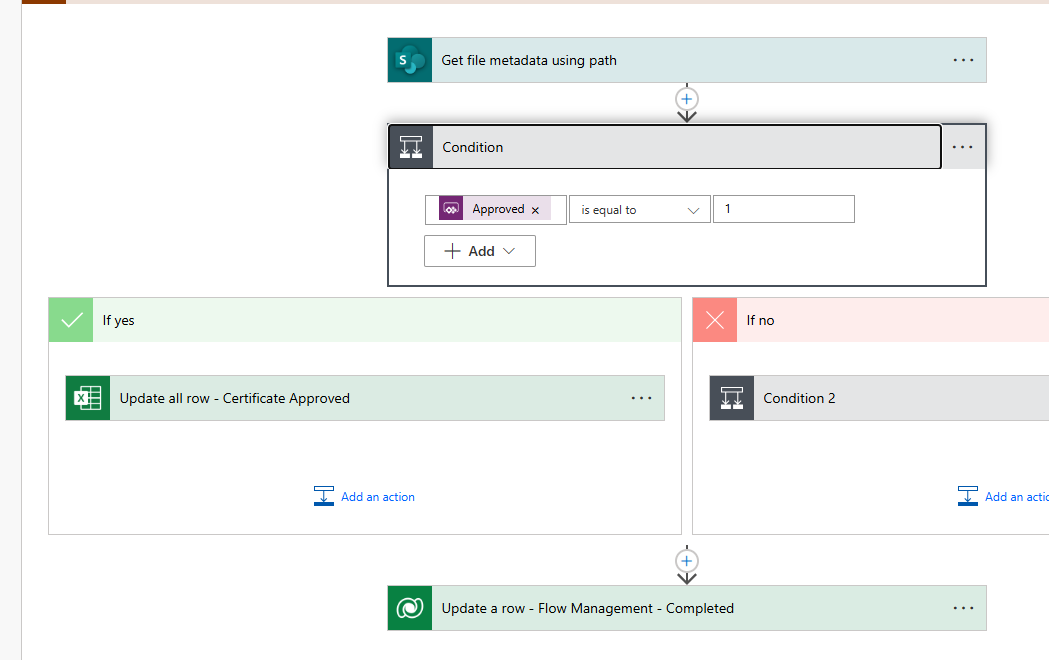


This is my second flow (convert the excel in pdf)
Here the "Do Until" to check the value of the B52 cell (the condition is an other check depending of the data.)
 
This is the convert part.
 
And this is the developped condition that you see above
 
 
Thank you a lot !
 
And Merry Christmas :)
Categories:
I have the same question (0)
  • Suggested answer
    Nived_Nambiar Profile Picture
    18,138 Super User 2026 Season 1 on at
     
    Can you try this office script ?
     
    function main(workbook: ExcelScript.Workbook) {
        // Recalculate all formulas in the workbook
        workbook.getApplication().calculate(ExcelScript.CalculationType.full);
    }
    
     
    See whether this helps to avoid the usage of do until and delay actions ?


    Thanks & Regards,
    Nived N

    Stay connected:
    LinkedIn | YouTube | Blogs

    Was this answer helpful?
    If yes, please mark it as the solution by selecting the checkbox in the discussion thread.
    Your feedback motivates me to keep contributing. Thank you!

  • Rayman223 Profile Picture
    8 on at
    I try this script in a previous try but unfortunately it does not help :(
    I also try both script but the do until is still necessary.
  • Suggested answer
    Nived_Nambiar Profile Picture
    18,138 Super User 2026 Season 1 on at
     
    I could not think of using office script further for this 🤔
     
    Let's try something different
     
    Try these options
     
    1. Use a delay after updating row and then use create file action to create same file in other location - see whether that does a refresh job (quite complicated way)
     
    2. Use graph api for excel which helps to create and close excel sessions - this would be equivalent to open and closing excel workbooks which may can refresh the workbook sheet with formulas.


    Thanks & Regards,
    Nived N

    Stay connected:
    LinkedIn | YouTube | Blogs

    Was this answer helpful?
    If yes, please mark it as the solution by selecting the checkbox in the discussion thread.
    Your feedback motivates me to keep contributing. Thank you!

  • Rayman223 Profile Picture
    8 on at
    Thank you for your reply.
     

    I already tried creating a file between the update row and the PDF, but it didn’t change anything. (I haven’t tried adding a delay, but how many seconds should I use?).

    As for the second idea, I must admit I’m completely lost. This is beyond my skill level.


    Anyway, thank you for your help. I’ll keep the flow as it is for now and stay on the lookout for further improvements.

  • Verified answer
    Nived_Nambiar Profile Picture
    18,138 Super User 2026 Season 1 on at
    Hi 
     
    Refer this on how to use excel graph api -


    Thanks & Regards,
    Nived N

    Stay connected:
    LinkedIn | YouTube | Blogs

    Was this answer helpful?
    If yes, please mark it as the solution by selecting the checkbox in the discussion thread.
    Your feedback motivates me to keep contributing. Thank you!

Under review

Thank you for your reply! To ensure a great experience for everyone, your content is awaiting approval by our Community Managers. Please check back later.

Helpful resources

Quick Links

Introducing the 2026 Season 1 community Super Users

Congratulations to our 2026 Super Users!

Kudos to our 2025 Community Spotlight Honorees

Congratulations to our 2025 community superstars!

Congratulations to the April Top 10 Community Leaders!

These are the community rock stars!

Leaderboard > Power Automate

#1
Vish WR Profile Picture

Vish WR 957

#2
Valantis Profile Picture

Valantis 847

#3
Haque Profile Picture

Haque 609

Last 30 days Overall leaderboard
