web
You’re offline. This is a read only version of the page.
close
Skip to main content

Announcements

News and Announcements icon
Community site session details

Community site session details

Session Id :
Power Platform Community / Forums / Power Automate / Hierarchical Approval ...
Power Automate
Suggested Answer

Hierarchical Approval Flow

(0) ShareShare
ReportReport
Posted on by 986
Hi everyone,
My scenario is as follows:
I have to build a 2 level approval flow for a SharePoint list. Currently employees (to be specific marketing team) creates content in a SP list (assume PostList) wherein they fill in the required information and also mention the name of the person from whom they need to get L1 approval (i.e. Technical approver). Technical Approver is someone who has knowledge of the content that's to be posted (like Microsoft Power Platform), they have two options either to accept or reject.
1. If Technical Approver : Accepts (Status is modified to Approve)
Else if they reject: The creator should be given a chance to edit the details and resubmit it (Status is modified to Reject)

(Once the Technical Approver approves the request it goes to L2 team. Their job is to check if everything is grammatically correct or not )
(L2 team comprises of 2 members and have same set of actions i.e. Approve and Reject)
2.  If Accepted: Then the marketing team can go ahead with Publishing (Status is modified to: Publish)
Else: If there are any issues: Then it should be assigned back to the user (user will check the comments) and make the changes accordingly and then once they make the changes this time it should skip L1/Technical Approver and get approval from L2 team itself.

The Status column has 5 values: New (Default value), Under-Review, Approved, Rejected, Publish
 
There is one more constraint: 
Assume L2 team members as : Sara and John
Assume John creates a content request like:
Title: Co-Pilot new announcements
Description: This post demonstrates the new features that were announced in the AMA conference 2024
Category: LinkedIn
Creator: John
Attachments: File.jpeg
Technical Approver (Person type ): Samuel

Once John submits the request : It is forwarded to Samuel (who is Technical Approver / L1 Approver) he accepts it
Now it moves forward to L2 team: 
Now in this case the John should not be able to approve his request instead only Sara can take action 
So how to manage this constraint.

I have designed the flow wherein L1 approval is handled but the two cases that I  have mentioned regarding L2 team:
i) If they reject it should be assigned back to user and then directly to L2 team (L1/Technical approver should be skipped)
ii) If one of the members has created the request then they should not be  able to approve in L2 level.

To avoid Infinite looping have added the Trigger conditions:
Trigger only when status: New or Reject and the next condition is to give a chance to user to update request (like L1 has rejected)


Trigger Conditions:
@or(equals(triggerOutputs()?['body/Status/Value'],'New'),equals(triggerOutputs()?['body/Status/Value'],'Rejected'))
@equals(triggerOutputs()?['body/Author/Email'],triggerOutputs()?['body/Editor/Email'])
(Have added the above Trigger conditions to avoid the Infinite loop scenario)

SharePoint List structure:


L1 Approval:

Have used the HTML table action to store some information like Technical Approver Response, Comments, Approver Name (as these details are captured in Start and Wait for approval action; so I am not storing them in the list)

Also I have added Stop Sharing at start to avoid unnecessary manipulation while the request in Approval phase:
(By default the Status value is set as New when a new request gets created and later it is changed to 'Under-Review')


So if you guys have inputs please do let me know and if you need any additional information please do let me know.

Regards,
Sidhant.
 
FlowStruc1_PostApproval.png
Categories:
I have the same question (0)
  • Sidhant_02 Profile Picture
    986 on at
    Hi,
    A quick update:
    I was to find a way to tackle the Level-2 issues which I mentioned in my post:
    i) How to manage from L2 team is the creator then they should not be getting the approval or rejection of request.
    ii) How to differentiate between Technical Approver Rejection (L1 level) and L2 .
     
    To differentiate between Rejection by Technical Approver and L2 Team I have added an additional status value:
    'L2Reject'

    Now for the issue 1 i.e. if someone from the L2 team is the creator for post content then they should not be involved in the approval process in L2-level. So for this at the start I created an array: wherein I initialized the team members and then in the condition block checking if the creator is one of the team members from L2 team:
    If they are then that specific member is removed from the array list and the array value is updated.
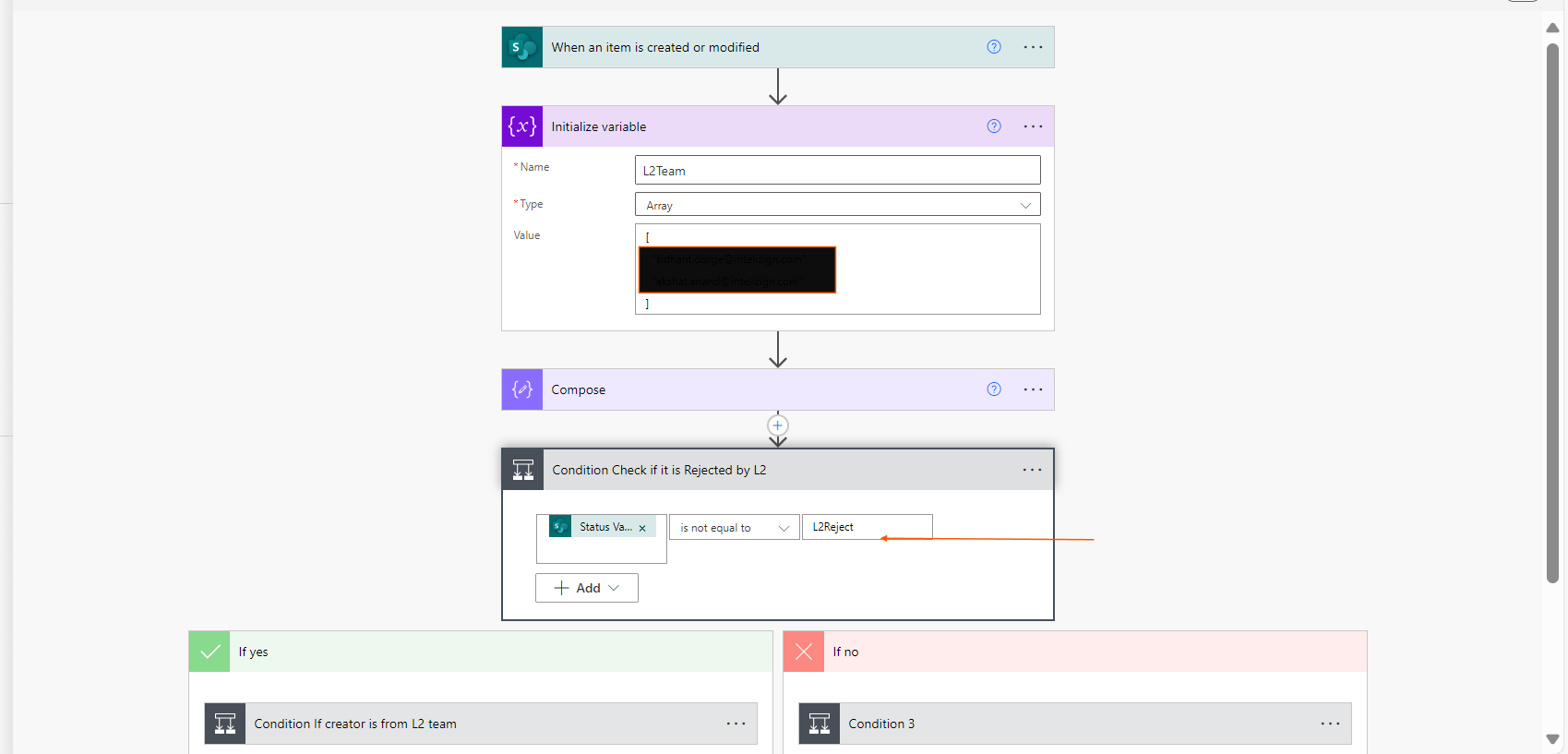
    (as you can see in above image the array is initialized with L2 team members email)
    Then I have added another conditional block wherein a check is performed to see if it is Rejected by L2 team (i.e. L2Reject), if its True:  then follow the normal flow: User-> L1 Approval -> L2 approval 
    If not: Then approval is needed from L2 team only.


    Then have added another condition to see if the creator is any member from the L2 team or not:
    If they are then stored that member in a variable (using Compose) then filtered the array variable which does not contain that particular value and then updated the array variable (using Set) ad using join joined the values using ';'

    Else: (If the creator is not from L2 team then there is no need of filtering all the members should get the approval and the first one to respond can take the call.)

    Also have updated the Trigger condition:
    @equals(triggerOutputs()?['body/Author/Email'],triggerOutputs()?['body/Editor/Email'])
    @or(equals(triggerOutputs()?['body/Status/Value'],'New'),equals(triggerOutputs()?['body/Status/Value'],'Rejected'),equals(triggerOutputs()?['body/Status/Value'],'L2Reject'))

    Now there is only one issue that the start and wait approval gets triggered twice in case of rejection:
    I will explain with an example:
    Assume I have raised a content request ; my Technical Approver is: Sam
    (L2 team consists of: John, Lee)

    My request is approved by Sam now it goes to L2 level (i.e. received by John and Lee whoever responds first takes the  action; Assume John rejects my request and provides comments: Grammar issue) that modifies the status: Approve-> L2Reject then I get a notification about it but again the  L2 team gets the approval message i.e. It triggers twice
    This is where I can't understand why 


    Any idea what might be the problem. As I need to give the creator chance to update the details when it is rejected by L1 team or L2 team instead of creating a new request.
  • Suggested answer
    Sidhant_02 Profile Picture
    986 on at
    Quick update:
    For the issue that I mentioned earlier: i.e. Two approvals mail been sent even before user can make any changes and save it. So to avoid this what I did was added three new columns (Single line of Text) i.e. L1ApproverStatus, L2ApproverStatus, UserModified (with Default value set to: Yes). The L1ApproverStatus, L2ApproverStatus just to keep track of intermediate status.


    Few updates in the flow:


    So if the request is rejected then I am setting UserModified (which will act as a flag) set to 'No'. So then now the flow won't be sending the approval flow email as at start itself I am checking if UserModified is set to 'Yes' then only proceed else it will do nothing (i.e. skipped). So once the user updates the only constraint is that they (creator) just need to set the value in UserModified column from No and Yes which will trigger the flow and then only the approver email will be sent.

    This solves my problem

Under review

Thank you for your reply! To ensure a great experience for everyone, your content is awaiting approval by our Community Managers. Please check back later.

Helpful resources

Quick Links

Introducing the 2026 Season 1 community Super Users

Congratulations to our 2026 Super Users!

Kudos to our 2025 Community Spotlight Honorees

Congratulations to our 2025 community superstars!

Congratulations to the April Top 10 Community Leaders!

These are the community rock stars!

Leaderboard > Power Automate

#1
Vish WR Profile Picture

Vish WR 997

#2
Valantis Profile Picture

Valantis 810

#3
Haque Profile Picture

Haque 642

Last 30 days Overall leaderboard
