web
You’re offline. This is a read only version of the page.
close
Skip to main content

Announcements

News and Announcements icon
Community site session details

Community site session details

Session Id :
Power Platform Community / Forums / Power Automate / Ai model extract infor...
Power Automate
Suggested Answer

Ai model extract information from invoices

(0) ShareShare
ReportReport
Posted on by 22
Hi all, I've made use of the invoice processing model to extract fields such as vendor name, item description, quantity and value from quotations to populate an Excel file. It works  but I'm facing some issues.
1) It cannot extract the new text value when the old value is struck off. The old value is still extracted. e.g. instead of extracting 1230 and 6240, it extracts 1025 and 2080. It also extracts 65- instead of 6.
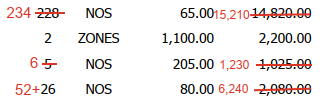
 
2) When a whole line of item is being struck off, that item will still appear in Excel.
 
3) Only the item SOCKET x2 is being extracted instead of all 7 items.
 
I understand there are some limitations using AI Builder. Is there any way to overcome them? Thank you
Categories:
I have the same question (0)
  • Suggested answer
    Riyaz_riz11 Profile Picture
    4,048 Super User 2026 Season 1 on at
    Hi,
     
    AI Builder invoice model struggles with strikethroughs and partial lines  it's a known limitation.
     
    Pre-process PDFs with Azure Document Intelligence better OCR for edits before AI Builder, or build custom OCR model trained on struck-off samples.
     
    Filter low-confidence outputs (<70%) and add post-processing logic to detect strikethrough patterns double lines, X marks) Manual review queue for uncertain items until model retrains with corrected samples.

    Even you can try with custom prompt.
     
    If I have answered your question, please mark it as the preferred solution ✅ . If you like my response, please give it a Thumbs Up 👍.
    Regards,
    Riyaz
    ​

Under review

Thank you for your reply! To ensure a great experience for everyone, your content is awaiting approval by our Community Managers. Please check back later.

Helpful resources

Quick Links

Introducing the 2026 Season 1 community Super Users

Congratulations to our 2026 Super Users!

Kudos to our 2025 Community Spotlight Honorees

Congratulations to our 2025 community superstars!

Congratulations to the March Top 10 Community Leaders!

These are the community rock stars!

Leaderboard > Power Automate

#1
Haque Profile Picture

Haque 589

#2
Valantis Profile Picture

Valantis 328

#3
David_MA Profile Picture

David_MA 284 Super User 2026 Season 1

Last 30 days Overall leaderboard








