

web
You’re offline. This is a read only version of the page.
close
Skip to main content

Announcements

News and Announcements icon
Community site session details

Community site session details

Session Id :
Power Platform Community / Forums / Power Automate / Select one datafield i...
Power Automate
Suggested Answer

Select one datafield in several rows and executeur same Action for all rows

(0) ShareShare
ReportReport
Posted on by 11
Hello everybody,
 
i have a question.
 
I have created a workflow in Power Automate Desktop and with that flow a website will be opened, the login is automated, but I’m running into a problem. There are replacement rules where in the column "For (Voor)" all rows that contain the value "timesheets (urenbrieven)" need to be refreshed by pressing the Apply to task button (blue button). I’m trying to do this with an if then else construct, but unfortunately it’s not working. Can someone help me with this? Maybe it is better to build this flow in Power Automate and make a cloud flow or an instant flow?


This is the workflow:
 
 
This is the error:
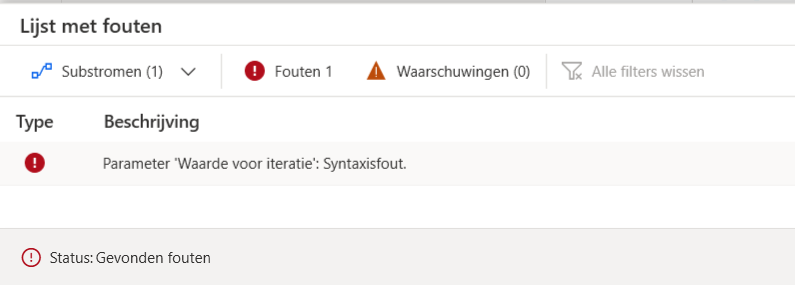
 
Hopefully someone can help me with this flow.
 
Problem: Somebody logins in to a webpage, the logincredentials will be add with variables,
then the flow goes in the menubar to Worklows, then Replacements, and every replacement rule, with Value "Urenbrieven" in Column For (Voor), must be refreshed by pressing Button Apply to tasks (blue button at the end of the row. 
 
And this process i want to automate, because now we have to do this manually four-five times a day. 
 
Is this possible to automate this process?
 
Looking forward to your replies.
 
With regards, 
Diana 
I have the same question (0)
  • Suggested answer
    sannavajjala87 Profile Picture
    931 Super User 2026 Season 2 on at
    Hi,
     
    Yes, this is definitely something that can be automated with Power Automate Desktop. Based on your screenshots, the issue appears to be the For Each action syntax rather than the website automation itself.
    The error:
    Parameter 'Value for iteration': Syntax error
    suggests that %data-title="Voor" = 'Urenbrieven'% is being used as a collection in the For Each loop, but it isn't a valid list or collection variable.
    Instead, I would recommend:
    1. Use Extract data from web page to retrieve all rows from the table into a DataTable.
    2. Loop through the DataTable rows using For Each.
    3. Check:
    If CurrentItem['Voor'] = 'Urenbrieven'
    1. For matching rows, click the corresponding "Toepassen op taken" button.
    If the table structure is stable, another option is to capture all matching UI elements and loop through those UI elements rather than trying to iterate over the text value directly.
    I would stay with Power Automate Desktop for this scenario. Since you're interacting with a web page and clicking buttons on specific rows, a cloud flow alone won't be able to perform those UI actions. PAD is the right tool here.
    The next thing I'd check is whether your web data extraction returns a DataTable or a list of UI elements. That will determine the correct loop structure.
     
    Thanks & Regards,
    Manoj Annavajjala

Under review

Thank you for your reply! To ensure a great experience for everyone, your content is awaiting approval by our Community Managers. Please check back later.

Helpful resources

Quick Links

Season of Sharing Community Challenge Winners!

Congratulations to our community stars!

Kudos to our 2025 Community Spotlight Honorees

Expanding mentorship, skilling, and AI innovation

Congratulations to the July Top 10 Community Leaders!

These are the community rock stars!

Leaderboard > Power Automate

#1
David_MA Profile Picture

David_MA 269 Super User 2026 Season 2

#2
trice602 Profile Picture

trice602 184 Super User 2026 Season 2

#3
11manish Profile Picture

11manish 136 Super User 2026 Season 2

Last 30 days Overall leaderboard




