web
You’re offline. This is a read only version of the page.
close
Skip to main content

Announcements

News and Announcements icon
Community site session details

Community site session details

Session Id :
Power Platform Community / Forums / Power Automate / How to check if Blob f...
Power Automate
Suggested Answer

How to check if Blob file exsits without raising error

(0) ShareShare
ReportReport
Posted on by 1,946 Season of Giving Solutions 2025
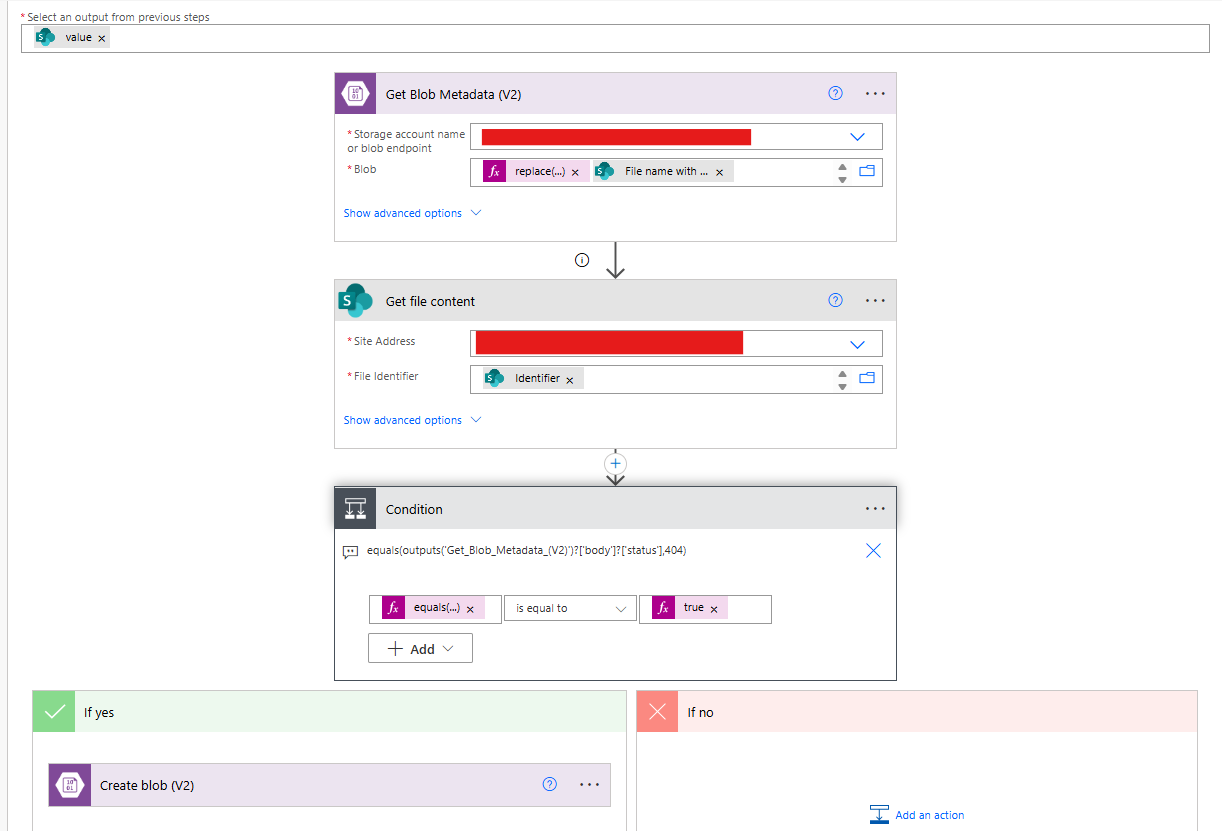
I am getting SharePoint files, then create them inside Blob, but before moving the file i need to check if the file already exists inside the Blob,  for this i used the "Get Blob Metadata (v2)", but this action will fail if the file does not exists.. so how i can overcome this?
 
now i am checking the status code if its equal to 404, the i assume that the file does not exists.. but how i can eliminate this? is there an action to check if blob file exists without the need to handle errors?
 
here is the flow, where the "Get file content" is configured to run even if the "Get Blob Metadata(v2)" fail:-
I have the same question (0)
  • Suggested answer
    Michael E. Gernaey Profile Picture
    53,963 Moderator on at
     
    You can either use list blobs and filter by the name but you still end up checking if you received something.
     
    or you can simply create a parallel scope (or jus actions), right after the get metadata and on one just set it to run on success and the other on fail/skipped/timedout 
     
    Then you won't be checking, but essentially anything you call is going to require you to check if it returned something (such as checking the length of list blobs.
     
    So unless you do the  RunAfter check model, which requires no code at all and no conditions, you will have too.
     

    If these suggestions help resolve your issue, Please consider Marking the answer as such and also maybe a like.

    Thank you!
    Sincerely, Michael Gernaey

Under review

Thank you for your reply! To ensure a great experience for everyone, your content is awaiting approval by our Community Managers. Please check back later.

Helpful resources

Quick Links

Introducing the 2026 Season 1 community Super Users

Congratulations to our 2026 Super Users!

Kudos to our 2025 Community Spotlight Honorees

Congratulations to our 2025 community superstars!

Congratulations to the April Top 10 Community Leaders!

These are the community rock stars!

Leaderboard > Power Automate

#1
Vish WR Profile Picture

Vish WR 840

#2
Valantis Profile Picture

Valantis 661

#3
Haque Profile Picture

Haque 589

Last 30 days Overall leaderboard








