web
You’re offline. This is a read only version of the page.
close
Skip to main content

Notifications

Announcements

Community site session details

Community site session details

Session Id :
Power Platform Community / Forums / Power Automate / How to use Power Autom...
Power Automate
Unanswered

How to use Power Automate to automate extraction of email addresses from eml files

(0) ShareShare
ReportReport
Posted on by
In an Excel file, we have a column with names of companies. The emails of correspondences between these companies and us are in a Onedrive folder (.eml files).
Basically, we want to use Power Automate (or other MS365 automation tools) to automatically extract all email addresses in emails (.eml files).
So (1) first Power Automate has to search the company name in search box of the Onedrive folder. This will throw up multiple emails (since there is usually multiple emails to and from the company) but usually the results near the top are most relevant.
(2)Next Power Automate will copy all the email addresses (including those of other people in the email loop who are not from the company)
 in first 5 emails and then paste them across the same row as the company name inside the Excel file.
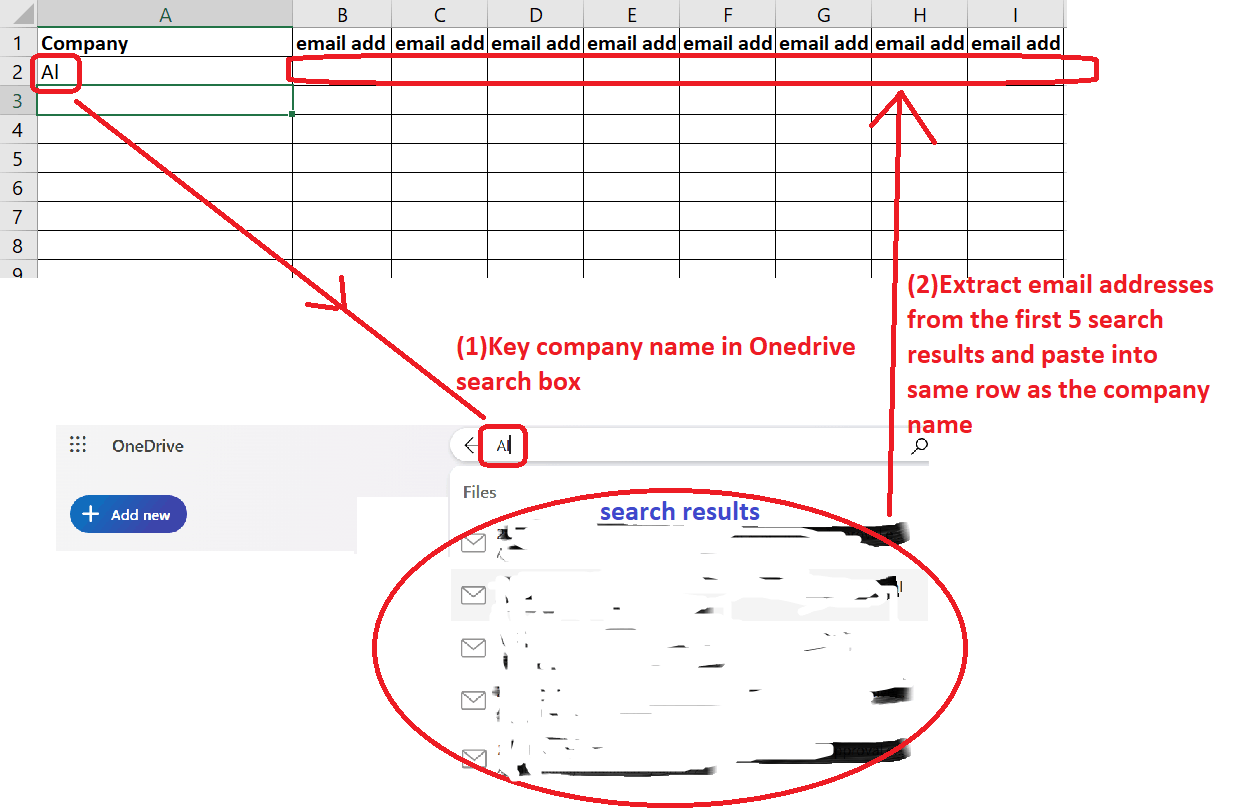
 
(Once we have all those email addresses in the Excel file, we can manually eye ball each row to pick/identify the email address that match the company).
Would appreciate advice on the steps to use Power Automate (or other automation tools) for this automation.
Thanks in advance for any advice
 
Categories:
I have the same question (0)
  • Mark Nanneman Profile Picture
    991 Super User 2025 Season 2 on at
    Did you want to do this in Power Automate Cloud Flows or Power Automate Desktop?

    Before doing this in power automate cloud, I'd consider how many .eml files you're going through.  If it's a lot you could run into throttling issues.  It'd be best to make sure you have some method in place to do it in pieces, and move each processed .eml to a different folder so you don't process it again. 

    I'd also reconsider the way you're storing the email addresses in the excel table--I would recommend just doing one email per row and just repeating the company name for each email address.  I'd also recommend storing the .eml name and/or file id for each email address.  Later you can copy and manipulate the data however you like.  

    There are a number of ways to do something like this, it'd just depend on how many files you're processing and what you're more comfortable with.  In Power Automate Desktop you can do regex https://learn.microsoft.com/en-us/power-automate/desktop-flows/actions-reference/text

    In Power Automate Cloud Flows you could probably use a Low-Code Plugin (if you have Dataverse Accelerator) to do a PowerFx Match or MatchAll function with a regular expression, 

    https://learn.microsoft.com/en-us/power-platform/power-fx/reference/function-ismatch

    https://learn.microsoft.com/en-us/power-apps/maker/data-platform/low-code-plug-ins?tabs=instant


    Or you could build your own simple parsing expression directly in Power Automate cloud.

    It would be best to limit what kind of email address you want (To: From: CC: etc.) and build some kind of expression/logic to only extract emails from certain places in the .eml because they can show up all over and many times for each email.

    E.g. here's just a few of the email addresses in a random email .eml in my inbox:


    Example of how to get the From: address out of an .eml in Power Automate Cloud:


    1. Get a list of .eml files in one drive, convert the content of each file to a string.


    2. Use expressions to extract the email address following the "From: " line in the .eml


    Last(
         Split(
               First(
                    Split(
                         Last(
                             Split(
                                  outputs('Compose_Raw_Text_of_Email_EML'),
                                  'From: ')
                          ),
                          '>'
                     )
                ),
                '<'
           )
    )


    3. Store the extracted email in an array variable (or write to an excel file)

    you can convert the array variable to a csv easily with the built in cloud flow action.


    Example test run:


    If this helped you, please click "Does this answer your question" and give it a like to help others in the community (+ close the ticket)!

    Power Platform Developer | LinkedIn: Mark Nanneman | Blog: Power Stuff  | YouTube: Mark's Power Stuff  |

Under review

Thank you for your reply! To ensure a great experience for everyone, your content is awaiting approval by our Community Managers. Please check back later.

Helpful resources

Quick Links

Forum hierarchy changes are complete!

In our never-ending quest to improve we are simplifying the forum hierarchy…

Ajay Kumar Gannamaneni – Community Spotlight

We are honored to recognize Ajay Kumar Gannamaneni as our Community Spotlight for December…

Leaderboard > Power Automate

#1
Michael E. Gernaey Profile Picture

Michael E. Gernaey 501 Super User 2025 Season 2

#2
Tomac Profile Picture

Tomac 323 Moderator

#3
abm abm Profile Picture

abm abm 237 Most Valuable Professional

Last 30 days Overall leaderboard







