web
You’re offline. This is a read only version of the page.
close
Skip to main content

Notifications

Announcements

Community site session details

Community site session details

Session Id :
Power Platform Community / Forums / Power Automate / Problems with "Delete ...
Power Automate
Unanswered

Problems with "Delete Stale Devices"-Flow

(0) ShareShare
ReportReport
Posted on by 2

Hello,


I am trying to delete all my stale devices in Entra with a logic App, which should run weekly. Unfortunately, I am running into problems.

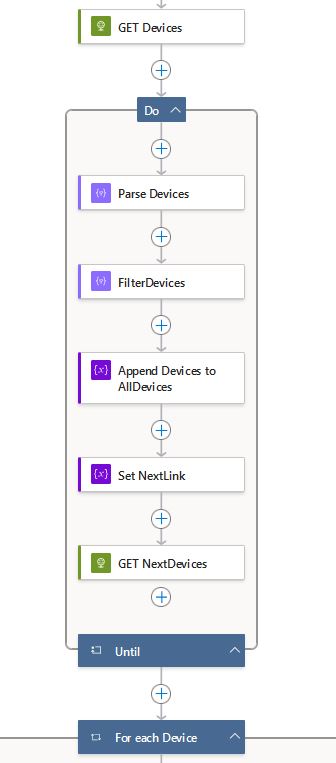
With Graph GET request, I can only receive 100 entries if I did my research correctly. So What I am trying to do with the Do → Until loop is to paginate through all the devices (~2000), filter all out which are stale (not signed in since >=180 days) and append these to the Array AllDevices. Then with the odata.nextLink property, I want to do the loop until it is Null. However, this does not work as intended, it seems like it still only gets 100 devices and/or does not append to the array.

The parse logic looks like this:
 

{
    "type": "object",
    "properties": {
        "value": {
            "type": "array",
            "items": {
                "type": "object",
                "properties": {
                    "id": {
                        "type": "string"
                    },
                    "approximateLastSignInDateTime": {
                        "type": [
                            "string",
                            "null"
                        ],
                        "format": "date-time"
                    },
                    "displayName": {
                        "type": [
                            "string",
                            "null"
                        ]
                    }
                },
                "required": [
                    "id",
                    "approximateLastSignInDateTime",
                    "displayName"
                ]
            }
        },
        "@@odata.nextLink": {
            "type": [
                "string",
                "null"
            ]
        }
    },
    "required": [
        "value"
    ]
}

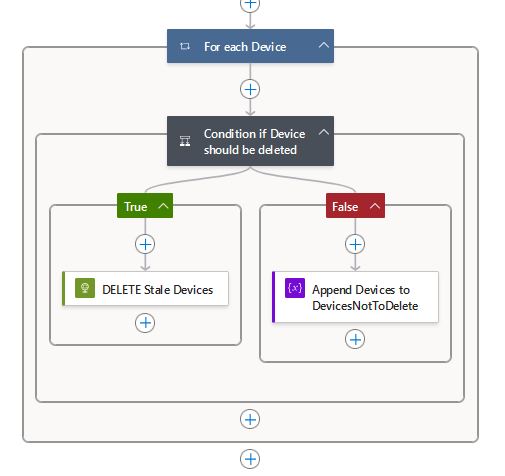
The delete logic already works out fine, by the way.

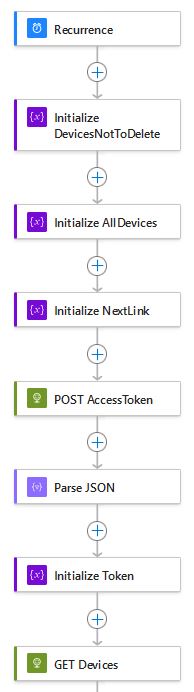
Below I append the flow logic, if you need further details to help me troubleshoot, let me know! 


Thanks!

PS: this is built via a logic app in Azure not PowerAutomate, but logic wise it should not make any difference afaik.


Categories:
I have the same question (0)
  • MV-25031158-0 Profile Picture
    2 on at
    hy, to get more results you could use $top=999, this gives more results. https://graph.microsoft.com/v1.0/devices?$top=999&
  • Srini007 Profile Picture
    3,327 Super User 2025 Season 2 on at
     
    So, try as below
     
    Initialize a Boolean variable as bool_HasData
    Initialize a Integer Variable as int_Counter and set the value to 100 
     
    Now You can use Do-until and the condition is that to bool_HasData is false
     
    Now inside the Do-until you can place Get Devices HTTP request and in the first you can fetch like 100, you can use the counter variable for that, some thing like you url + int_Counter
     
    Check the length of the response if it is greater than 0, then you can place you actions in true branch
    1. ParseJSON
    2. FilterArray
    3. AppendArray
    4. Set Variable bool_HasData to true
    5. Increment the counter to 100
    Check below for a high-level flow
     
     
    Let us know if you are facing any issue
     

    (If this answers your question you can mark as Answered and give it a Like)

    Regards,
    Srini


Under review

Thank you for your reply! To ensure a great experience for everyone, your content is awaiting approval by our Community Managers. Please check back later.

Helpful resources

Quick Links

Forum hierarchy changes are complete!

In our never-ending quest to improve we are simplifying the forum hierarchy…

Ajay Kumar Gannamaneni – Community Spotlight

We are honored to recognize Ajay Kumar Gannamaneni as our Community Spotlight for December…

Leaderboard > Power Automate

#1
Michael E. Gernaey Profile Picture

Michael E. Gernaey 501 Super User 2025 Season 2

#2
Tomac Profile Picture

Tomac 323 Moderator

#3
abm abm Profile Picture

abm abm 237 Most Valuable Professional

Last 30 days Overall leaderboard