web
You’re offline. This is a read only version of the page.
close
Skip to main content

Announcements

News and Announcements icon
Community site session details

Community site session details

Session Id :
Power Platform Community / Forums / Power Automate / desktop connection Err...
Power Automate
Suggested Answer

desktop connection Error "Could not map connection MSEntraID to AD user on the target machine "

(1) ShareShare
ReportReport
Posted on by 4
Hi
 
I have Power Automate set up in a default environment and connecting to a local machine, all that is working fine, and has been for some time.
 
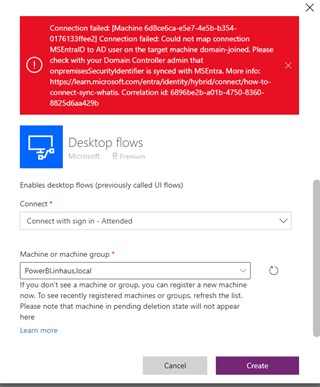
Recently I created a new enviroment and build some AI models.  I dont want these flows calling desktop flows on that same local machine.  I created a new local machine and can see that in the power apps admin, then when I tried to create a desktop connection (using Attended sign in) I get this error "Connection failed: Could not map connection MSEntraID to AD user on the target machine domain-joined".
 
My System Administrator says the Domain Contoller/MSEntra is correct.
 
I have tried this with different users and on different machines and I am getting the same error.  I have even tried it with different enviroments and those dont work either.  It seems the only environment that works is the default one.
 
thanks for your time.
 
I have been asked for more details.  Here are the steps I did
 
Recently, I created a new environment called ’Inhaus Production Apps’

 
I then went into power automate desktop and in the settings created a machine connection. Below you can see the machine was successfully created.
 
In Power Automate in my browser, I can see this machine connected
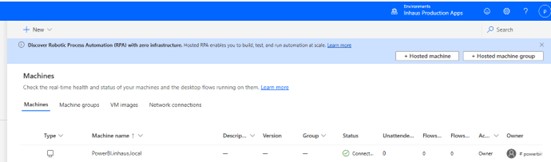
 
Now, in Power Automate in my browser, I go to connections and create a connection for a Desktop flow. I am using ‘Connect with sign in – Attended’ as this is what I am licensed for.
 

Then I get this error…
Categories:
I have the same question (0)
  • Michael E. Gernaey Profile Picture
    53,963 Moderator on at
     
    Please always share walk-through pictures of exactly the steps you took, what you configured, what you expect to happen and what happened, so we can follow along.
  • RS-23041934-0 Profile Picture
    4 on at
    Thanks Michael I have added more details.
  • Suggested answer
    RS-23041934-0 Profile Picture
    4 on at
    SOLVED....
     
    my support guy worked this with me.  He determined that when you create the connection, you need to use the option to connect with Username/Password not the connect with sign in.  
     
    then in power bi, when you call the Run Mode - Attended.
     
    I thought that because I need to use the Run Mode Attended the connection should be connect with sign in - Attended but that is wrong. 

Under review

Thank you for your reply! To ensure a great experience for everyone, your content is awaiting approval by our Community Managers. Please check back later.

Helpful resources

Quick Links

Introducing the 2026 Season 1 community Super Users

Congratulations to our 2026 Super Users!

Kudos to our 2025 Community Spotlight Honorees

Congratulations to our 2025 community superstars!

Congratulations to the April Top 10 Community Leaders!

These are the community rock stars!

Leaderboard > Power Automate

#1
Vish WR Profile Picture

Vish WR 785

#2
Valantis Profile Picture

Valantis 669

#3
Haque Profile Picture

Haque 563

Last 30 days Overall leaderboard



