web
You’re offline. This is a read only version of the page.
close
Skip to main content

Notifications

Announcements

Community site session details

Community site session details

Session Id :
Power Platform Community / Forums / Power Automate / Checking for Duplicate...
Power Automate
Answered

Checking for Duplicates in a SharePoint List

(0) ShareShare
ReportReport
Posted on by 21
Hello All,
 
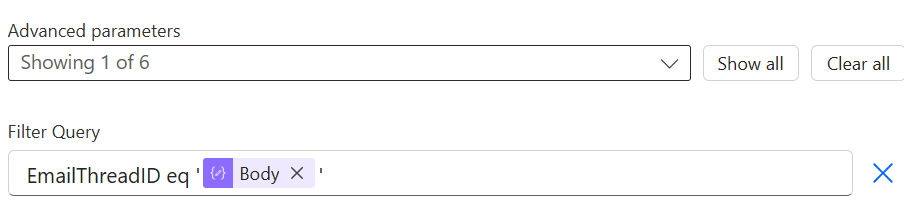
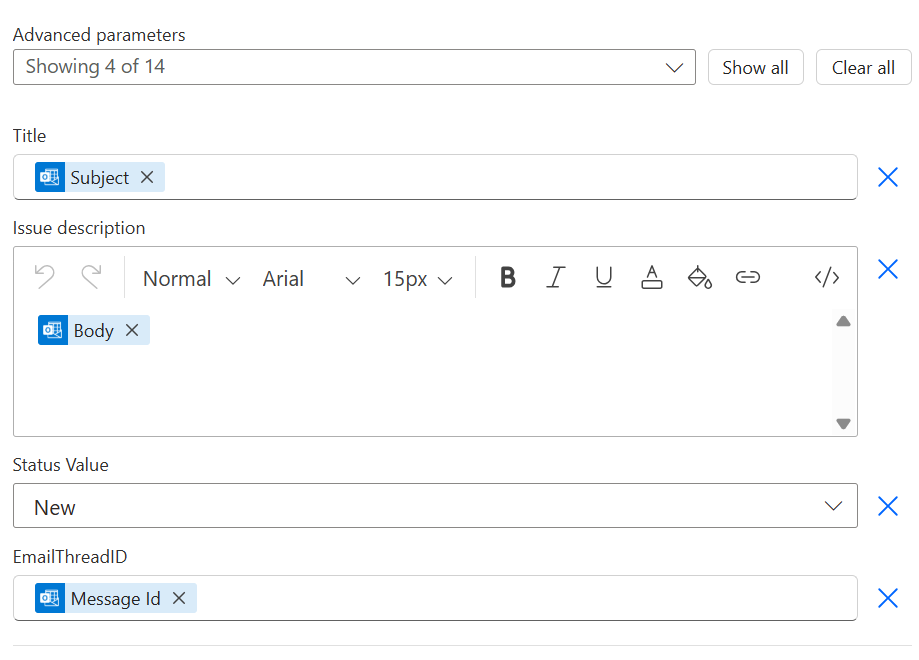
I'm using the helpdesk template on SharePoint and I've created a flow here if someone emails our shared mailbox, it generates a ticket. I've extended that flow to add it where if someone emails/replies back to that same email, it doesn't generate another ticket/item on the list. I can't seem to know what I'm doing wrong as it's not showing any errors but it's not producing the results wanted as it's still generating more tickets on the same email thread.
 
Initially before a new item/ticket is generated in the list, it would check for the "message id" that was extracted and if the returned amount is 0, it'll proceed with a creating a new ticket/item. If not, the flow ends but I may see if it can just add it as a comment.
 
Below is everything I have.
 
 
For "Get Items"
 
 
For "Create item"
Categories:
I have the same question (0)
  • StretchFredrik Profile Picture
    3,395 Super User 2025 Season 2 on at
    Hello, MessageId is a new id for every email, even in the same thread. Try swapping it to Conversation ID and enable Pagination on your Get items step =)
     
    If my response solved your issue, please mark it as ✅ Accepted Answer and give it a like.
  • HV-08081631-0 Profile Picture
    21 on at
    @StretchFredrik I just noticed something, after the ConversationID is added to it's column in the SharePoint list, it keeps adding a "=" at the end of the ID. This would cause the condition to be true all the time. 
     
    Would you know why it does this?
  • StretchFredrik Profile Picture
    3,395 Super User 2025 Season 2 on at
     
    Could you share an image of what you mean and how it would affect the if statement =)
     
     
  • HV-08081631-0 Profile Picture
    21 on at
    @StretchFredrik Scratch that, nevermind. I fully looked at the raw data and it appears to be correct. But I'm not sure how the conditions are still appearing to be true. This is what the raw data look like for Get Items.
     
     
    Below is what is shown within the SharePoint list.


  • Suggested answer
    StretchFredrik Profile Picture
    3,395 Super User 2025 Season 2 on at
    Probably has to do with the \n that is in the conversation_ID in the flow run, but not in the SharePoint columns. We can try removing it before saving it to SharePoint by doing this in the "EmailThreadID" as a expression:
     
    Split(CONVERSATION_ID HERE,'\n')[0]
     
    If my response solved your issue, please mark it as ✅ Accepted Answer and give it a like.
  • HV-08081631-0 Profile Picture
    21 on at
    @StretchFredrik So this is what I have for the EmailThreadID before it's created in the SharePoint List.
     
     
    Also, I noticed that the output in my "Get Items" is empty. Is that normal?
     
  • StretchFredrik Profile Picture
    3,395 Super User 2025 Season 2 on at
    Have you enabled pagination on the Get items step? If not, press the three dots go to settings, enable pagination and put 5000 as the number.
     
    Does the flow work as expected after that?
     
    If my response solved your issue, please mark it as ✅ Accepted Answer and give it a like.
  • Suggested answer
    WillPage Profile Picture
    2,307 Super User 2025 Season 2 on at
    The message ID is always going to be unique for each incoming email so you can't use it for grouping messages like that. The best you can do is put a ticket ID in the subject line of your response to the initial query, e.g Re: original subject [Ticket#1]

    ..where 1 is the list item ID of the ticket from dynamic content
     
    Then when the person replies, you can parse out that number by doing

    int(slice(triggerOutputs()?['body/subject'], add(indexOf(triggerOutputs()?['body/subject'],'[Ticket#'),8),lastIndexOf(triggerOutputs()?['body/subject'],']')))

    The result of that will be your list item ID which you can then use to lookup the original ticket.

  • Verified answer
    HV-08081631-0 Profile Picture
    21 on at
    Thank you for your help you two @WillPage @StretchFredrik.
     
    It looks like the issue was coming from my "Compose." I checked the output on that and that was where it was adding the "\n." I thought I didn't need to make it into a string value but I added the '' to my "Compose" connector and that resolved the issue. My logic was right but looks like I just missed these minor pieces.
  • StretchFredrik Profile Picture
    3,395 Super User 2025 Season 2 on at
    Glad you got it to work. 
     
    Dont forget to put your post as answered. 
     
    Have a nice day!

Under review

Thank you for your reply! To ensure a great experience for everyone, your content is awaiting approval by our Community Managers. Please check back later.

Helpful resources

Quick Links

Forum hierarchy changes are complete!

In our never-ending quest to improve we are simplifying the forum hierarchy…

Ajay Kumar Gannamaneni – Community Spotlight

We are honored to recognize Ajay Kumar Gannamaneni as our Community Spotlight for December…

Leaderboard > Power Automate

#1
Michael E. Gernaey Profile Picture

Michael E. Gernaey 525 Super User 2025 Season 2

#2
Tomac Profile Picture

Tomac 324 Moderator

#3
abm abm Profile Picture

abm abm 232 Most Valuable Professional

Last 30 days Overall leaderboard



