web
You’re offline. This is a read only version of the page.
close
Skip to main content

Announcements

News and Announcements icon
Community site session details

Community site session details

Session Id :
Power Platform Community / Forums / Power Automate / Trouble trying to upda...
Power Automate
Suggested Answer

Trouble trying to update Excel row after approvals Flow

(1) ShareShare
ReportReport
Posted on by 48
Hi team, this is Sayan, and I'm trying to update a Row after the approvals flow.
For example, if the Supervisor approves it, the Excel row should update as "Approved", I tried but it's not working at all.
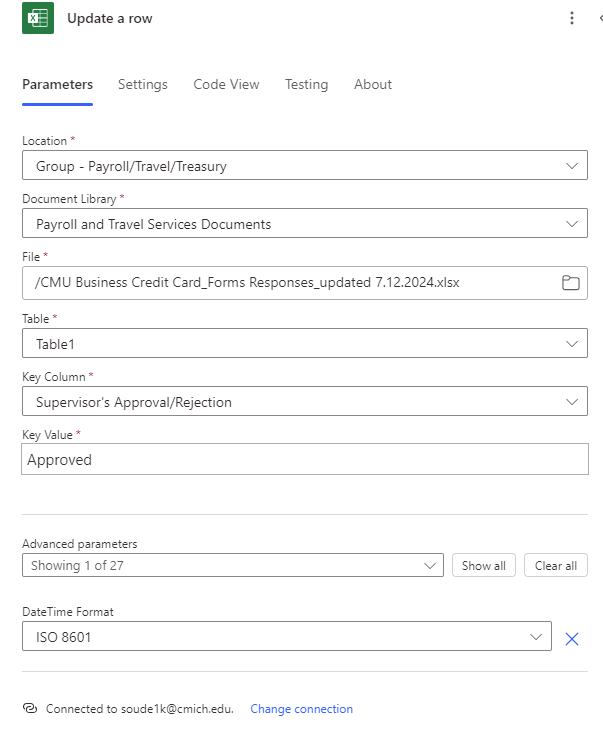
I'm not sure what to put in that "Key Value" field either.

 
I I want to update this Row named "Supervisor's Approval/Rejection".
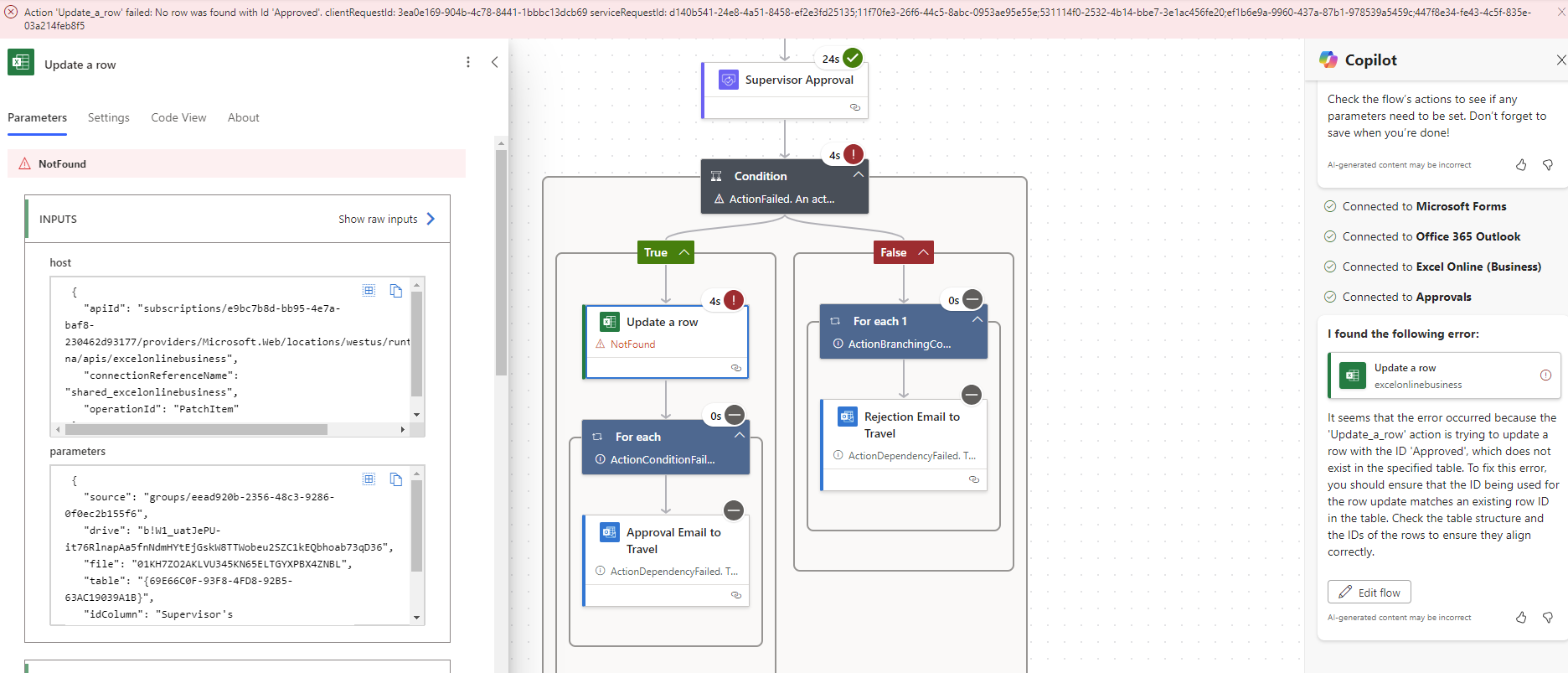
 
I'm getting this error after running the flow.

 So I would think that something related to "Key Value" field in the "Update a Row" flow.
 
Can anyone please help with this matter? 
If I have to explain it simply, I have an excel file in sharepoint, and after the approvals, I want PowerAutomate to update a specific row in that excel spreadsheet.
Any help will be super appreciated.
 
 
Regards,
Sayan Kayal
Categories:
I have the same question (0)
  • Suggested answer
    Michael E. Gernaey Profile Picture
    53,963 Moderator on at
    Hi
     
    The Key, is the combination of Headers(Columns) you are using to define UniqueNess.
     
    Without that there is no way for the Excel action to know what Row to update. You have to add the Key to the Excel Table you created, so that these actions work at all.
     
    Here is a great way to do it in Power automate, but you can simply do it in Excel also.
     

Under review

Thank you for your reply! To ensure a great experience for everyone, your content is awaiting approval by our Community Managers. Please check back later.

Helpful resources

Quick Links

Introducing the 2026 Season 1 community Super Users

Congratulations to our 2026 Super Users!

Kudos to our 2025 Community Spotlight Honorees

Congratulations to our 2025 community superstars!

Congratulations to the April Top 10 Community Leaders!

These are the community rock stars!

Leaderboard > Power Automate

#1
Vish WR Profile Picture

Vish WR 801

#2
Valantis Profile Picture

Valantis 602

#3
Haque Profile Picture

Haque 581

Last 30 days Overall leaderboard








