web
You’re offline. This is a read only version of the page.
close
Skip to main content

Announcements

News and Announcements icon
Community site session details

Community site session details

Session Id :
Power Platform Community / Forums / Power Automate / Sharepoint page approv...
Power Automate
Suggested Answer

Sharepoint page approval flow no longer working unless page is out of edit mode

(0) ShareShare
ReportReport
Posted on by
Hi all, we have had publishing approval flows in place on our modern Sharepoint intranet for some time, but recently they have stopped working unless users save and close the page (i.e. take the page out of edit mode) before submitting for approval. This is causing confusion, as to the general user the flow appears to have been triggered correctly but nothing happens.
 
Looking at the flow we can see it has started running but failed with the following error message (have Xd out identifying items): 
 

{

  "status"400,

  "message""The file \"https://xxxx.sharepoint.com/sites/Communications/SitePages/News-flow-test.aspx\" is locked for shared use by xxx.xxxxxxx@xxxx.xxx.xx.\r\nclientRequestId: 9877745c-6c88-4b65-9b80-dbcea22c2d4d\r\nserviceRequestId: 0090c2a1-c04c-5000-d4fb-777831d20db1"

}


So clearly the approval flow is being prevented from running by the page still being in draft. Previously, when users pressed submit for approval the page would be automatically taken out of edit mode.

Can anyone confirm why this might have changed and whether we now have to specify a step in the flow in order to take the page/post out of edit mode - and if so, how?

Categories:
I have the same question (0)
  • Suggested answer
    Fredrik_A Profile Picture
    3,644 Super User 2026 Season 1 on at
    Hello,
     
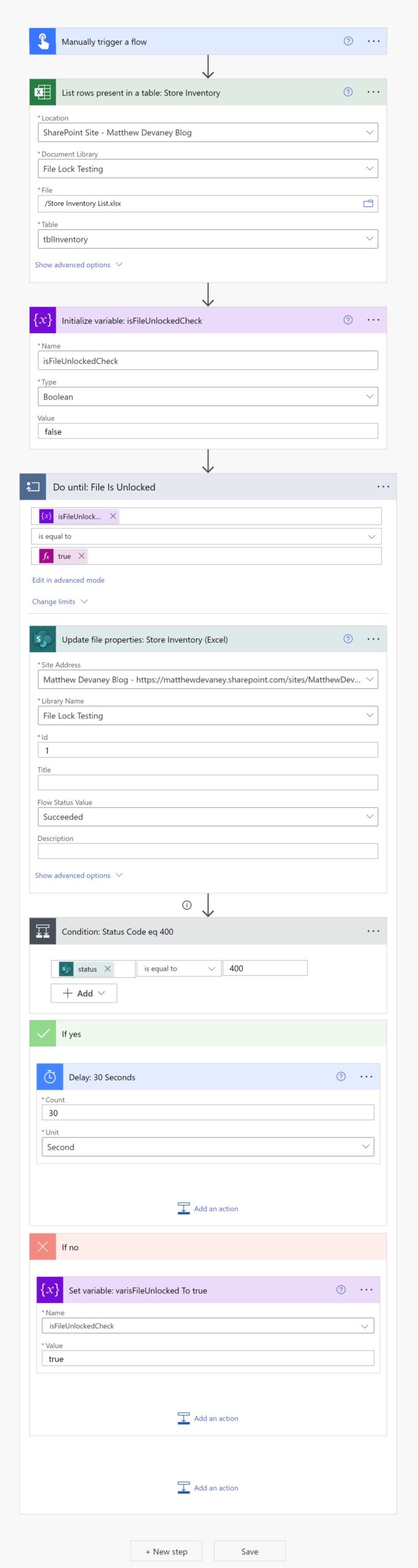
    what you could do to prevent this is add a action "Do until" and loop until it gets unlocked, below screenshot of the solution is from matthewdevaney's blog.
     
     
    If my response solved your issue, please mark it as ✅ Accepted Answer and give it a like.

Under review

Thank you for your reply! To ensure a great experience for everyone, your content is awaiting approval by our Community Managers. Please check back later.

Helpful resources

Quick Links

Introducing the 2026 Season 1 community Super Users

Congratulations to our 2026 Super Users!

Kudos to our 2025 Community Spotlight Honorees

Congratulations to our 2025 community superstars!

Congratulations to the March Top 10 Community Leaders!

These are the community rock stars!

Leaderboard > Power Automate

#1
Vish WR Profile Picture

Vish WR 873

#2
Valantis Profile Picture

Valantis 822

#3
Haque Profile Picture

Haque 482

Last 30 days Overall leaderboard