web
You’re offline. This is a read only version of the page.
close
Skip to main content

Announcements

News and Announcements icon
Community site session details

Community site session details

Session Id :
Power Automate
Answered

CSV_Table line break

(0) ShareShare
ReportReport
Posted on by 6

Hi Everyone, 

I'm trying to create an CSV file from my excel file. 

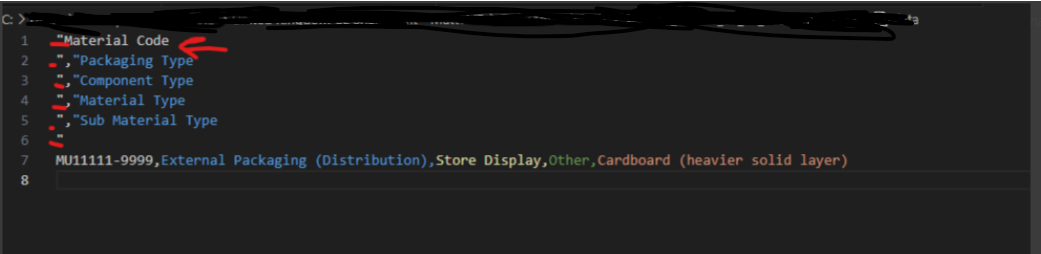
All process works fine , I just have that CSV file header is broken as header contains quotation marks and line break. 

If I'm using automatic all works fine (CSV file spot on), however I don't need all columns from the file.  Once I'm doing custom it does have  
\n on each header line 



My Flow:
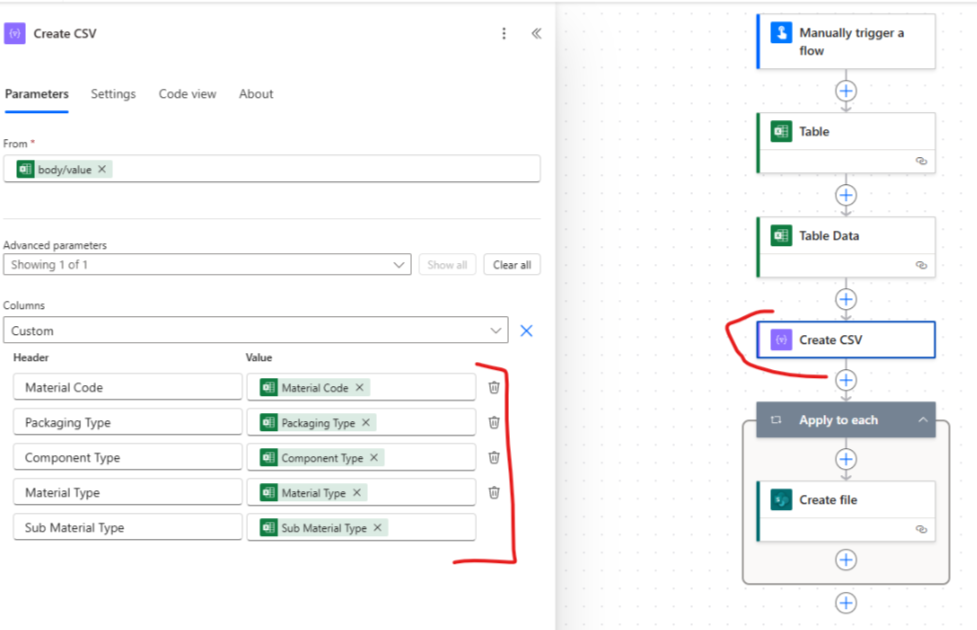


How I can remove a new lines from header ?  
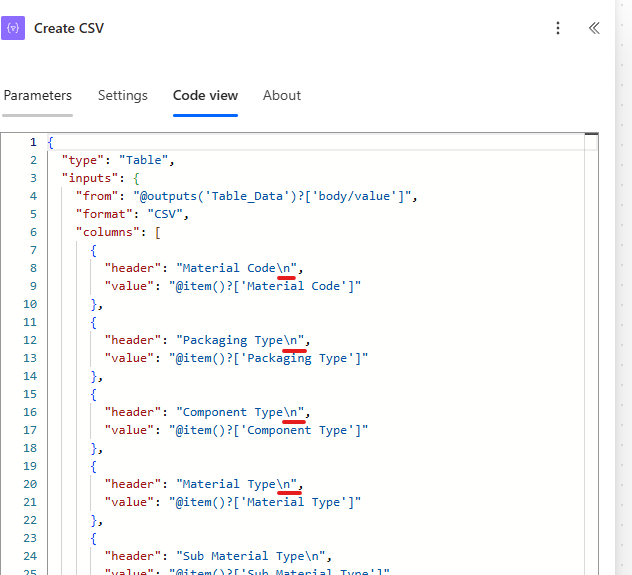

Categories:
I have the same question (0)
  • Verified answer
    Pstork1 Profile Picture
    69,397 Most Valuable Professional on at
    Since Automatic works for you try using a Data Select to isolate just the columns you want in an array and then use the output of that to create the CSV.

    ----------------------------------------------------------------------------------
    If this Post helped you, please click "Does this answer your question" and give it a like to help others in the community find the answer too!

    Paul Papanek Stork, MVP
    Blog: https://www.dontpapanic.com/blog
     
  • DC-17061215-0 Profile Picture
    6 on at
    Hi @Pstork1

    Thank you for your answer. 

    I have tried to isolate needed columns, however CVS still has brake line in the header. 

    On the select filter it does return with new line indicator for some reason. 


  • Pstork1 Profile Picture
    69,397 Most Valuable Professional on at
    If its returning with the new line on a Data Select then it must be a new bug that has developed in Power Automate.  Based on your screenshot you aren't adding one in the title column of the data select. I would try two things.
     
    1) Try switching back to the legacy editor.  This kind of bug is often something that appears only in the new designer.  If you go back to the legacy designer and add the Data Select there that may solve the problem.
     
    2) If that doesn't fix the problem then you need to do a Replace() on the first record of the array that comes out of the data select.  Here's a blog that discusses how to Replace a linefeed.  How to replace new line ('n') in a Power Automate expression
     

    ----------------------------------------------------------------------------------
    If this Post helped you, please click "Does this answer your question" and give it a like to help others in the community find the answer too!

    Paul Papanek Stork, MVP
    Blog: https://www.dontpapanic.com/blog
     
     
  • DC-17061215-0 Profile Picture
    6 on at
    @Pstork1

    Thank you so much for your assistance on this issues. 

    Switching back to the legacy editor it didn't help. 

    However, I did go back to "Select" filter and notice that it have "Switch to text mode" that I wasn't aware off.

    By switching to text mode I manually modified my mapping by deleting /n from each header line. 

    And it did resolve the issues. 


Under review

Thank you for your reply! To ensure a great experience for everyone, your content is awaiting approval by our Community Managers. Please check back later.

Helpful resources

Quick Links

Introducing the 2026 Season 1 community Super Users

Congratulations to our 2026 Super Users!

Kudos to our 2025 Community Spotlight Honorees

Congratulations to our 2025 community superstars!

Congratulations to the April Top 10 Community Leaders!

These are the community rock stars!

Leaderboard > Power Automate

#1
Vish WR Profile Picture

Vish WR 976

#2
Valantis Profile Picture

Valantis 863

#3
Haque Profile Picture

Haque 547

Last 30 days Overall leaderboard