web
You’re offline. This is a read only version of the page.
close
Skip to main content

Notifications

Announcements

Community site session details

Community site session details

Session Id :
Power Platform Community / Forums / Power Automate / How to remove the html...
Power Automate
Suggested Answer

How to remove the html code i a preview off a e-mail?

(0) ShareShare
ReportReport
Posted on by 23
Hey all,
 
I have a strange problem with the preview off e-mail.
 
I would like to remove the <data:image..... code from the preview text but I can't figure out how.
Then I would try to use another picture, so see if the one I should use was broken and as you can see, the Power Automate logo look like I should, but the who other e-mails, is showing the <data:image html code.
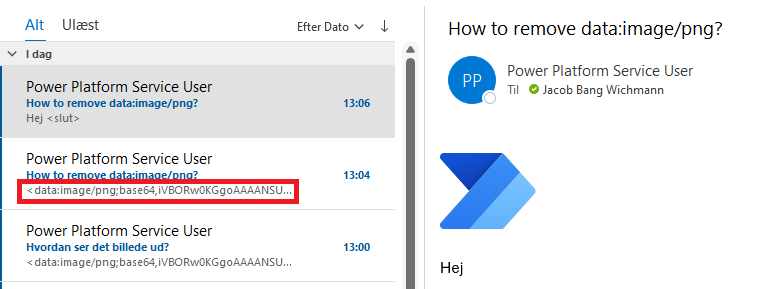
 
I have used the same steps in the flow, just change the path to the logo.
Both logo's are png's.
 
What do I do wrong?

Maybe it worth to mention that I have tried to type the <data or use the function: dataUri(body('Get_file_content_using_path_-_billede')), but it still noget doing like I would have it.

Looking forward to your ideas! Thanks :) 
Categories:
I have the same question (0)
  • Suggested answer
    Daniel Bocklandt Profile Picture
    5,117 Super User 2025 Season 2 on at
    Hey try doing exactly the same thing but in the old  designer. 
     
    I had this problem once and going back to the old designer and sticking to it rsolved it weirdly for me.
    YOu could just need to write the code again. That's all it took for me to get it to work correctly. 
     
    If this solvede your porblem please accept it as solution so others can find it as well. 
    If it helped in any other way consider liking it so we can keep supporting eachother. 
  • Suggested answer
    JB-30071354-0 Profile Picture
    23 on at
    Hey DBO_DV,
     
    Thanks for this, but I have tried to switch to the old designer and make a new flow, but none off them did the trick. Both e-mails starts with <data.... :( 
  • Suggested answer
    David_MA Profile Picture
    12,982 Super User 2025 Season 2 on at
    You need to put the e-mail action into HTML instead of edit mode. To do that, click on the <> in the toolbar below body in the action. Since it is in edit mode, it does not consider your code as HTML and sends it as text instead. When the action is in HTML mode, you will not see options for bold, underline, italics, etc.
  • Suggested answer
    Daniel Bocklandt Profile Picture
    5,117 Super User 2025 Season 2 on at
    you probably did it but just to be absolutely sure:
     
    Did you select this button ? 
    So that it looks like this? 
  • Suggested answer
    JB-30071354-0 Profile Picture
    23 on at
    You are correct, I have selected the button :) 
     

Under review

Thank you for your reply! To ensure a great experience for everyone, your content is awaiting approval by our Community Managers. Please check back later.

Helpful resources

Quick Links

Forum hierarchy changes are complete!

In our never-ending quest to improve we are simplifying the forum hierarchy…

Ajay Kumar Gannamaneni – Community Spotlight

We are honored to recognize Ajay Kumar Gannamaneni as our Community Spotlight for December…

Leaderboard > Power Automate

#1
Michael E. Gernaey Profile Picture

Michael E. Gernaey 519 Super User 2025 Season 2

#2
Tomac Profile Picture

Tomac 296 Moderator

#3
abm abm Profile Picture

abm abm 232 Most Valuable Professional

Last 30 days Overall leaderboard



