web
You’re offline. This is a read only version of the page.
close
Skip to main content

Notifications

Announcements

Community site session details

Community site session details

Session Id :
Power Platform Community / Forums / Power Automate / Send email with attach...
Power Automate
Unanswered

Send email with attachment from list

(0) ShareShare
ReportReport
Posted on by 6

Hi Guys,


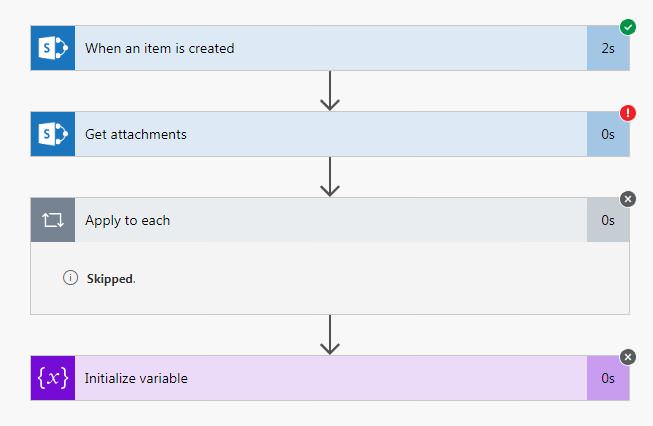
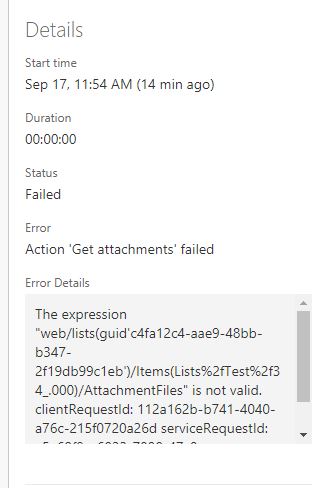
I'm trying to make a workflow that when item is created in the list it will send an email including the Attachment of uploaded by the end user. However I always encounter an error in "Get Attachment" action of my flow. I tried a lot of samples posted here by other users but I still encouter that error.


Error:

The expression "web/lists(guid'c4fa12c4-aae9-48bb-b347-2f19db99c1eb')/Items(Lists%2fTest%2f34_.000)/AttachmentFiles" is not valid. clientRequestId: 112a162b-b741-4040-a76c-215f0720a26d serviceRequestId: a5a68f9e-6023-7000-47c0-9664381249d1


Thanks.

Categories:
I have the same question (0)
  • Verified answer
    ScottShearer Profile Picture
    25,270 Most Valuable Professional on at

    @Normz:


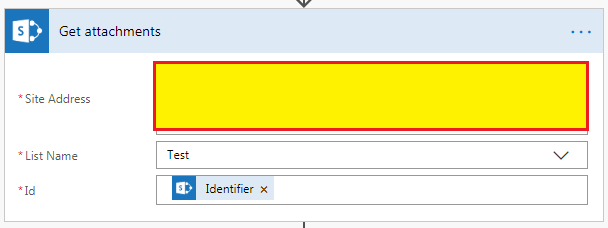
    In your screen shot of the Get Attachments action, it shows that you are referencing the Identifier in the Id field.  You need to reference ID and not Identifier.  If you don't see it in Dynamic properties, click on "see more".


    If this solves your problem, please mark your post as Solved.


    Scott

  • Verified answer
    v-yamao-msft Profile Picture
    on at

    Hi @Normz,


    I assume that this blog about Send multiple attachments on a single email will be a great help for you, please check it at here:

    https://flow.microsoft.com/en-us/blog/multiple-attachments-single-email/


    Best regards,

    Mabel Mao

  • Normz Profile Picture
    6 on at

    Thanks @ScottShearer & @v-yamao-msft. I can pass through "Get Attachment" action now. However, I encounter new error in "Sending Email" action. The flow is working if the list I created does not have an attachment, but it I try to create an item with attachment, i encounter the error below.


    Error Details:

    No input parameters provided. Please provide required input parameters 'To', 'Subject' and 'Body'. clientRequestId: d145377a-9976-41e7-b015-81cf09dd859a


    Kobvfcd


     nzTeZ7c


    TExMzjY


    Thanks,


  • v-yamao-msft Profile Picture
    on at

    Hi @Normz,


    I can reproduce this issue on my side.


    I will do some test and back to you later.


    Best regards,

    Mabel Mao

  • v-yamao-msft Profile Picture
    on at

    Hi @Normz,


    Please try to remove the variable and use the dynamic content Display name and File content in the flow.


    The following flow works fine, please take it for a reference:

     1.PNG


    Best regards,

    Mabel Mao

Under review

Thank you for your reply! To ensure a great experience for everyone, your content is awaiting approval by our Community Managers. Please check back later.

Helpful resources

Quick Links

Forum hierarchy changes are complete!

In our never-ending quest to improve we are simplifying the forum hierarchy…

Ajay Kumar Gannamaneni – Community Spotlight

We are honored to recognize Ajay Kumar Gannamaneni as our Community Spotlight for December…

Leaderboard > Power Automate

#1
Michael E. Gernaey Profile Picture

Michael E. Gernaey 463 Super User 2025 Season 2

#2
Tomac Profile Picture

Tomac 427 Moderator

#3
abm abm Profile Picture

abm abm 245 Most Valuable Professional

Last 30 days Overall leaderboard