




 Share
Share Report
 56
56I'm working on a flow where I need to be able to detect changes between two arrays with objects.
varPrevious:
varPrevious:
[
{"uniqueID": "1111", "FirstName": "John", LastName: "Smith", "Age": "30"} ,
{"uniqueID": "2222", "FirstName": "Peter", LastName: "Paul", "Age": "32"} ,
{"uniqueID": "3333", "FirstName": "Steve", LastName: "Johnson", "Age": "25"} ,
{"uniqueID": "4444", "FirstName": "Randy", LastName: "Moss", "Age": "26"}
]
varCurrent:
varCurrent:
[
{"uniqueID": "1111", "FirstName": "John", LastName: "Smith", "Age": "30"} ,
{"uniqueID": "2222", "FirstName": "Peter", LastName: "Paul", "Age": "32"} ,
{"uniqueID": "3333", "FirstName": "Steve", LastName: "Smith", "Age": "25"} ,
{"uniqueID": "5555", "FirstName": "Jerry", LastName: "Rice", "Age": "34"}
]
Given the two arrays I would like to be able to filter out new entries, deleted entries, and modified entries for reporting purposes.
End Goal:
New Entries:
[{"uniqueID": "5555", "FirstName": "Jerry", LastName: "Rice", "Age": "34"} ]
[{"uniqueID": "5555", "FirstName": "Jerry", LastName: "Rice", "Age": "34"} ]
Deleted Entries:
[{"uniqueID": "4444", "FirstName": "Randy", LastName: "Moss", "Age": "26"} ]
Modified Entries:
[{"uniqueID": "3333", "FirstName": "Steve", LastName: "Smith", "Age": "25"} ]
I have tried using the filter array action but I can't seem to figure it out.
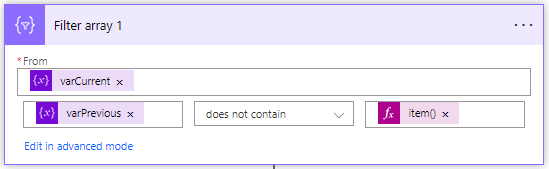
I have tried using the filter array action but I can't seem to figure it out.
Output:
[
[
{"uniqueID": "3333", "FirstName": "Steve", LastName: "Smith", "Age": "25"} ,
{"uniqueID": "5555", "FirstName": "Jerry", LastName: "Rice", "Age": "34"}
]
The filter array action above returns the modified object (id:3333) and the new object (id:5555). The same happens when I filter for the deleted object. The filter array action returns the modified object (id:3333) and the deleted object (id:4444).
Any help would be greatly appreciated.
Thanks
Thanks
Categories:
I have the same question (0)
 All responses (
 Answers (







