web
You’re offline. This is a read only version of the page.
close
Skip to main content

Announcements

News and Announcements icon
Community site session details

Community site session details

Session Id :
Power Platform Community / Forums / Power Automate / Unable to select the U...
Power Automate
Suggested Answer

Unable to select the UI element

(0) ShareShare
ReportReport
Posted on by
In power automate I was suppose to automate frew things in power bi, the thing is power automate is unable to click on the data source settings option in power bi but it's selecting the entire screen. It's not getting that element to click and instead is selecting entire screen.

Further when we test the selector it says parent screen could not be found.
I have the same question (0)
  • Suggested answer
    eetuRobo Profile Picture
    4,524 Super User 2026 Season 1 on at
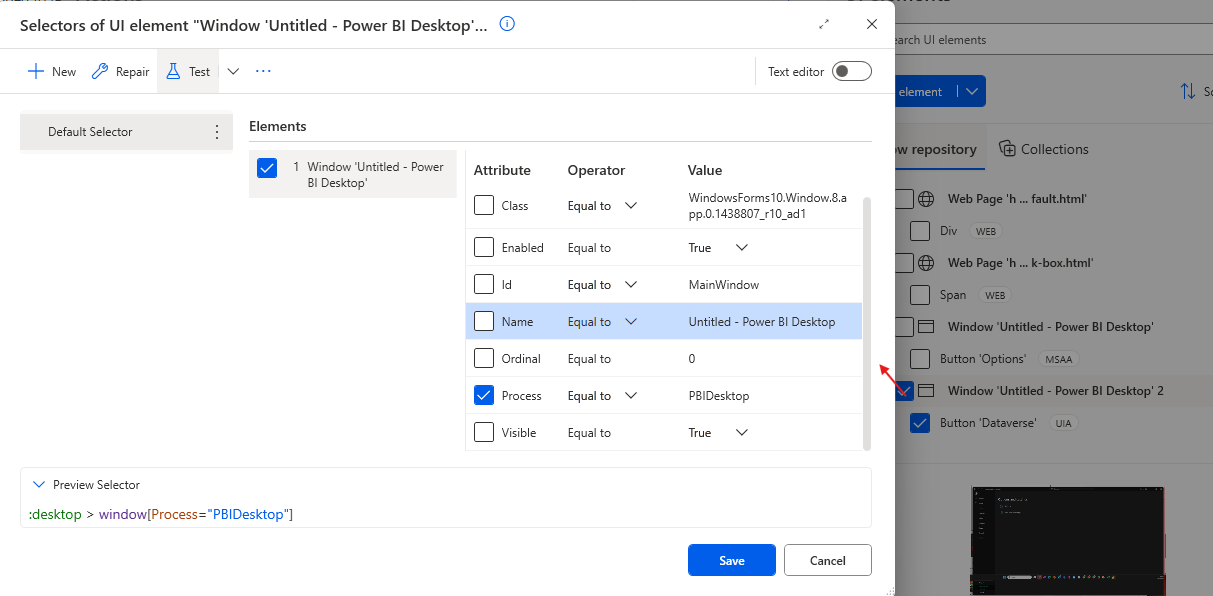
    I tried to do that and it does seem like PAD has hard time finding the Options and Settings view in Power BI. But when I switched to MSAA -capture mode it seemed to find it. 


    But even then when I tested the selector it failed to find the element so I needed to simplify it a lot by taking most of the elements off from the selector.
    So I only left the last element (number 15 named "Button 'Options'"). Then it worked.

    Downside is that making the element so simple it makes it much slower and so the action takes like 15 seconds to find the element. 


    But I decided to test if I captured any element I could from the Power BI with the default UIA -capturing mode and just rewrote the selector in Text mode to be the 
    button[Name="Options"]

    That actually made it work and much faster (took like 5s to locate the element).

    So try to just copy and paste this: button[Name="Options"]
    To your selector and see if that works.


    If you will get error about the window element then make sure the window element is not referring to a name that might be different on different flow runs. If you only ever have one Power BI window open then you can just toggle the "Name" attribute off so that it doesn't try to find a window with that exact name.
Under review

Thank you for your reply! To ensure a great experience for everyone, your content is awaiting approval by our Community Managers. Please check back later.

Helpful resources

Quick Links

Introducing the 2026 Season 1 community Super Users

Congratulations to our 2026 Super Users!

Kudos to our 2025 Community Spotlight Honorees

Congratulations to our 2025 community superstars!

Congratulations to the April Top 10 Community Leaders!

These are the community rock stars!

Leaderboard > Power Automate

#1
Vish WR Profile Picture

Vish WR 785

#2
Valantis Profile Picture

Valantis 669

#3
Haque Profile Picture

Haque 563

Last 30 days Overall leaderboard







