web
You’re offline. This is a read only version of the page.
close
Skip to main content

Announcements

News and Announcements icon
Community site session details

Community site session details

Session Id :
Power Platform Community / Forums / Power Automate / Legacy Trigger Warning...
Power Automate
Suggested Answer

Legacy Trigger Warning Appearing on New Flow – Need Clarification

(0) ShareShare
ReportReport
Posted on by 109
Hi,  Microsoft Support,

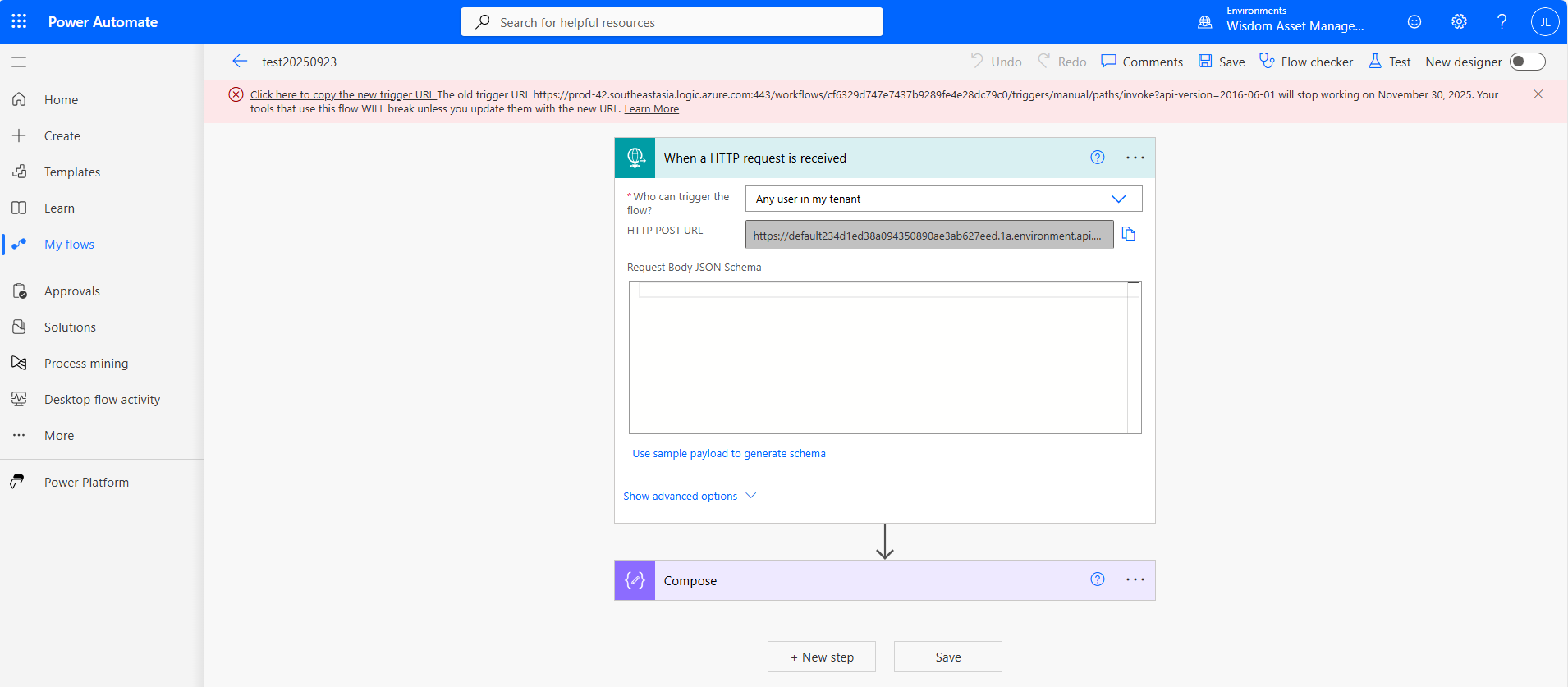
I recently created a new flow in Power Automate with the “When an HTTP request is received” trigger. This flow was not copied or cloned, and the trigger URL is already using the new format with environment.api.powerplatform.com.

However, I still see a warning at the top saying that the old trigger URL (logic.azure.com) will stop working after November 30, 2025, even though this flow should not be using it.


NewFlow_Error.png
Categories:
I have the same question (1)
  • Suggested answer
    Michael E. Gernaey Profile Picture
    53,963 Moderator on at
     
    I do not actually see that it shows an error (no red dots).
     
    But to be safe I would click it, just verify for sure 100% and then close it.
     
    Unless its not working, I would ignore it.
     

    If these suggestions help resolve your issue, Please consider Marking the answer as such and also maybe a like.

    Thank you!
    Sincerely, Michael Gernaey
  • Expiscornovus Profile Picture
    33,851 Most Valuable Professional on at
    Hi @_Judy_,
     
    It looks like Microsoft keeps showing the message even though the new url is being used. I have the same experience in my developer environment.
     
    Your flow has the new url in the HTTP POST URL field, so it should be fine for the future (after the 30th of November).
     
     
    Happy to help out 😁

    I share more #PowerAutomate and #SharePointOnline content on my Blog, LinkedIn, Bluesky profile or Youtube Channel

Under review

Thank you for your reply! To ensure a great experience for everyone, your content is awaiting approval by our Community Managers. Please check back later.

Helpful resources

Quick Links

Introducing the 2026 Season 1 community Super Users

Congratulations to our 2026 Super Users!

Kudos to our 2025 Community Spotlight Honorees

Congratulations to our 2025 community superstars!

Congratulations to the April Top 10 Community Leaders!

These are the community rock stars!

Leaderboard > Power Automate

#1
Vish WR Profile Picture

Vish WR 816

#2
Valantis Profile Picture

Valantis 603

#3
Haque Profile Picture

Haque 566

Last 30 days Overall leaderboard



