Hello Microsoft Community,
I need assistance with setting up a Power Automate flow to process rows from an Excel file and compare them against a Dataverse table. The flow must handle ALL rows from the Excel file and ALL rows in Dataverse to achieve the following:
-
Identify all matching rows between Excel and Dataverse.
- Action: Update all matching rows in Dataverse with data from the Excel file.
-
Identify all non-matching rows from the Excel file.
- Action: Create new rows in Dataverse for all non-matching rows.
Context
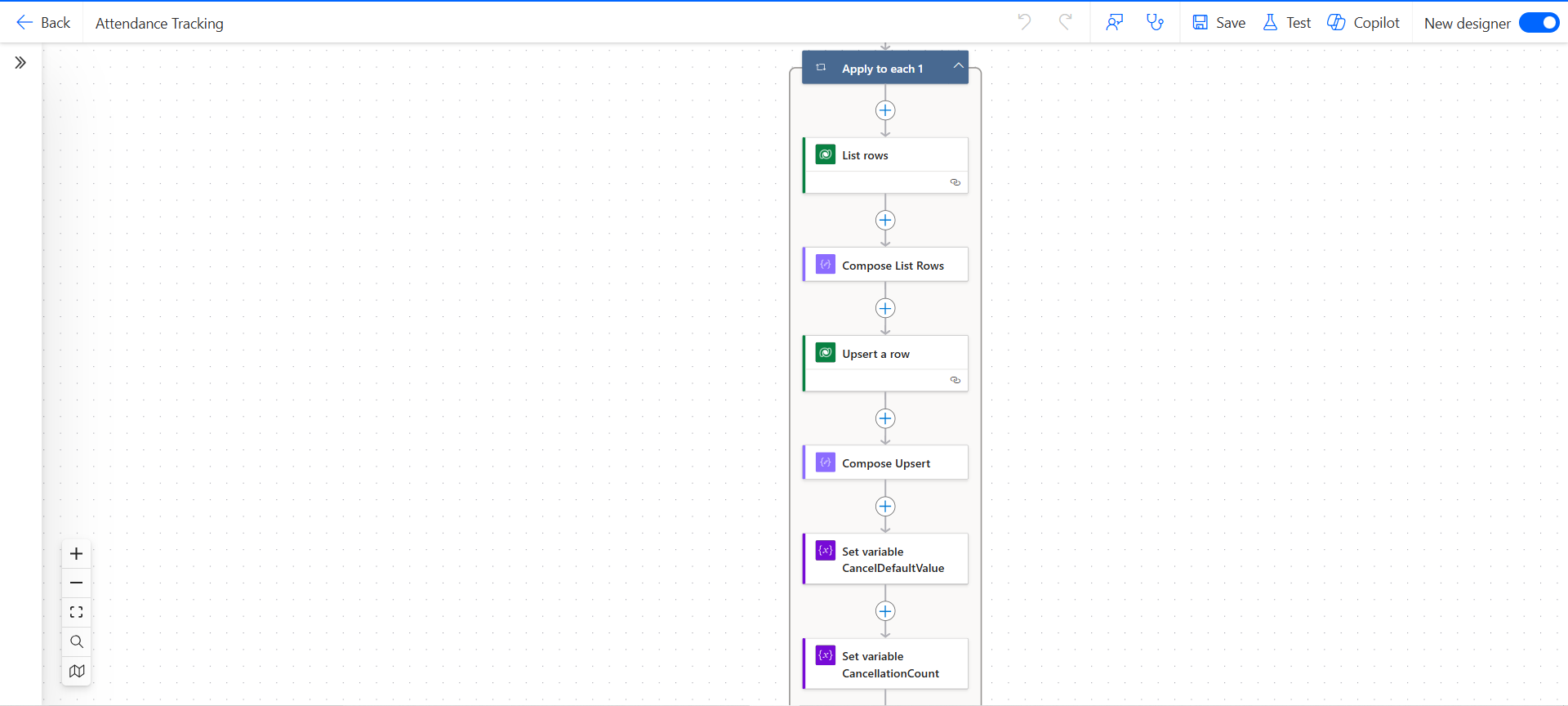
The Excel file may include a mix of matching and non-matching rows, so the flow needs to process both conditions either simultaneously or sequentially. The flow structure is as follows:
- Apply to Each (Excel Rows): Loops through each row in the Excel file.
- List Rows (Dataverse): Currently inside the loop and retrieves all rows from the Dataverse table.
- Compose List Rows: Captures outputs from the Dataverse table for comparison.
- Upsert a Row (Dataverse): Intended to handle updates to matching rows and create new records for non-matching rows.
Issues Faced
1. Upsert a Row Limitations:
-
The current expression being used in the Upsert step relies on filter() and first() to retrieve matching rows. This limits the action to process only one matching Dataverse row at a time, which is insufficient since ALL matching rows need to be updated.
-
Here are examples of expressions that were attempted but did not produce the desired outcome:
- Outcome: Retrieved only the first matching row, ignoring subsequent matches.
- Outcome: Resulted in invalid expressions for the Upsert step.
2. Condition Action:
- Using a Condition action to separate matching and non-matching rows is not viable as it processes only one condition at a time. This results in:
- Ignoring non-matching rows when matching rows exist.
- Failing to meet the requirement of processing both matching and non-matching rows from the Excel file.
3. Filter Array Step:
- While suggested as a solution to retrieve matching Dataverse rows, it duplicates the List Rows action and complicates the flow unnecessarily. Using it alongside List Rows creates redundancy and has not resolved the issue of processing all rows.
- If using the filter array action is the best way to achieve the objective alongside List rows, can you provide an expression that would properly filter matching vs. non-matching rows
Attempted expressions that did not produce the desired outcome.
@and(
equals(item()?['ppts_childsname'], items('Apply_to_each')?['ChildsName']),
equals(item()?['ppts_file'], items('Apply_to_each')?['FileNumber'])
)
filter(
outputs('List_Rows')?['value'],
item()?['ppts_childsname'] eq items('Apply_to_each')?['ChildsName'] and
item()?['ppts_file'] eq items('Apply_to_each')?['FileNumber']
)
join(

	filter(

	outputs('List_Rows')?['value'],

	item()?['ppts_childsname'] eq items('Apply_to_each')?['ChildsName'] and

	item()?['ppts_file'] eq items('Apply_to_each')?['FileNumber']

	)?[0]?['ppts_attendancetrackerid'],

	','

	)
Requirements
The flow must:
- Compare ALL rows in the Excel file with ALL rows in Dataverse.
- Update ALL matching rows in Dataverse for each corresponding Excel row.
- Create new rows in Dataverse for ALL non-matching rows from Excel.
- Process both matching and non-matching rows from the Excel file in one flow run.
Current Flow Steps
Attached is a screenshot of the current flow setup. Here are the key steps:
- List Rows (Dataverse): Retrieves all rows for comparison and is currently inside the loop.
- Compose List Rows: Captures Dataverse data for downstream comparison.
- Upsert a Row (Dataverse): Intended to handle both updates and new creations.
Request
-
Expression Assistance:
- How can the Upsert action (or an alternative action) handle ALL matching rows in Dataverse without relying on
first()?
- Can you provide sample expressions for efficiently comparing matching rows and non-matching rows ensuring all conditions are met so that matching rows in Dataverse are updated AND for non-matching rows, new rows are created?
-
Alternative Approach:
- Given that the Upsert action may not be suitable, what is the best way to process both matching and non-matching rows in the same flow?
- Can you provide suggestions for handling this requirement without unnecessary redundancy.
Thank you in advance for your detailed guidance. I look forward to any assistance, sample expressions, or alternative approaches the community can provide.




 8
8






 Share
Share Report
 All responses (
 Answers (





