web
You’re offline. This is a read only version of the page.
close
Skip to main content

Notifications

Announcements

Community site session details

Community site session details

Session Id :
Power Platform Community / Forums / Power Automate / Problem with Power Aut...
Power Automate
Suggested Answer

Problem with Power Automate Desktop versions

(0) ShareShare
ReportReport
Posted on by 43
Hello, I need some help by installing the latests version of Power Automate Desktop. I have to PC's, my principal computer already has the latest version of PAD and everything it's fine. I tried to install PAD in my other PC but there's one problem:

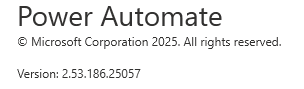
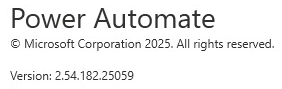
When I installed PAD in my other PC and executed it, the available version is 2.53, but in my principal PC the version I have is 2.54. I already clicked Settings and Check for updates but nothing.

Why is that happening if I downloaded in both cases the installer from the Power Automate web.


PC 2:
 
Principal PC:
I have the same question (0)
  • Suggested answer
    eetuRobo Profile Picture
    4,204 Super User 2025 Season 2 on at
    I think that's because that latest version is not available in all regions. So if your virtual machine is in server that is in different region it might get the newest releases bit later.

    You can see the version releases and which regions has which build here:

    https://learn.microsoft.com/fi-fi/power-platform/released-versions/power-automate-desktop


    I don't think its very up to date though or there is some latency in my region (north europe so Station 3) for the updates since it says every region should have the march update (build 2502-update2) I still have the february version 2.53.180 and updates say mine is up to date.


    Try to move the installer from your principal PC into the PC2 and use that installer to update it to the newest version. If that doesn't work either wait for few weeks so that the newest patch will be available in the PC2s region or downgrade the principal PC to the 2.53.186.25057 version.

    You can download older versions here to have same versions in bot PCs (thanks to jfevia): Releases · jfevia/Power-Automate-Desktop
  • Suggested answer
    CU12030836-1 Profile Picture
    4 on at
    I had the same problem between developer and production machines, I downloaded the installer from power platform portal from my home pc and got the installer version 2.54.188.25066, and now i install it at each machine. Something must have gone wrong with these releases.

Under review

Thank you for your reply! To ensure a great experience for everyone, your content is awaiting approval by our Community Managers. Please check back later.

Helpful resources

Quick Links

Forum hierarchy changes are complete!

In our never-ending quest to improve we are simplifying the forum hierarchy…

Ajay Kumar Gannamaneni – Community Spotlight

We are honored to recognize Ajay Kumar Gannamaneni as our Community Spotlight for December…

Leaderboard > Power Automate

#1
Michael E. Gernaey Profile Picture

Michael E. Gernaey 501 Super User 2025 Season 2

#2
Tomac Profile Picture

Tomac 323 Moderator

#3
abm abm Profile Picture

abm abm 237 Most Valuable Professional

Last 30 days Overall leaderboard



